
Stephen Gard
Inspiring
January 11, 2021
Question

Index Entries bold, page numbers regular

  • January 11, 2021
  • 2 replies
  • 553 views

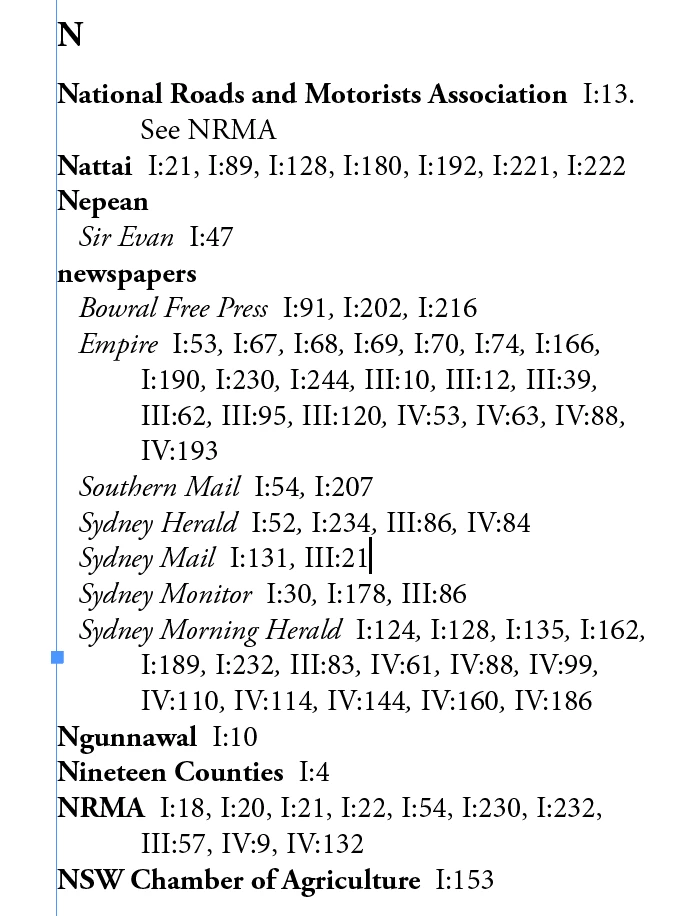
I'd like to have my Index Level 1 Entries in bold, but the page numbers follwing the entry in 'regular'.

See my screen shot below, where I changed the Level 1 enries manually to bold.

I tried do do this by choosing another style for Page Number in the Generate Index pane, but this had made no difference when the updated Index appeared.

Is it possible to what I want? Perhaps with a GREP?

Stephen Gard

BTW : the Index is far from complete.
 

This topic has been closed for replies.

2 replies

Participating Frequently
January 13, 2021

Hello @Stephen Gard


Try \b[IV]+\b. From my quick test this should work using the grep approach.


Regards

Eshu153
Inspiring
January 13, 2021

If you set the page number style to bold, it will work automatically. After applying a style, are you regenerating the index?


Thanks and Regards

Eswari

Eshu153
Inspiring
January 13, 2021

I just added the bold style and generated the index again. and it worked. otherwise, you can search and replace.