

Sean5CF1
Inspiring
December 8, 2023
Question

Indexing "See" or "See also" issues

  • December 8, 2023
  • 3 replies
  • 1085 views

Hi All


Have a 500 page book with many cross references and indexed items

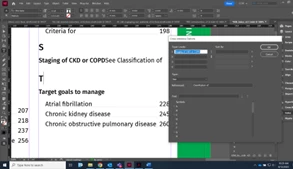
Trying to use the "See" function as per the Adobe how to instructions but it looks dodgy


3 things

  1.  there is no forced space between what people will look for and where i want them to "see". this is despite me putting a space after COPD
  2.  why isn't this nicely nested on the next line with a page number?
  3.  why is there no option to italisise?


Apologees for the dodgy picture. Scales badly when attached here
 

This topic has been closed for replies.

3 replies

Peter Kahrel
Community Expert
Community Expert
December 12, 2023

The page I mentioned earlier had a link to the wrong script, apologies. That led me down a rabbit hole with prefixes, but they're not needed. (Had to do with an idea for a different way of handling see-also cross-references.)


You need two things to fix cross-references:

1. Sort and combine cross-references (always needed at topics with more than one cross-reference):

https://creativepro.com/files/kahrel/indesign/index-fixes-sort-and-combine-cross-references.html

2. Move cross-references after page references (optional, but you need it):

https://creativepro.com/files/kahrel/indesign/index-move-see-also-cross-references.jsx


Peter Kahrel
Community Expert
Community Expert
December 11, 2023

But adding page numbers to cross-references is unusual to say the least. A cross-ref like 'See X' or See also X' directs the reader to X, where they'll find page numbers. InDesign's index lacks many features, but this one is not one that I would expect.


But anyway, if you must have cross-refs with page references then you can prefix a special marker to the topics's name -- e.g. zzz as in zzz Classification of -- and do it as a current-page reference, not a cross-reference. The cross-reference will now appear on a new line when you generate the index, and all cross-references appear after tany page references. All you need to do then is to replace zzz with See also.


Sean5CF1
Sean5CF1Author
Inspiring
December 11, 2023

I understand what you're saying, and your right.

I'd like to give the cross-ref a go.

How does one "prefix a special maker to a topic name"

i tried indexing within the index, but that auto deletes after the next "index generate"

Peter Kahrel
Community Expert
Community Expert
December 8, 2023

> there is no forced space between what people will look for and where i want them to "see". this is despite me putting a space after COPD


You set this in the Generate Index window:


> why isn't this nicely nested on the next line with a page number?


A cross-reference with a page number? If you mean, why are cross-references not on a new line, then the answer is that that's how Adobe thought it should be done., but it's just one of two styles. The one you're after can be done with a script, see https://creativepro.com/files/kahrel/indesign/index-fixes.html, under "See also cross-references immediately follow the topic".


> why is there no option to italisise?


You can italicise 'See' and 'See also' and/or the referenced topic in the Generate Index window:


Sean5CF1
Sean5CF1Author
Inspiring
December 10, 2023

Ok the best i could do withour spending hours trying to figure out something that SHOULD be inately simple for an index is

 - The script suggested did little other than move text to next line

- Using the index style AND Entry spertators was the easiest way to "force line break" and "EM space" to look midly OK


pictures attached

posting picture intext here for some reason are low quality


 Would be nice and professional to finish this index with these "see" entries similar to all other entries e.g.


Staging of CKD and COPD

       See Classification of ......................................................455