/t5/indesign-discussions/initial-line-of-most-paragraphs-hyphenating/td-p/13160954Aug 26, 2022
Aug 26, 2022
Copy link to clipboard
Copied
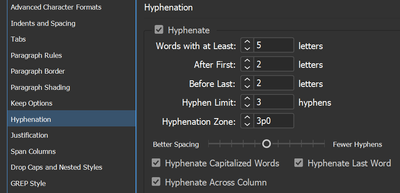
Laying out a book where I'm finding a surprisingly high rate of first lines to paragraphs hyphenating. Approximately half the first lines to some chapters. The line length is a fairly standard 12–15 words, though usually a word shorter on the first line as it's indented (by .55cm), but this seems to be having the effect of dramatically increasing the instances of hyphenation on that first line. It interrupts flow when when it happens so consistently, just as the reader is trying to gain momentum on that first line. Any thoughts? Appreciate all replies.
Certainly a possibility that this is an expression of sheer randomness, and many adjustments to H&J settings were tried with some success, but overall, it's a compromise if I opt to eliminate these hyphenations on the first line. Does it bother others as much if you see 80% of the first couple pages' paragraphs hyphenating on the first line?
/t5/indesign-discussions/initial-line-of-most-paragraphs-hyphenating/m-p/13161807#M490163Aug 26, 2022
Aug 26, 2022
Copy link to clipboard
Copied
I think that James is probably right. However, I recall a bug I encountered that caused differences in handling of text layout between the Adobe Paragraph Composer and the World-Ready Composer. If you select a bunch of text with the Text tool and switch composers (in the Justification dialog, or in the flyout menu from the Paragraph panel) does your layout change at all? It seems to happen more often to me with hanging indents, e.g. bulleted or numbered paragraphs.
I was hopeful that a switch to World-Ready Composer might work, not as hopeful that Chinese warplanes would stop entering our air defense zone here in Taiwan, but close. Alas, no change this time, on either front.




 4
Replies
4
Replies




 AdChoices