
meisje met de parel
Participating Frequently
October 12, 2022
Answered

Interactive Content

  • October 12, 2022
  • 1 reply
  • 274 views

Hello!

How to make the content in ID active so that after PDF export it will redirect to the relevant page?

This topic has been closed for replies.
Correct answer Eric Dumas

Hi,

As you export from InDesign, you can choose the following options: 

  • Export as 'Adobe PDF (Interactive)'

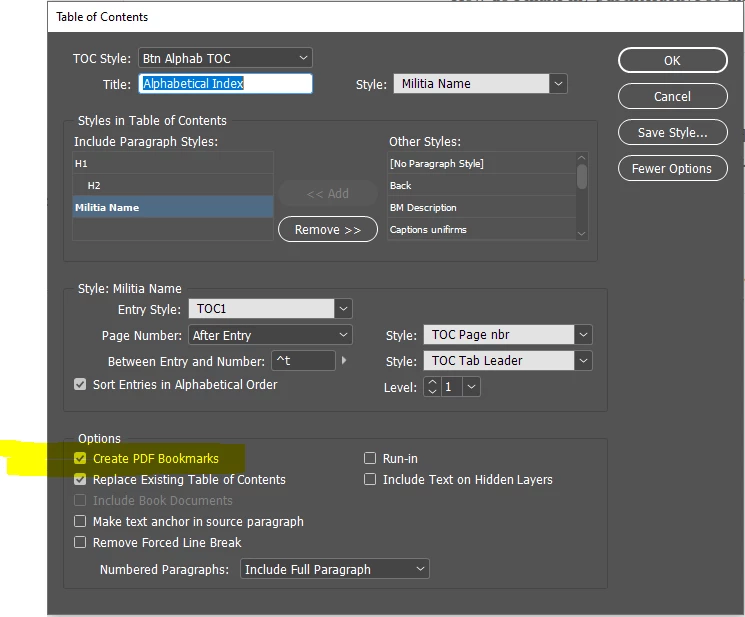
If your table of content was created using the Layout > Table of Contents... function, and the PDF Bookmark option is selected, your pdf should allow for links between the item listed in the table of contents and the page where it comes from.
Create a table of contents in Adobe InDesign

Create an interactive PDF (adobe.com)

1 reply

Eric Dumas
Community Expert
Eric DumasCommunity ExpertCorrect answer
Community Expert
October 12, 2022

Hi,

As you export from InDesign, you can choose the following options: 

  • Export as 'Adobe PDF (Interactive)'

If your table of content was created using the Layout > Table of Contents... function, and the PDF Bookmark option is selected, your pdf should allow for links between the item listed in the table of contents and the page where it comes from.

Create a table of contents in Adobe InDesign

Create an interactive PDF (adobe.com)

meisje met de parel
Participating Frequently
October 12, 2022

It works perfect!
