
Participant
July 31, 2019
Question

Invert color of text on colored background

  • July 31, 2019
  • 6 replies
  • 23105 views

Hello.

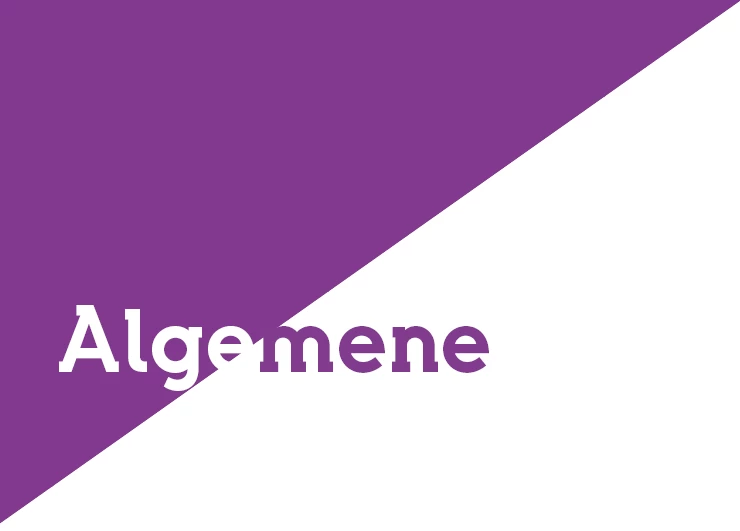
I want to do something like this: the color changes according to the used colored background. I tried the solutions which came up after searching on many forums, but I couldn't find anything. Effects > Text: Difference 100% also doesn't work.

What can I do?

Thanks in advance.
This topic has been closed for replies.

6 replies

rob day
Community Expert
Community Expert
July 31, 2019

You can do it in Photoshop with two layers using the Divide Blending Mode. Here the text is set to the same color as the rectangle with no Background layer. You could place a PS file and Option-Click it to edit:

Community Expert
August 1, 2019

Hi together,

I think our OP bramw123 is looking for a control or property that automatically changes color of text or other objects if a certain contrast is reached with a background color. Whatever object is stacked behind. There is no control for this in InDesign.

Rob's example with PhotoShop's "Divide" effect is a good example. Thank you for this. It is good enough if the background is the same color as the foreground. Perhaps we can think this further: Objects that are aware of contrast? Colors that are aware of contrasts? Objects where a contrast aware color is applied that can change color when the background changes color? Where the user defines the contrast color and the amount of contrast perhaps plus a threshold of contrast? Hm.

"Contrast aware colors", wouldn't that be a fabulous feature request?

Adobe InDesign Feedback

Regards,
Uwe

Community Expert
August 1, 2019
Branislav Milic
Known Participant
July 31, 2019

No time to translate from French but here I explain how to do that without outlining or pasting inside. Just some smart use of swatches and blending modes: Adobe InDesign - Texte dynamique en négatif - YouTube https://www.youtube.com/watch?v=89XvJ49OObE

rob day
Community Expert
Community Expert
July 31, 2019

The OP wants the inverted text to to be a color, not black. I’m not sure there is a blending trick that will do that?

Luke Jennings
Inspiring
July 31, 2019

Here's yet another way:

1. Copy text box to clipboard.

2. Select triangle shape, paste into.

3. Select original text and send to back, lock it.

4. Direct select the pasted-into type and change it to white.

5. Group together.

Edit, upon re-reading, I see this is pretty much the same as Gernot's post.

Jongware
Community Expert
Community Expert
July 31, 2019

Would it be a problem if this text appears *twice*?

If not, copy your text frame 2 times on top of the current one. Delete all text in one frame, set its contents to "Graphics", and delete the bottom right point, then close the path, to make the triangle shape. Cut one of the text frames and paste this into the triangle.

Set the background color of the triangle to your desired color and its text to white; this will be the top frame. Set the color of the text in the bottom frame to the correct color, and you'll end up with this:

macpawel
Participating Frequently
July 31, 2019

If it's possible use Illustrator - maybe it's a good idea to prepare such hader in Illustrator -

Just use Live Paint method to adjust the border of Background and Text


I think - it's impossible to make it on real text in InDesign
The easiest way is convert to outlines and dovide your text intu two pices

But it's not a text - so better choice is using Illustrator and Live Paint

Willi Adelberger
Community Expert
Community Expert
July 31, 2019

In InDeisgn I know only to convert text in path, select both objects, Oject > Pathfinder > Exclude Overlap (Maybe the wording is different as I translate fromthe German Version)

Inspiring
July 31, 2019

Probably a good idea. It works as well without Convert Text to Path:

1. Make text in red

2. Make text in white

3. Make triangle as path and fill red

4. Place red text

5. Copy white text

6. Select path

7. Paste Into (path works as clipping path)

8. Arrange > Bring to Front (the white text has to be on top)

Best regards --Gernot Hoffmann