
Participant
July 21, 2017
Answered

Invisible section break?

  • July 21, 2017
  • 1 reply
  • 1406 views

Indesign newbie, and a question about restarting page breaks.

I have a quote collection that I have decided to maintain in InDesign. The first page has an opening blurb, then the quotes follow.

Standard two-page spread stuff. Not a big deal, right? Sort of...

I am not really sure what I have done to myself with this, though. The first page (blurb) ends with a pound sign (#) and I am not really sure how it got there.

On the second page, when I try to insert the numbering, I get the following error message:

I assumed that the message mean that I had already placed a section break in the 3rd page. But I just can't find the little bugger.

What should I be looking for to resolve this? I just want the first page to say "i" and the second to start with "1". I am making this much harder than it needs to be.

Help.
This topic has been closed for replies.
Correct answer Bill Silbert

First of all the # symbol you got at the end of your blurb is merely a character that InDesign inserts after the final text that is contained in a  frame that is not part of a text thread.

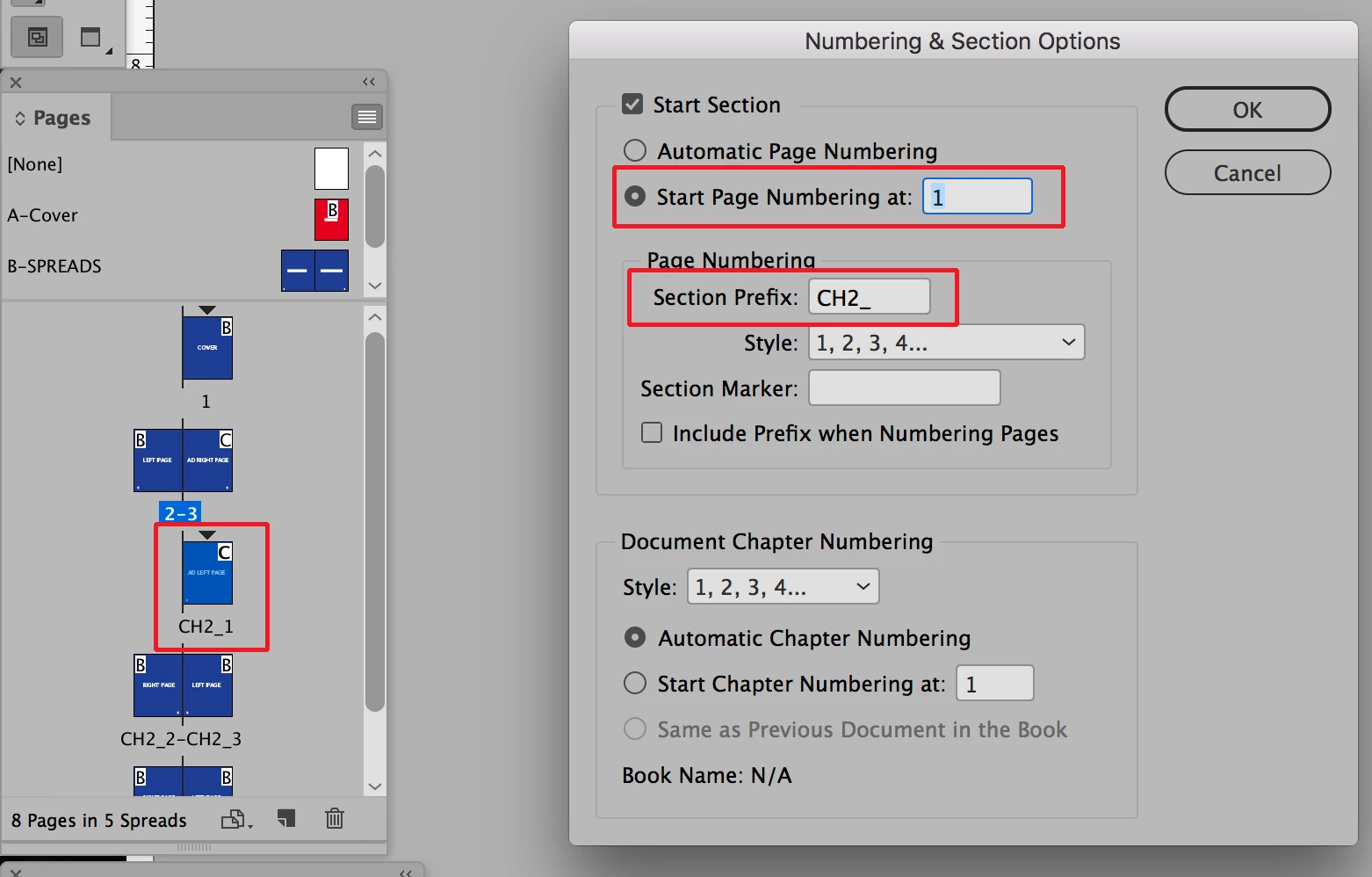
Secondly the warning that you got is one that you get when you have set up more than one section in a document. You'll get it if you try to navigate, print or export as a pdf a page in a section which has the same number used as one in another section. Sections can be set up using a unique prefix so that they can be navigated to using their prefix. See the screen shot below for more information about sections:

Every page of a document that is the beginning of a section will have a black triangle above it in the Pages Panel as in the picture above. In the Numbering & Section Options dialog which can be obtained through the Pages Panel pull-down menu you can add the prefix needed for that section. You can also indicate what number will start the section. If you no longer want the section just uncheck "Start Section". In a document with sections pages can also be navigated to by using their actual number in the document but inserting a + sign in front of it.

1 reply

Bill Silbert
Community Expert
Bill SilbertCommunity ExpertCorrect answer
Community Expert
July 22, 2017

First of all the # symbol you got at the end of your blurb is merely a character that InDesign inserts after the final text that is contained in a  frame that is not part of a text thread.

Secondly the warning that you got is one that you get when you have set up more than one section in a document. You'll get it if you try to navigate, print or export as a pdf a page in a section which has the same number used as one in another section. Sections can be set up using a unique prefix so that they can be navigated to using their prefix. See the screen shot below for more information about sections:

Every page of a document that is the beginning of a section will have a black triangle above it in the Pages Panel as in the picture above. In the Numbering & Section Options dialog which can be obtained through the Pages Panel pull-down menu you can add the prefix needed for that section. You can also indicate what number will start the section. If you no longer want the section just uncheck "Start Section". In a document with sections pages can also be navigated to by using their actual number in the document but inserting a + sign in front of it.

BobLevine
Community Expert
Community Expert
July 22, 2017

Just to clarify that. The # is an end of story symbol. It will appear at the end of every story regardless of whether the text is in threaded text frames or stand alone frames.