
Known Participant
November 17, 2023
Answered

Is Data Merge the tool I'm looking for?

  • November 17, 2023
  • 1 reply
  • 1824 views

Hello Adobe Community,


I've fairly recently been introduced to data merges and it has improved my workflow drastically for some processes but I'm not afraid to admit that I only have basic knowledge of InDesign and it's tools.


I have a design to deal with that I feel data merge is appropriate for, but I cannot fathom to get the correct result.


To summarise, I am creating various pages to be printed however I need to keep some sort of order according to my original data, in which, i've tidied up to create my own data merge.

 

C1-R = Category 1, Red

C1-B = Category 2, Blue - etc in reference to my template design.
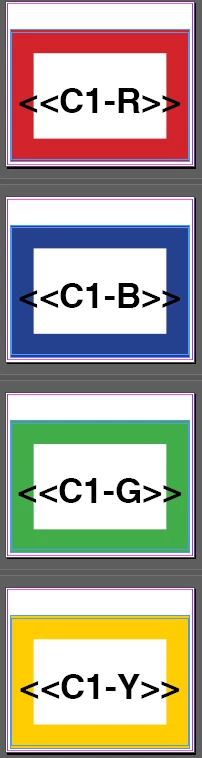
 

The above is my current point, to avoid mixing up the 'categorys' so to say, I am only using my C1 columns on each variation. The table does however have empty spaces, as not all colours have the same numbers or amount. Running the data merge producing these empty pages even with ignore blanks ticked. 


This isn't too much of an issue, but I have tried creating 'alternate layouts' but the merge does not work the way I'd hoped, and instead generates all copies into the Yellow section.


Obviously, I was hoping the reds, in my data as C1-R would go into the template for C1-R etc but this is not the case.


Is there a way around this? I'm unsure what I'm getting wrong, and whether a data merge is actually the tool I need to be using to achieve what I'm aiming to achieve efficiently...



This topic has been closed for replies.
Correct answer Colin Flashman

Hi Colin,


Apologies i'm still not making sense, I'm struggling to explain the desired outcome.

It's a bit more complex due to how the client wishes to see the final data, but I have x6 groups of variable data, that fits into 4 designs. 


Above is a sample of the data sent to me, the full project makes 1085 individual prints. The way I've set up the data merge is as into 'cells' (C1 = Cell 1 as per client data). Then the various colours as below:


My final result for Cell 1 (uploaded PDF) works and matches my data, but ideally I need to get my document to have all red designs together, blue together and so on. 


I will certainly take a look at your blog/CreativePro - as I believe that I'm going to end up getting lots of data that may have various designs such as this brief in future.


I had a look at the PDF that was uploaded and have re-read the brief.

To make sure I'm understanding it correctly, here's what I have:

* The client gives you a variable data range (that hopefully you don't have to key in manually after you have the ranges).

* From these ranges, some have to be specific colours.

* You want specific ranges to be grouped in their colours.

* You want to do this in one file.

If I have this right, I'd make the data as follows:

Code,color

AA01,red

AA02,red

AA03,red...

and so on.

Then once that range is done, in the same database you can have the next records as

BA01,blue

BA02,blue

BA03,blue...

and so on.

Now, the catch is how to change colours during the data merge. It can be done though it isn't in the help guide. This post describes how to achieve the technique but it requires knowledge of GREP styles: https://creativepro.com/changing-colors-during-a-data-merge/

Otherwise, you can make a solid patch of colour as a graphic and instead of the second column of the database being the name of the color, it can refer to the graphic that contains the color e.g. red.pdf or red.ai

Let me know if I've understood this properly or not.


1 reply

Joel Cherney
Community Expert
Community Expert
November 17, 2023

I'm going to confess that I have no idea what you're trying to do with your merge. I've read your post a few times now and can't figure out your goal. But before I ask you what you're trying to make, I'd like to know why you're using Alternate Layouts. I don't really work with Alternate Layouts myself, but I read in the HelpX documentation that the main purpose of alternate layouts is to make it easy to work with "multiple page sizes, orientations, or aspect ratios." Is that what you're trying to do? If so, this other bit I chopped out of the documentation that says (emphasis mine):  


STEP 1: Choose a target device and its corresponding dimension and orientation. Then create your primary layout for all the pages.


inclines me to suggest that you should probably run your merge before creating Alternate Layouts.


If you don't need to publish to multiple page sizes or orientations or aspect ratios, perhaps you can describe to us the final product you're working towards, and we can either help you figure out how to use Data Merge to get there, or perhaps suggest a third-party plugin that would get you whatever it is you're trying to get out of Alternate Layouts. 

RJNMSAuthor
Known Participant
November 20, 2023

Hi Joel,


Many thanks for the reply - reading back at my post I will try to clear up what I'm suggesting. It would seem alternative pages likely isn't what I need to be using either so thanks again for that, but my intention was to group my results into colour results. This is what I'm currently getting after removing alt layouts:


Almost as if I want to change the data merge from reading coloumn by coloumn and instead produce a result row by row, so that all the red results are together, all the blue are together and so on. In terms of resultd Pg 1 would be followed by the data from Pg 5.


It's more a time saving question, as there's over at least 3000 individual items and as there are some empty rows in some columns, a few hundred more with blank results thrown into the mix, so I don't think I can change the format of my actual data.


Colin Flashman
Community Expert
Colin FlashmanCommunity ExpertCorrect answer
Community Expert
November 21, 2023

Hi Colin,


Apologies i'm still not making sense, I'm struggling to explain the desired outcome.

It's a bit more complex due to how the client wishes to see the final data, but I have x6 groups of variable data, that fits into 4 designs. 


Above is a sample of the data sent to me, the full project makes 1085 individual prints. The way I've set up the data merge is as into 'cells' (C1 = Cell 1 as per client data). Then the various colours as below:


My final result for Cell 1 (uploaded PDF) works and matches my data, but ideally I need to get my document to have all red designs together, blue together and so on. 


I will certainly take a look at your blog/CreativePro - as I believe that I'm going to end up getting lots of data that may have various designs such as this brief in future.


I had a look at the PDF that was uploaded and have re-read the brief.

To make sure I'm understanding it correctly, here's what I have:

* The client gives you a variable data range (that hopefully you don't have to key in manually after you have the ranges).

* From these ranges, some have to be specific colours.

* You want specific ranges to be grouped in their colours.

* You want to do this in one file.

If I have this right, I'd make the data as follows:

Code,color

AA01,red

AA02,red

AA03,red...

and so on.

Then once that range is done, in the same database you can have the next records as

BA01,blue

BA02,blue

BA03,blue...

and so on.

Now, the catch is how to change colours during the data merge. It can be done though it isn't in the help guide. This post describes how to achieve the technique but it requires knowledge of GREP styles: https://creativepro.com/changing-colors-during-a-data-merge/

Otherwise, you can make a solid patch of colour as a graphic and instead of the second column of the database being the name of the color, it can refer to the graphic that contains the color e.g. red.pdf or red.ai

Let me know if I've understood this properly or not.


If the answer wasn't in my post, perhaps it might be on my blog at colecandoo!