

Is it possible that flattening "native elements" is different than "imported elements"?
This is a follow-up to a post on the Illustrator group.
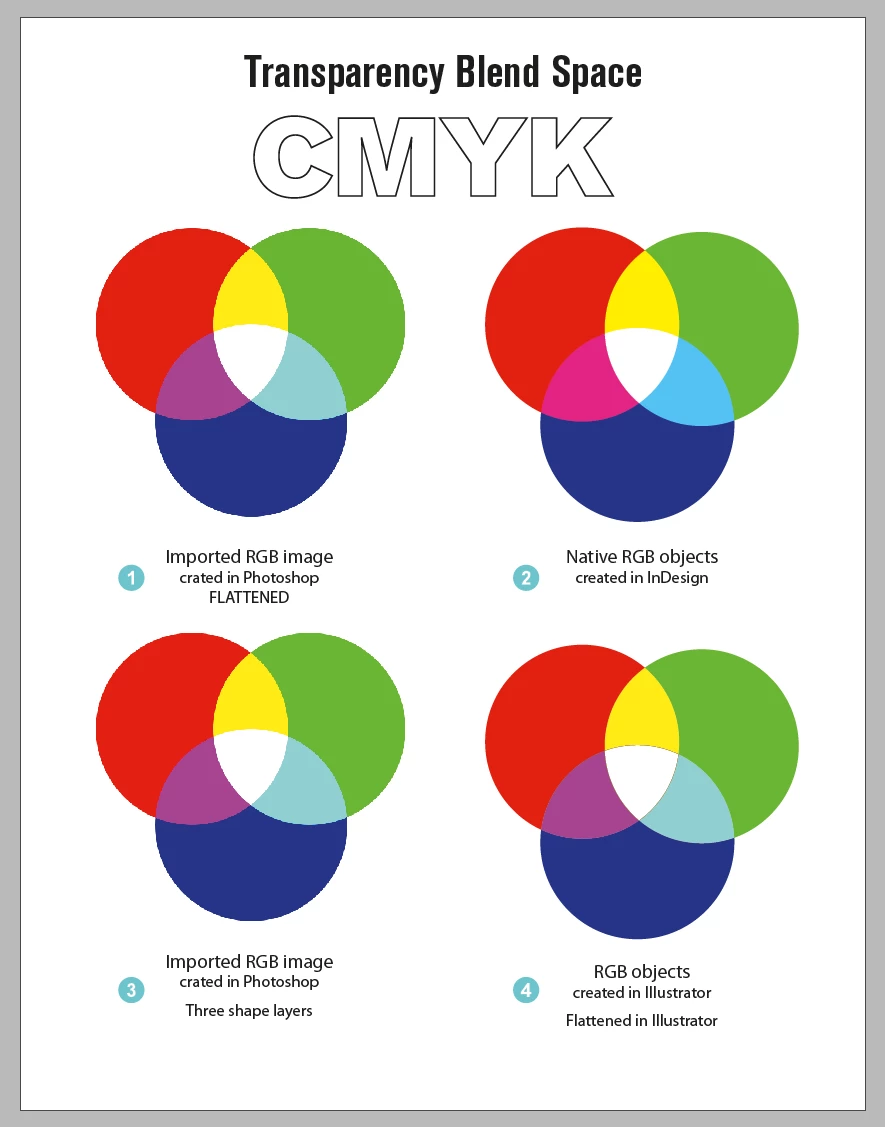
I created simple RGB objects that use Overlay blend mode in InDesign. Three separate RGB circles, colored with 255r, 255g and 255b. Their overlap shows up as 'cyan', 'magenta' and 'yellow' as expected.
The document Transparency Blending space is set to CMYK.
I have four distinct 'graphics' :
1) created in Photoshop "flattened"
2) created in InDesign "live" (unflattened)
3) created in Photoshop, in three separate shape layers
4) created in Illustrator, "flattened"
What I don't understand is why is the graphic created in RGB appears different from those created in Photoshop and Illustrator? Clearly, to the best of my understanding, it is as though, the native InDesign graphic is NOT being flattened in CMYK space but in RGB space, despite the setting of the Transparency Blending Space.
What am I missing?
 AdChoices