
siva k
Known Participant
July 20, 2011
Answered

Is it possible to create a new file with using xml file through java Script?

  • July 20, 2011
  • 2 replies
  • 3586 views

Hello every one,

Is it possible to create a new file with using xml file through java Script

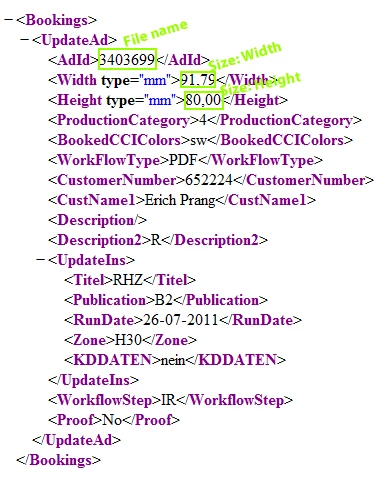
  • I have xml information which needs to use for File Name, Size.
  • Based on xml file can we create a new file in InDesign with java script?
  • Kindly help me if anyone has any idea regarding this.

I am using InDesign CS4 in windows 7

Sample file is attached below.

Regards,

Siva

<UpdateAd>
<AdId>3403699</AdId>
<Width type="mm">91,79</Width>
<Height type="mm">80,00</Height>
<ProductionCategory>4</ProductionCategory>
<BookedCCIColors>sw</BookedCCIColors>
<WorkFlowType>PDF</WorkFlowType>
<CustomerNumber>652224</CustomerNumber>
<CustName1>Erich Prang</CustName1>
<Description/>
<Description2>R</Description2>
<UpdateIns>
<Titel>RHZ</Titel>
<Publication>B2</Publication>
<RunDate>26-07-2011</RunDate>
<Zone>H30</Zone>
<KDDATEN>nein</KDDATEN>
</UpdateIns>
<WorkflowStep>IR</WorkflowStep>
<Proof>No</Proof>
</UpdateAd>
This topic has been closed for replies.
Correct answer Harbs.

Hi Harbs,

Thanks for your solution, extra thanks for your explanation. It’s working but creating as just a file instead of .indd file. One more last request cans we add 1pt inside stroke (100% black) to created document?

Once again thanks a lot for your extra effects

Siva


Try this:

var f =File.openDialog ();
f.open('r');
var xml = new XML(f.read());
f.close();

var myDocument = app.documents.add();
myDocument.documentPreferences.pageHeight = xml..Height+"mm";
myDocument.documentPreferences.pageWidth = xml..Width+"mm";
var rect = myDocument.pages[0].rectangles,add();
rect.geometricBounds = myDocument.pages[0].bounds;
rect.strokeAlignment = StrokeAlignment.INSIDE_ALIGNMENT;
rect.strokeColor = myDocument.swatches.item("Black");
rect.strokeWeight = 1;
myDocument.save(File(f.path + "/" + xml..AdId + ".indd"))

Harbs

2 replies

John Hawkinson
Inspiring
July 20, 2011

Sure, you can do this with InDesign's E4X parser.

First you read in the file and create an XML object, then you get the tags you need, then you create the document.

var fname = "/path/to/myfile.xml",

  f, xml, filename, width, height;

f = new File(fname);

f.open('r');

xml = new XML(f.read());

f.close();

filename = xml.updatead[0].adid[0];

width = xml.updatead[0].width[0];

height = xml.updatead[0].height[0];

doc = app.documents.add(undefined, undefined,

    { name: filename } );

That doesn't deal with setting the width and the height of the document.

MakeDocumentWithPreset.jsx from the scripting samples suggests you should use a document preset. I'm not sure if there is a cleaner way.

siva k
siva kAuthor
Known Participant
July 21, 2011

Hi John,

Thank you very much for your script, and suggestions; I have used your script in InDesign like other scripts. but unfortunately it’s not working its showing an error. If you don’t mind could you see that error once? Or I am missing something? Please help me.

Regards,
Siva

John Hawkinson
Inspiring
July 21, 2011

Well, you should set a breakpoint and explore it with the data browser.

Perhaps the XML object is case sensitive and you need to use

xml.UpdateAd[0].AdId[0]. Perhaps the data is not being read properly from the file?

If you're unfamiliar with breakpoints in the ESTK, you should read the JavaScript Tools Guide.

Techi_Panda
Inspiring
July 20, 2011

Hi Siva

You can create new XML file based on your old XML file using XSLT

John Hawkinson
Inspiring
July 20, 2011

You can create new XML file based on your old XML file using XSLT

Do  you mean XSLT transforming the XML into IDML and opening the IDML? I think that would be a lot more complicated...

Techi_Panda
Inspiring
July 20, 2011

Hi John

Thanks for your code