

Exit
  • Global community
    • Language:
      • Deutsch
      • English
      • Español
      • Français
      • Português
  • 日本語コミュニティ
  • 한국 커뮤니티
0

Is it possible to only select the cells in a column that have applied "body" cellstyle

Guide ,
Feb 15, 2025 Feb 15, 2025


Sometimes the table is too long, even several pages, you need to exclude the header, continuation, and end of the table, dragging and selecting may be your best way, but it is still a bit cumbersome and troublesome.

What's the best way to do this?
Or a script that selects only the cells in the columns that have the body style applied to them.

After selecting a column, you can perform many operations, and then selecting a row is faster!


Thank you very much.

(Attachments available)
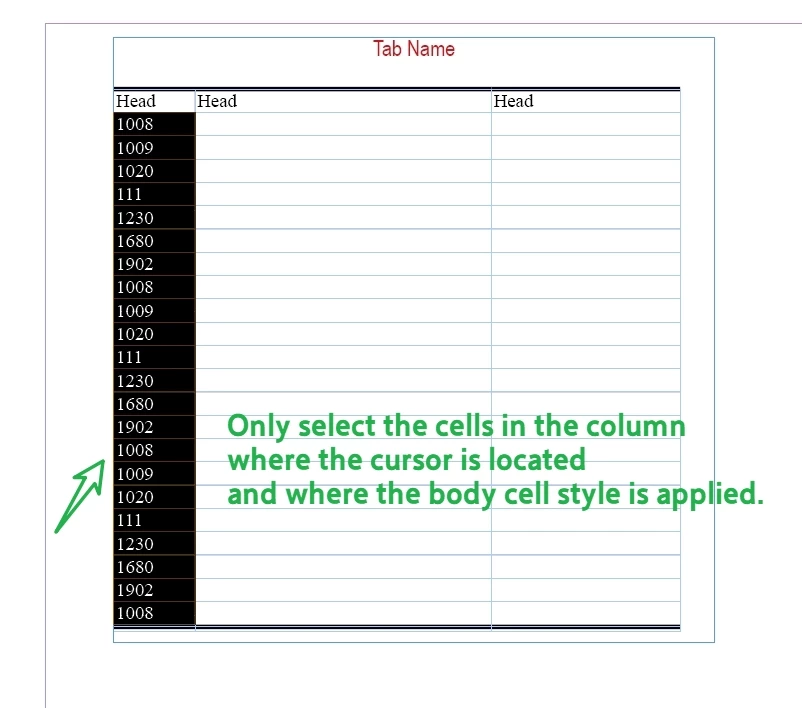
only.jpg


TOPICS
Bug , Feature request , How to , Import and export , Performance , Scripting
1.9K
Translate
Report
Community guidelines
Be kind and respectful, give credit to the original source of content, and search for duplicates before posting. Learn more
community guidelines

correct answers 2 Correct answers

Guide , Feb 15, 2025 Feb 15, 2025

Basically, something like that:


/*
    _FRIdNGE-0799_ColumnCellsSelectionBasedOnActiveCell.jsx
    Script written by FRIdNGE, Michel Allio [15/02/25]

    See: https://community.adobe.com/t5/indesign-discussions/is-it-possible-to-only-select-the-cells-in-a-column-that-have-applied-quot-body-quot-cellstyle/td-p/15155765
*/

app.doScript("main()", ScriptLanguage.javascript, undefined, UndoModes.ENTIRE_SCRIPT, "To Layout! …");

function main() {

    // Place the Cursor in any Cell:
    var myCell 
...
Translate
LEGEND , Feb 15, 2025 Feb 15, 2025

@dublove 


This should work:


app.doScript("main()", ScriptLanguage.javascript, undefined, UndoModes.ENTIRE_SCRIPT, "To Layout! …");

function main() {

    // Place the Cursor in any Cell:
    var myCell = app.selection[0].parent;
    var myCellStyle = myCell.appliedCellStyle;
    var myColumnCells = myCell.parentColumn.cells;
    var C = myColumnCells.length,  c;
    var myCounter = 0;
    var StartRow = 0;
    var EndRow = 0;
    for ( c = 0; c < C; c++ ) 
    {
//        alert(c);
        
...
Translate
LEGEND ,
Feb 15, 2025 Feb 15, 2025

It all depends on the structure of your table. 


If you've it configured "properly" - defined number of header and footer rows - you can use this info to calculate range to select - in script. 


If you want to select rows that have specific ParaStyle / CellStyle applied - you need to check every cell in the range you want to select. 


Translate
Report
Community guidelines
Be kind and respectful, give credit to the original source of content, and search for duplicates before posting. Learn more
community guidelines
Guide ,
Feb 15, 2025 Feb 15, 2025

Basically, something like that:


/*
    _FRIdNGE-0799_ColumnCellsSelectionBasedOnActiveCell.jsx
    Script written by FRIdNGE, Michel Allio [15/02/25]

    See: https://community.adobe.com/t5/indesign-discussions/is-it-possible-to-only-select-the-cells-in-a-column-that-have-applied-quot-body-quot-cellstyle/td-p/15155765
*/

app.doScript("main()", ScriptLanguage.javascript, undefined, UndoModes.ENTIRE_SCRIPT, "To Layout! …");

function main() {

    // Place the Cursor in any Cell:
    var myCell = app.selection[0].parent;
    var myCellStyle = myCell.appliedCellStyle;
    var myColumnCells = myCell.parentColumn.cells;
    var C = myColumnCells.length,  c;
    var myCounter = 0;
    for ( c = 0; c < C; c++ ) if ( myColumnCells[c].appliedCellStyle === myCellStyle ) {
        // Treatment To Be Done:
        myColumnCells[c].fillColor = "red";
        myCounter++
    }

    alert( "On Column " + Number(myCell.parentColumn.index+1) + ": " + myCounter + " Cells")

}


This Script will apply a "red" color to all the right cells of a column.


(^/)  The Jedi

Translate
Report
Community guidelines
Be kind and respectful, give credit to the original source of content, and search for duplicates before posting. Learn more
community guidelines
LEGEND ,
Feb 15, 2025 Feb 15, 2025

@FRIdNGE


But @dublove wants to SELECT them?


If CellStyle is already applied to the cells - what's the point of creating local override? 


Translate
Report
Community guidelines
Be kind and respectful, give credit to the original source of content, and search for duplicates before posting. Learn more
community guidelines
Guide ,
Feb 15, 2025 Feb 15, 2025

HI FRIdNGE!

Thank you very much

This script of yours is running fine.

Learning.......


var cell = app.activeDocument.selection[0].parent;
function selectColumn() {
	cell.parentColumn.select();
}
selectColumn();


That's all I know
It can select current column.


myColumnCells[c].select();
How does this sentence transform to select all eligible Cells
Translate
Report
Community guidelines
Be kind and respectful, give credit to the original source of content, and search for duplicates before posting. Learn more
community guidelines
LEGEND ,
Feb 15, 2025 Feb 15, 2025

@dublove 


This should work:


app.doScript("main()", ScriptLanguage.javascript, undefined, UndoModes.ENTIRE_SCRIPT, "To Layout! …");

function main() {

    // Place the Cursor in any Cell:
    var myCell = app.selection[0].parent;
    var myCellStyle = myCell.appliedCellStyle;
    var myColumnCells = myCell.parentColumn.cells;
    var C = myColumnCells.length,  c;
    var myCounter = 0;
    var StartRow = 0;
    var EndRow = 0;
    for ( c = 0; c < C; c++ ) 
    {
//        alert(c);
        if ( myColumnCells[c].appliedCellStyle === myCellStyle ) 
        {
            if (StartRow)
            {
            }
            else
            {
                StartRow = c;
            };
        }
        else
        {
            if (StartRow)
            {
                EndRow = c;
                break;
            };
        };
    };
    if (StartRow > 0 && EndRow == 0)
    {
        EndRow = c;
    };
    if (StartRow>0 && EndRow > 0)
    {
     
   app.select(myCell);
   app.select(myCell.parent.cells.itemByRange(myColumnCells[StartRow], myColumnCells[EndRow]));
    };
};


Of course you can convert it to a function.


Translate
Report
Community guidelines
Be kind and respectful, give credit to the original source of content, and search for duplicates before posting. Learn more
community guidelines
Guide ,
Feb 15, 2025 Feb 15, 2025

Hi Robert at ID-Tasker

Thanks.


It's no response.
I still don't know where to add "select();"
Multiple if else and I'm getting a little dizzy ......

Translate
Report
Community guidelines
Be kind and respectful, give credit to the original source of content, and search for duplicates before posting. Learn more
community guidelines
LEGEND ,
Feb 15, 2025 Feb 15, 2025

Right, sorry. 


You've to add this before the last "};":


if (StartRow>0 && EndRow > 0)
{
app.select(myCell.parent.parent.itemByRange(myColumnCells[StartRow], myColumnCells[EndRow]));
};


Translate
Report
Community guidelines
Be kind and respectful, give credit to the original source of content, and search for duplicates before posting. Learn more
community guidelines
Guide ,
Feb 15, 2025 Feb 15, 2025

nothing new show up

Translate
Report
Community guidelines
Be kind and respectful, give credit to the original source of content, and search for duplicates before posting. Learn more
community guidelines
LEGEND ,
Feb 15, 2025 Feb 15, 2025
quote

nothing new show up


By @dublove


Right, sorry, replying from my phone. 


It should be OK now - please copy the whole code again.


Translate
Report
Community guidelines
Be kind and respectful, give credit to the original source of content, and search for duplicates before posting. Learn more
community guidelines
LEGEND ,
Feb 15, 2025 Feb 15, 2025
quote

Multiple if else and I'm getting a little dizzy ......


By @dublove


In short:

  • iterate though all cells and check if applied CellStyle is the same, 
  • If StartRow is "0" - remember current value of "c" - start of the region - if not "0" - ignore, as the start of the region was already found, 
  • If applied CellStyle isn't as the one we're looking for - check if StartRow was found - if it was - then remember "c" as EndRow - then exit anyway as we don't want to mix regions.


Translate
Report
Community guidelines
Be kind and respectful, give credit to the original source of content, and search for duplicates before posting. Learn more
community guidelines
LEGEND ,
Feb 15, 2025 Feb 15, 2025

@dublove


I've just edited my code - moved "break;" outside of the if.


And added select() part. 


Translate
Report
Community guidelines
Be kind and respectful, give credit to the original source of content, and search for duplicates before posting. Learn more
community guidelines
Guide ,
Feb 15, 2025 Feb 15, 2025

I updated your new code and it's still not responding.

Translate
Report
Community guidelines
Be kind and respectful, give credit to the original source of content, and search for duplicates before posting. Learn more
community guidelines
LEGEND ,
Feb 15, 2025 Feb 15, 2025
quote

I updated your new code and it's still not responding.


By @dublove


I forgot about using itemByRange() - please check again. 


Translate
Report
Community guidelines
Be kind and respectful, give credit to the original source of content, and search for duplicates before posting. Learn more
community guidelines
Guide ,
Feb 15, 2025 Feb 15, 2025

Lost.
Don't know where to stop.

Translate
Report
Community guidelines
Be kind and respectful, give credit to the original source of content, and search for duplicates before posting. Learn more
community guidelines
LEGEND ,
Feb 15, 2025 Feb 15, 2025
quote

Lost.
Don't know where to stop.


By @dublove


Still doesn't work? Do you get any errors? 


Translate
Report
Community guidelines
Be kind and respectful, give credit to the original source of content, and search for duplicates before posting. Learn more
community guidelines
Guide ,
Feb 15, 2025 Feb 15, 2025

No hints.
I used
alert( “Done! ...” )
Tests don't pop up in many places.

Translate
Report
Community guidelines
Be kind and respectful, give credit to the original source of content, and search for duplicates before posting. Learn more
community guidelines
LEGEND ,
Feb 15, 2025 Feb 15, 2025

@dublove 


Can you post your code? 


I think I know what's "wrong" 😉 


Translate
Report
Community guidelines
Be kind and respectful, give credit to the original source of content, and search for duplicates before posting. Learn more
community guidelines
Guide ,
Feb 15, 2025 Feb 15, 2025


Please look at FRIdNGE''s code.

Shouldn't the next sentence be before {?
if ( myColumnCells[c].appliedCellStyle === myCellStyle )


Translate
Report
Community guidelines
Be kind and respectful, give credit to the original source of content, and search for duplicates before posting. Learn more
community guidelines
LEGEND ,
Feb 15, 2025 Feb 15, 2025

@dublove


That's what I thought... 


My code was a REPLACEMENT of @FRIdNGEs main() function - not a standalone piece of code - you haven't copied the "calling" part from the beginning:


app.doScript("main()", ScriptLanguage.javascript, undefined, UndoModes.ENTIRE_SCRIPT, "To Layout! …");


Without that - my piece of code is just bunch of characters. 


Translate
Report
Community guidelines
Be kind and respectful, give credit to the original source of content, and search for duplicates before posting. Learn more
community guidelines
Guide ,
Feb 15, 2025 Feb 15, 2025

Look at the code I posted again, patched the top of the FRIdNGE

Shouldn't the next sentence be before {?
if ( myColumnCells[c].appliedCellStyle === myCellStyle )


app.doScript("main()", ScriptLanguage.javascript, undefined, UndoModes.ENTIRE_SCRIPT, "To Layout! …");

function main() {

    // Place the Cursor in any Cell:
    var myCell = app.selection[0].parent;
    var myCellStyle = myCell.appliedCellStyle;
    var myColumnCells = myCell.parentColumn.cells;
    var C = myColumnCells.length,  c;
    var myCounter = 0;
    var StartRow = 0;
    var EndRow = 0;
    for ( c = 0; c < C; c++ ) 
    {
        if ( myColumnCells[c].appliedCellStyle === myCellStyle ) 
        {
            if (StartRow)
            {
            }
            else
            {
                StartRow = c;
            };
        }
        else
        {
            if (StartRow)
            {
                EndRow = c;
            };
            break;
        };
    };
    if (StartRow > 0 && EndRow == 0)
    {
        EndRow = c;
    };
    if (StartRow>0 && EndRow > 0)
    {
     
   app.select(myCell.parent.parent.itemByRange(myColumnCells[StartRow], myColumnCells[EndRow]));
    };
};


Translate
Report
Community guidelines
Be kind and respectful, give credit to the original source of content, and search for duplicates before posting. Learn more
community guidelines
LEGEND ,
Feb 15, 2025 Feb 15, 2025

@dublove 


OK, got to my laptop - now it's working - please copy the code again.


But because, you've all "body" rows set as body in thhe Table's applied TableStyle - the whole column - less the header and footer rows - will be selected anyway...


So, what I've suggested earlier - subtractig this info from the total number of rows would make more sense...


Translate
Report
Community guidelines
Be kind and respectful, give credit to the original source of content, and search for duplicates before posting. Learn more
community guidelines
LEGEND ,
Feb 15, 2025 Feb 15, 2025

@dublove 


And this is the effect - if you actually apply "body" CellStyle to only some Cells:


RobertatIDTasker_0-1739640859921.png


Translate
Report
Community guidelines
Be kind and respectful, give credit to the original source of content, and search for duplicates before posting. Learn more
community guidelines
Guide ,
Feb 15, 2025 Feb 15, 2025
How to avoid choosing footer?
myColumnCells[EndRow-1] ?
Translate
Report
Community guidelines
Be kind and respectful, give credit to the original source of content, and search for duplicates before posting. Learn more
community guidelines
LEGEND ,
Feb 15, 2025 Feb 15, 2025
quote
How to avoid choosing footer?
myColumnCells[EndRow-1] ?

By @dublove


But ONLY if you don't have CellsStyles applied directly in your Table.


Like I've said before - you don't have CellStyles applied in your Table - you only have them defined in the TableStyle applied - so they can't be "found" / recognised through checking what CellStyle is applied to the cell.


So this will nevver gonna work.


Translate
Report
Community guidelines
Be kind and respectful, give credit to the original source of content, and search for duplicates before posting. Learn more
community guidelines