

Question
Is there a script to automatically “continue rows” of a table?
You may need to determine if the first row is a “continuation row”.
If there is already a continuation row, skip it.
Then, using the selected row as the basis for the table header, add a merged blank row at the top and apply the “Continue” cell style, then fill the cell with the “Continu” character.
Next, copy the initially selected rows, the initially selected rows and new rows will be converted to table headers.
Then, set up to skip the first page of the table header.
Than k you ,Great Gods.
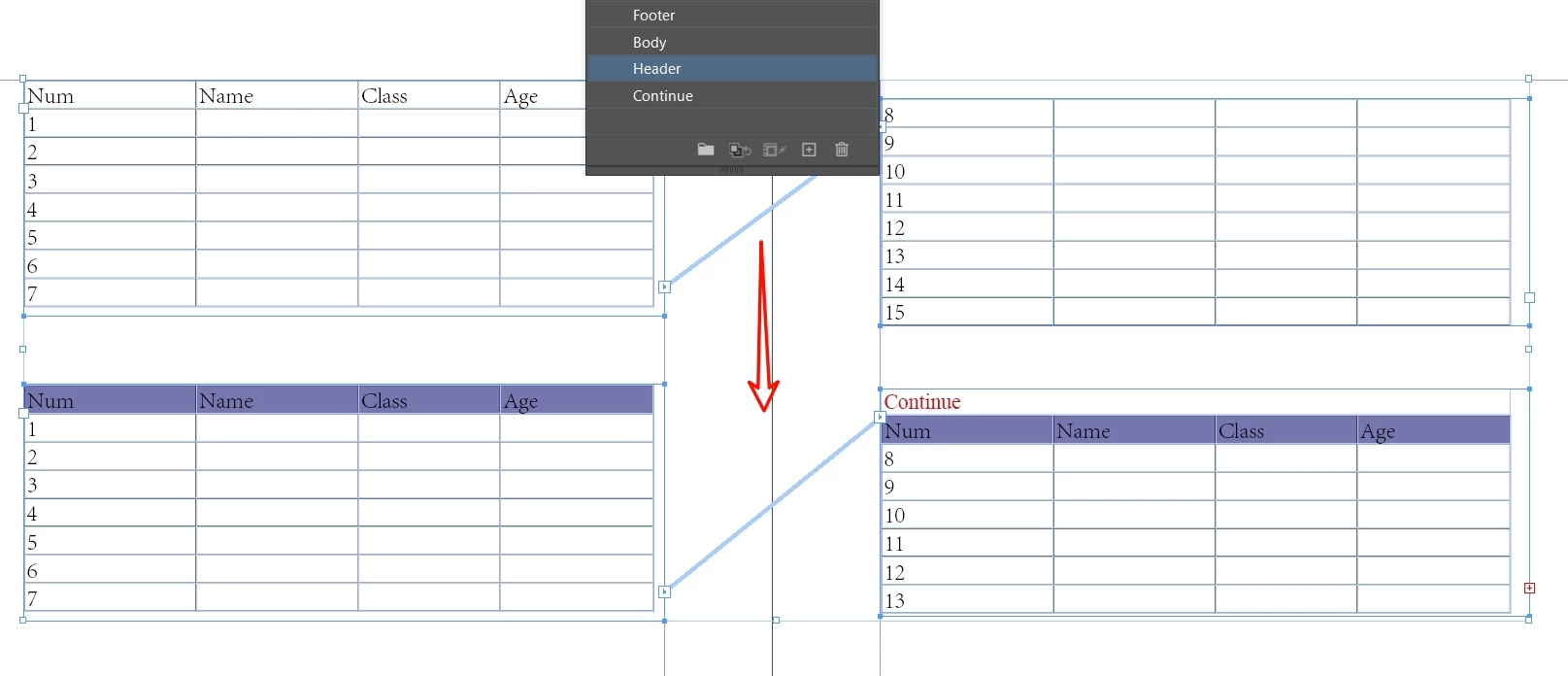
Some good people had written about it, but it was incomplete.
var ContinuedRow = app.selection[0]

// Optional:
// Not optional.
// Set the point size in a value, so that the text could be visible despite the minimal height of the cells:
ContinuedRow.cells.everyItem().appliedCellStyle = "Continue";//Applying unit styles
ContinuedRow.cells.everyItem().topInset = 0;//empty pace  above
ContinuedRow.cells.everyItem().leftInset = 0;//empty lpace  eft
ContinuedRow.cells.everyItem().bottomInset = 0;//empty space below
ContinuedRow.cells.everyItem().rightInset = 0;//empty space Right

ContinuedRow.cells.everyItem().rightEdgeStrokeWeight = 0;//Right column line is 0
ContinuedRow.cells.everyItem().leftEdgeStrokeWeight = 0;//Left column line is 0

ContinuedRow.cells.everyItem().minimumHeight  = "5mm";//Continued table row height


 AdChoices