
Inspiring
June 17, 2024
Answered

Is there a way to quickly identify special characters?

  • June 17, 2024
  • 3 replies
  • 1795 views

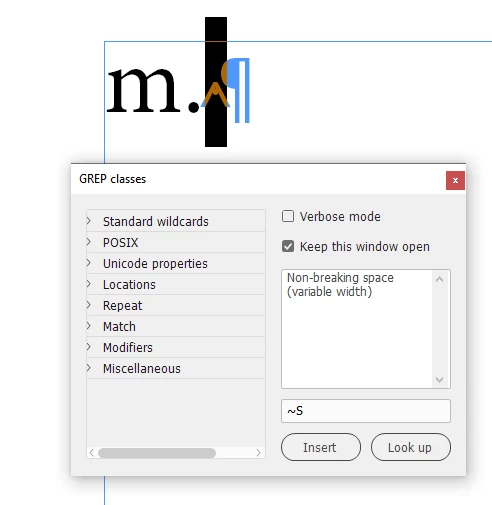
Just wondering if there's a way to highlight a special character and identify it within ID, i.e. highlight the character we're trying to identify, and have it referenced somewhere within the interface? Example given because I like pictures... but this would apply to any special character added internally or imported from other sources such as Word.

Thanks!
 

This topic has been closed for replies.
Correct answer Peter Kahrel

You can use this script to highlight a special character and display its full name:

https://creativepro.com/files/kahrel/indesign/grep_classes.html


Select a special character and click the 'Look up' button:

It doesn't look for special characters, that's a different script. You can use the code-name pairs in the blueCode() function.


P.


3 replies

Peter Kahrel
Community Expert
Peter KahrelCommunity ExpertCorrect answer
Community Expert
June 17, 2024

You can use this script to highlight a special character and display its full name:

https://creativepro.com/files/kahrel/indesign/grep_classes.html


Select a special character and click the 'Look up' button:

It doesn't look for special characters, that's a different script. You can use the code-name pairs in the blueCode() function.


P.


turner111Author
Inspiring
June 17, 2024

Awesome, thanks Peter.

pixxxelschubser
Community Expert
Community Expert
June 17, 2024

I would create an (additional) paragraph format with a grep style for the special character (or characters) and use it to call up a character format with a thick yellow underline.

Robert at ID-Tasker
Legend
June 17, 2024
quote

I would create an (additional) paragraph format with a grep style for the special character (or characters) and use it to call up a character format with a thick yellow underline.


By @pixxxelschubser


Right... It wasn't about what they mean - but where they are...


At least there is a list ready to use. 


Robert at ID-Tasker
Legend
June 17, 2024
turner111Author
Inspiring
June 17, 2024

Thanks Robert - sorry, should have noted that I'm looking for a description beyond Unicode, though that's helpful.
For example, rather than seeing "Unicode 0x20", which results in "Space", I would see the more detailed description of whatever that symbol is.

In this example, the character I've highlighted above indeed comes up as 0x20, "Space", but so does the "single dot" type space that normally appears between words.

So, part of this is understanding the difference! 

Robert at ID-Tasker
Legend
June 17, 2024

@turner111


Yeah, F8 will only show UNICODE value - not the "meaning".