

Is there another setting that includes stroke weight to a text box's size? How do I turn it off?
I have some text boxs with strokes. (I'm hoping it's easier to do it this way than to fuss with centering a colored box behind the text, especially when I'm going to repeating this layout over 50+ client postcards, all with unique fonts and colors, this month.) The weight of the stroke is being added to the total size and transformation dimensions--EVEN THOUGH IT'S UNCHECKED ON THE TRANSFORMATION SETTINGS. (See screenshot.)
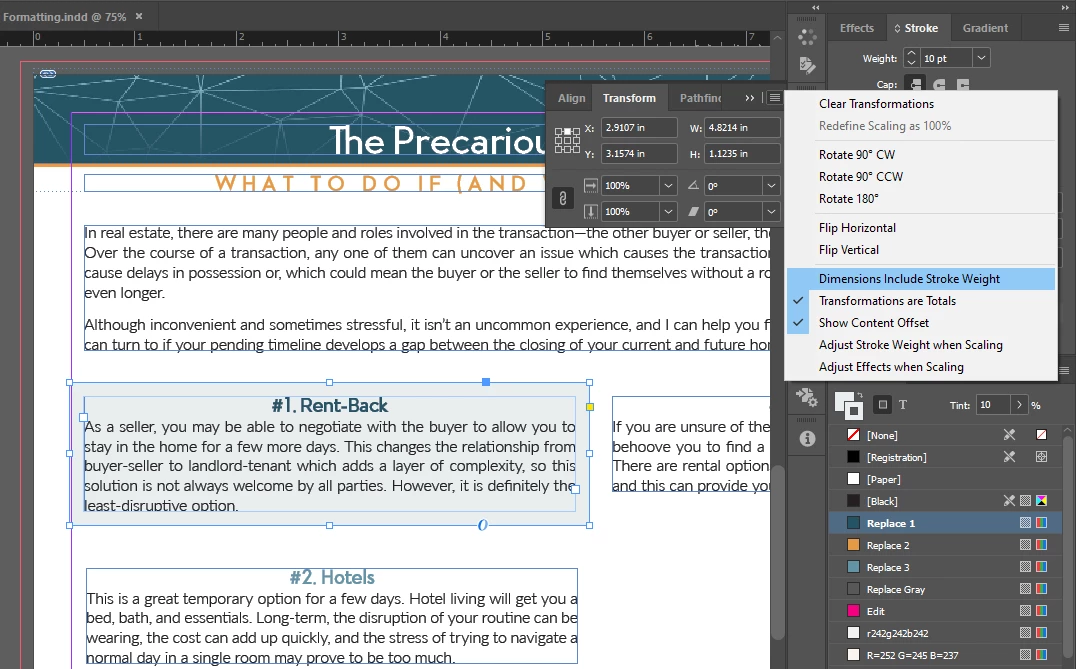
Basically, even though the WxH numbers don't include the 10pt stroke, I can't scale it using the corners without the edge of the stroke counting as the edge of the box. I also can't align it to the boxes edges--only the stroke's edges. My current work-around is to remove the stroke, edit the size/shape/layout, and then reengage the stroke (which it never remembers the settings of, so I have to reset those every time). All fo this is annoying and increases work time by a few minutes per piece, which adds up when you're trying to do 50+ pieces.
So is there another setting that I'm missing? Where is it?
Working on Windows 10 with Indesign updated to v.19.3.
 AdChoices