
Known Participant
June 13, 2023
Answered

Is there any specific algorithm relationship between Letter spacing and font size in InDesign?
  • June 13, 2023
  • 4 replies
  • 5240 views

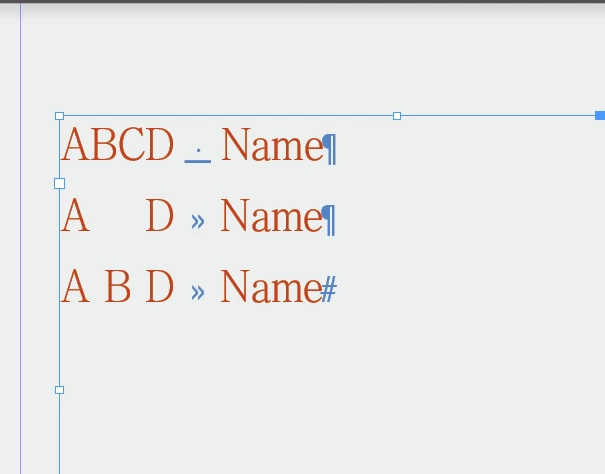
ABCD Name

AD Name

ABD Name


I need to align the three above.

Some people may use grids, but that feature is difficult to use and I usually don't use it. It's better to use font spacing.


However, it is troublesome to adjust the font spacing. For example, when the font size becomes larger, I have to try every Letter spacing value.

Just want to ask: What is the relationship between font size and spacing, can we calculate it?
 

This topic has been closed for replies.
Correct answer Peter Spier

And @Peter Spier has been right from the beginning with his table suggestion ...


In this case script would be much simpler - convert text to table and then set width of the column(s) and insets of the cells ...


Thank you Robert.

4 replies

m1b
Community Expert
Community Expert
June 15, 2023

Hi @dublove5CFE, the issue here is converting tracking units (which I assume you are using to space out the A in the second line) into ruler units. Tracking is measured in em units which relate to the font size. The conversion factor is, 1000 / font size. Some fonts have differing sized em squares but Indesign seems to calibrate them all to 1000 units in terms of the UI and scripting API. You can see how it works in this script, that attempts to solve your problem.


/**
 * Letterspace Chars To Align Tab.
 * Script expects to have a text selection that includes paragraphs share a tab stop,
 * and will adjust tracking of characters before the tab character so that the last
 * characters in each paragraph align.
 * So that the script can be run multiple times, it resets tracking to 0 each time.
 * @author m1b
 * @discussion https://community.adobe.com/t5/indesign-discussions/is-there-any-specific-algorithm-relationship-between-letter-spacing-and-font-size-in-indesign/m-p/13861581
 */

function main() {

    app.scriptPreferences.measurementUnit = MeasurementUnits.POINTS;

    const emSquare = 1000;

    var doc = app.activeDocument,
        text = doc.selection[0];

    if (
        text == undefined
        || typeof text.findGrep !== 'function'
    ) {
        alert('Please select some text and run script again.');
        return;
    }

    // find paragraphs with tabs
    app.findGrepPreferences = NothingEnum.NOTHING;
    app.findGrepPreferences.findWhat = '^[^\\t]+\\t';
    var found = text.findGrep();

    // store the horizontal position
    // of the right-most tab
    var positions = [],
        maxPosition = -Infinity;

    for (var i = 0; i < found.length; i++) {
        found[i].tracking = 0;
        positions[i] = found[i].insertionPoints[found[i].insertionPoints.length - 2].horizontalOffset;
        if (positions[i] > maxPosition)
            maxPosition = positions[i];
    }

    // track out the initial characters
    for (var i = 0; i < found.length; i++) {

        if (positions[i] == maxPosition)
            continue;

        var chars = found[i].characters.itemByRange(0, found[i].characters.length - 3).characters;

        for (var j = 0; j < chars.length; j++)
            chars[j].tracking = ((maxPosition - positions[i]) / chars.length) * (emSquare / chars[j].pointSize);

    }

}; // end main

app.doScript(main, ScriptLanguage.JAVASCRIPT, undefined, UndoModes.ENTIRE_SCRIPT, "Space Chars Before Tab");


Edit 2023-06-15: reset tracking to zero time.

Edit 2023-06-16: now correctly handles no characters before tab.


In the script you can see the conversion into em units here: <ruler distance> * (emSquare / chars[j].pointSize). Where emSquare is 1000.


Note that for convenience I altered your example so that every paragraph has a tab character to tell the script where to align. The script will only work if there is a tab in every selected paragraph—it will try to align the text before the tab. Here is what it does when I run it:

Let me know if that helps.

- Mark

Known Participant
June 15, 2023

Starting with the Tab key will prompt for an error.

And there is also no alignment

Known Participant
February 1, 2024

Did you try that script? It does return a width based on the font size (for *any* font size).


hello@m1b 

There are still some minor issues with this script.

Could you please take a look again? 

Thank you very much

More important issues:

If you run it for the second time, it may not work. The reason is that it cannot clear the first "tab" setting. Perhaps the script should be initialized before starting to run each time.

2. Cross column, cross page operation, script error.

3. There is an empty line between the selected areas, or there is no "tab" in the line, resulting in an error in the script.


Robert at ID-Tasker
Legend
June 14, 2023

What EXACTLY are you trying to achieve? 


Legend
June 13, 2023

A,B,C,D,N,a,m,e - each one has a DIFFERENT width chosen by the font designer. But they scale reasonably exactly with the font size - if you go from 12 point to 24 point the letter spacing (for each letter, for that specific font and weight and style) is exactly double.

Known Participant
June 14, 2023

I have been searching for many years

Peter Spier
Community Expert
Community Expert
June 14, 2023

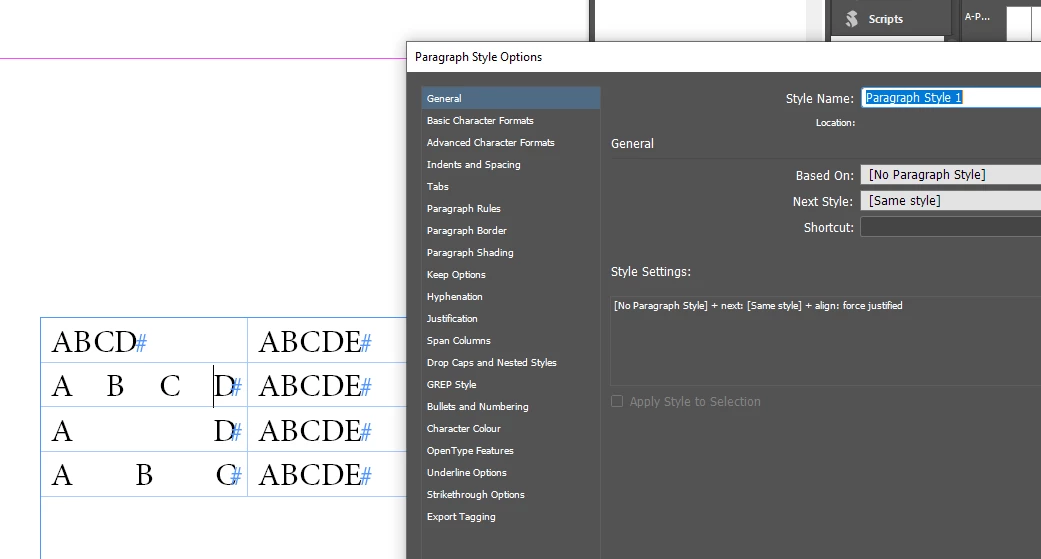
You can type (or place) your tabbed text normally, then select it and Table > Convert text to table...

Peter Spier
Community Expert
Community Expert
June 13, 2023

Letter spacing (kerning values) are set by the type designer and generally vary withthe combination of glyphs. For consistent spacing no matter waht the text might be you would need to use a mono-spaced font like Courier, or create your own.

I suspect this might work better if set up as a table. You could then use full justification in your paragraph styles to completely fill the width of each cell regardless of the number of characters.

Known Participant
June 14, 2023

The table is too cumbersome. Not a good idea

Robert at ID-Tasker
Legend
June 15, 2024
quote

The table is too cumbersome. Not a good idea


By @dublove5CFE


@dublove


Here is initial comment from the latest code created by m1b:


 * Notes and assumptions:
 * - Script assumes each paragraph is a single line.


This condition = "convert to table and forget" - earlier idea from @Peter Spier to use table... And would also automatically work for multiline paragraphs.