
Participant
March 21, 2025
Answered

Is there any way to create a sketchy line similar to powerpoint?

  • March 21, 2025
  • 6 replies
  • 741 views

Does anyone know of any way to change the line type of a shape or line in InDesign to give it a more sketchy hand drawn quality, similar to the powerpoint sketchy line tool, and not the pencil tool which is hard to edit?


Correct answer Eugene Tyson

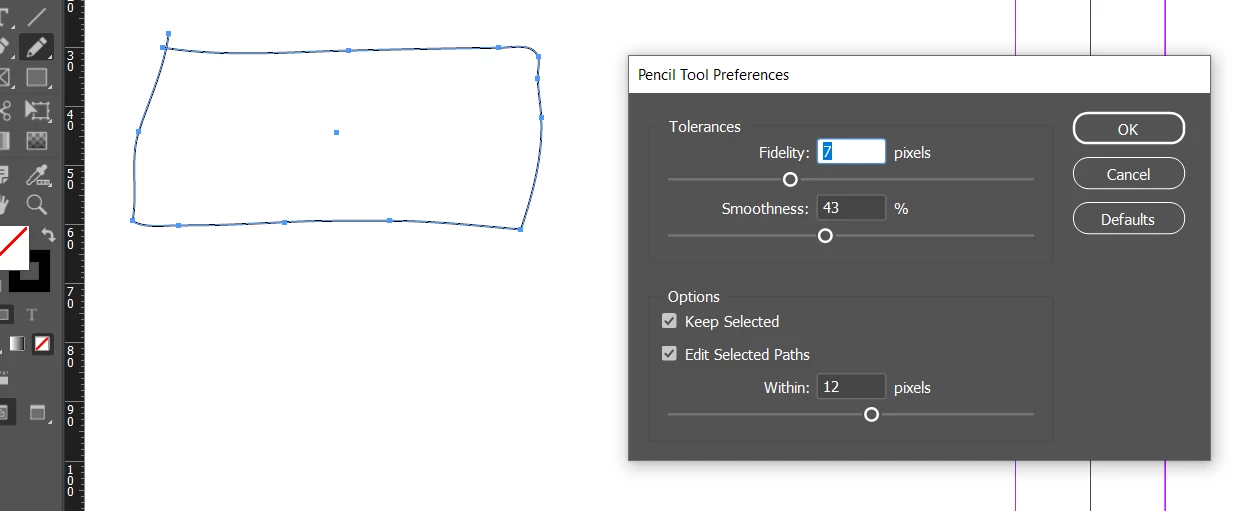
Use the Pencil tool - double click to edit settings
 

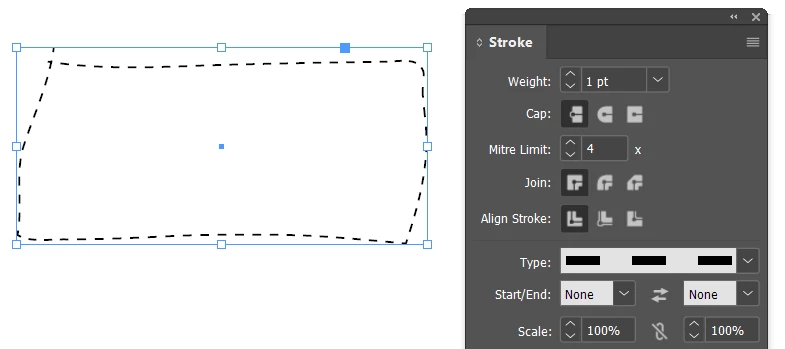
Make it a dashed stroke


----------------------------

And there's scripts in InDesign

in the Scripts folder in Javascript you'll find Patheffects.jsx


6 replies

Participant
March 26, 2025

Thanks everyone for the help! I didn't realise there were more options to the pencil tool to give it less anchor points. Super useful. Illustrator is great but my colleague currently has never opened the program so I was hoping to find something within InDesign. Thanks again!

Colin Flashman
Community Expert
Community Expert
March 25, 2025

I concur with the fellow experts here - draw the graphic in Illustrator (perhaps leveraging some of the effects menu's 'distort and transform' portion) and either copy and paste it into InDesign; or save the file and place it as a link.

If the answer wasn't in my post, perhaps it might be on my blog at colecandoo!
Eugene TysonCommunity ExpertCorrect answer
Community Expert
March 21, 2025

Use the Pencil tool - double click to edit settings


Make it a dashed stroke


----------------------------

And there's scripts in InDesign

in the Scripts folder in Javascript you'll find Patheffects.jsx


HARSHIKA_VERMA
Community Manager
Community Manager
March 25, 2025

Hi curious_architect,


Hope you're doing well!


We would like to follow up on your issue. Are you able to resolve the issue by following our experts suggestion? Please feel free to update the discussion for further assistance.


We would be happy to assist you.


Thanks,

Harshika

Robert at ID-Tasker
Legend
March 21, 2025

@curious_architect


The left one - just draw this object in InDesign - then convert it to a TextFrame if needed - Context -> Text - or leave as a graphic object. 


The right one - would require a bit more "patience" 😉 


Dave Creamer of IDEAS
Community Expert
Community Expert
March 21, 2025

Draw your shape in Illustrator and apply and Effect (experiment with different ones).

Save as .AI file and place in InDesign.

You can also expand the appearance and then copy/paste the shape into ID. However, you won't be able to edit the effect after that.


David Creamer: Community Expert (ACI and ACE 1995-2023)
Mike Witherell
Community Expert
Community Expert
March 21, 2025

InDesign does not have this capability, but you could draw it in Illustrator and place the graphic file into InDesign.

OTOH, you could use the Pen tool and its associated tools to add anchor points and drag them into random distorted shapes. But this would be done manually.

Mike Witherell