

dublove
Legend
November 1, 2024
Pergunta

Is there any way to make the packaged fonts not point to C:\windowns\Fonts?

  • November 1, 2024
  • 3 respostas
  • 907 Visualizações

Is there any way to make the packaged fonts not point to C:\windowns\Fonts?
Especially after packaging and copying to another computer, if the same font in “C:\windowns\Fonts” and “Document fonts” have the same name but different versions, it will point to the “C:\windowns\Fonts”. There will be an error.


Sometimes there will be a hint of missing characters, but you want to change it, but you can't.
Sometimes it is scary, the document will not prompt, will be used directly under the “C:\windows\Fonts”.
The correct way of thinking should be to prioritize the use of “Document fonts”.


Is there any way to use a script to set the fonts of a certain document to point only to “Document fonts” and disable pointing to “C:\windows\Fonts”.

Thank you very much.
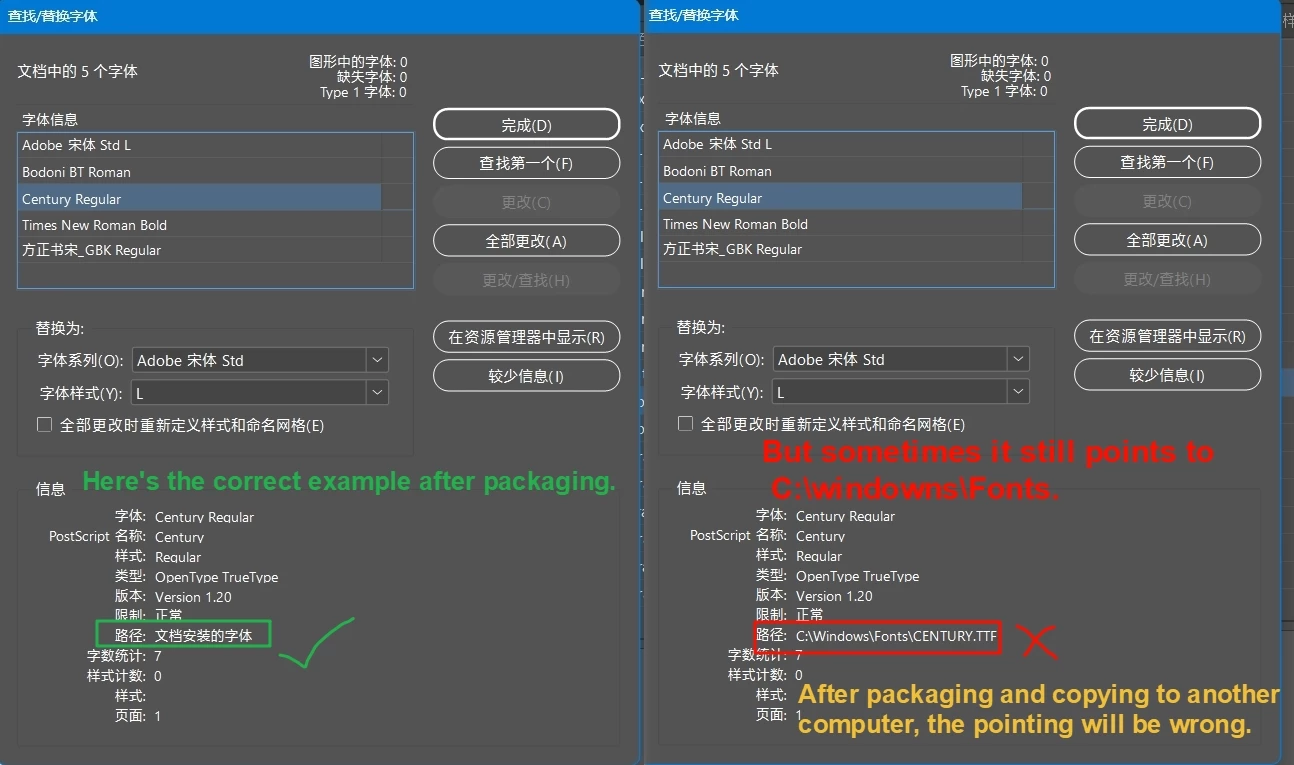
 

The full documentation is here(this is not an example of an error occurring and may not be informative)

http://www.fileconvoy.com/dfl.php?id=g699b5549b21dd62c1000567623835ed14e5b8cda60 

Este tópico foi fechado para respostas.

3 Respostas

Robert at ID-Tasker
Legend
November 1, 2024

@dublove


If you know in which situation what folder should be used for each font - it could be scripted.


dublove
dubloveAutor
Legend
November 2, 2024

Don't know the inner workings, might just have to rely on Adobe to improve it

Vivek-Sharma
Community Manager
Community Manager
November 8, 2024

We can't limit other people's fonts.
We just want to be able to point to “Document fonts” on our own computer when we open someone else's file.
This is safer, because sometimes the font name in my “C:\windows\fonts” is the same as the font name in someone else's “Document fonts”, but the font looks different, which is dangerous.
We have encountered this more than once, and there was no warning pop-up.


@dublove  Please find the response from our product team mentioned below:
"Document Fonts are indeed prioritized when a document is opened. Please share the document and the different versions of the Fonts with which you are facing the issue to investigate it further. Also please let us know the InDesign version with which the issue is reproducible."

^VS

BobLevine
Community Expert
Community Expert
November 1, 2024

Are you opening the file in a newer version of InDesign than it was created in? 

Vivek-Sharma
Community Manager
Community Manager
November 1, 2024

Hi, Thank you for reaching out to us. We've shared this query with our product team to explore further recommendations. We will keep you posted. 


^VS