
Inspiring
September 8, 2024
Answered

Is there anyone from Adobe who can help me regarding ID Bug 424115 (ID hangs)?

  • September 8, 2024
  • 4 replies
  • 2769 views

It has almost been a year (Sep-Oct 2023) since I ran into trouble updating my ID document. ID started to misbehave: it would go to 100% CPU with spinning disk cursor and it would never come out. Once I let it run for ages, and at some point it ran out of resources and crashed. From that moment on, I was trying to find out what was wrong, I tried a lot (older versions of ID, starting from the IDML, removing caches, different fonts, etc.), you name it, I tried it. Hanging happened at various moments, but at one point I found a reliable way to trigger it with a certain paragraph edit action at a specific point.


The document is a very large and complex document. It is about 240 Letter sized mostly two-column pages with 340 diagrams (sometimes inline, sometimes floating), index, references, etc., the works. I started the document in 2011-2012 and roughly once every three years I updated it (using the latest version of ID). You can find about it here: https://ea.rna.nl/mastering-archimate-edition-3-1/ (the last version produced in 2021, the first 50 pages are a free download)


I contacted Adobe. My document was checked by Adobe and judged to be 'not corrupted'. The issue was passed on to Adobe Engineering and they confirmed to me that it was an actual ID bug. It is apparently only triggered extremely rarely (only my document is a known trigger as far as I know), but it is a real bug (of course, going into some resource-wasting endless loop is a bug by definition, but you can allow for corrupted data to trigger such behaviour — my document is not corrupted though). It had the case number E-001071727.


Since then, I have been in the situation where I have been told various times that the bug would be fixed in an upcoming version, the first time on 1 December 2023 that "This issue will be planned to be fixed in version 19.2 of InDesign". That became 19.3 or 19.4. Every time I did not hear anything, except for instance when I asked, I was asked the same things by the same person (like: "do you have a small document that triggers it?" for which the answer is obviously no). The 'funniest' was on 6 Aug 2024 when I was told: "This issue will be resolved in the 19.5 version of InDesign, but its ETA is not fixed yet, so once that is informed, I will let you know.". I replied: "19.5 is out since 12 July 2024" (almost a month before). They replied: "This has been moved to be fixed in InDesign version 20.0, which will be released at the end of August or the first week of September" (that reply also contained the same thing from May: "Engineering has asked for the below detail- Can you help with a smaller document to look into this issue?"...). This made it clear that (a) engineering did not really look deep into it and thus (b) 'to be fixed in 20.0 which arrives late August/begin September' cannot be true.


I seem to be communicating with someone who is telling my what I like to hear, not necessarily what is true. It may also be that they are not correctly informed by the actual engineers.  The last message said "As per the engineering team this issue is now with the PDF team as the issue is also with the annotations in PDF on which they need sometime more to work. Please allow me another few days to come back to you with their findings.". That was 5 days ago. This last thing is so specific that it might mean they have actually looked into it, but by now, I have trouble believing anything that I am told.


In the meantime, I have let my CC subscription expire (no use paying for it if this is why I have it in the first place).


So, after 10 months, this message is a desperate attempt to get traction (and truth). There is a deep and nasty bug which can hit anyone (as it is a bug with unknown triggers) but might be so rare that it almost never does. But if it does, you are done for. End of your document, start fully over (and potentially run into it again, so a lot of work with a risk it won't do you any good).
 

This topic has been closed for replies.
Correct answer Gerben Wierda

Well, with thanks to @Robert at ID-Tasker's help I thought I had fixed my problem. I removed the Ophian font from my document entirely (there were some leftovers we thought had triggered the bug) and the problem seemed to be gone. I started finishing my project. I say 'seemed' because it is now back, it seems. And it now seems the font may not have been the real issue after all.


Because I was using a new font, I had to redo a lot of positioning of diagrams (text frames with an image and a numbered caption as text) as well as change references (e.g. "View X" having to become "View X on page Y" because of a different flow/layout.) While I was doing that, I wanted to change the custom bounding box a on a diagram text frame (in very seldom circumstances, creating a special bounding box is the only option to get it right). When I did this I got exact the same "hanging with 100% CPU on one core" again (only a hard kill would kill InDesign).


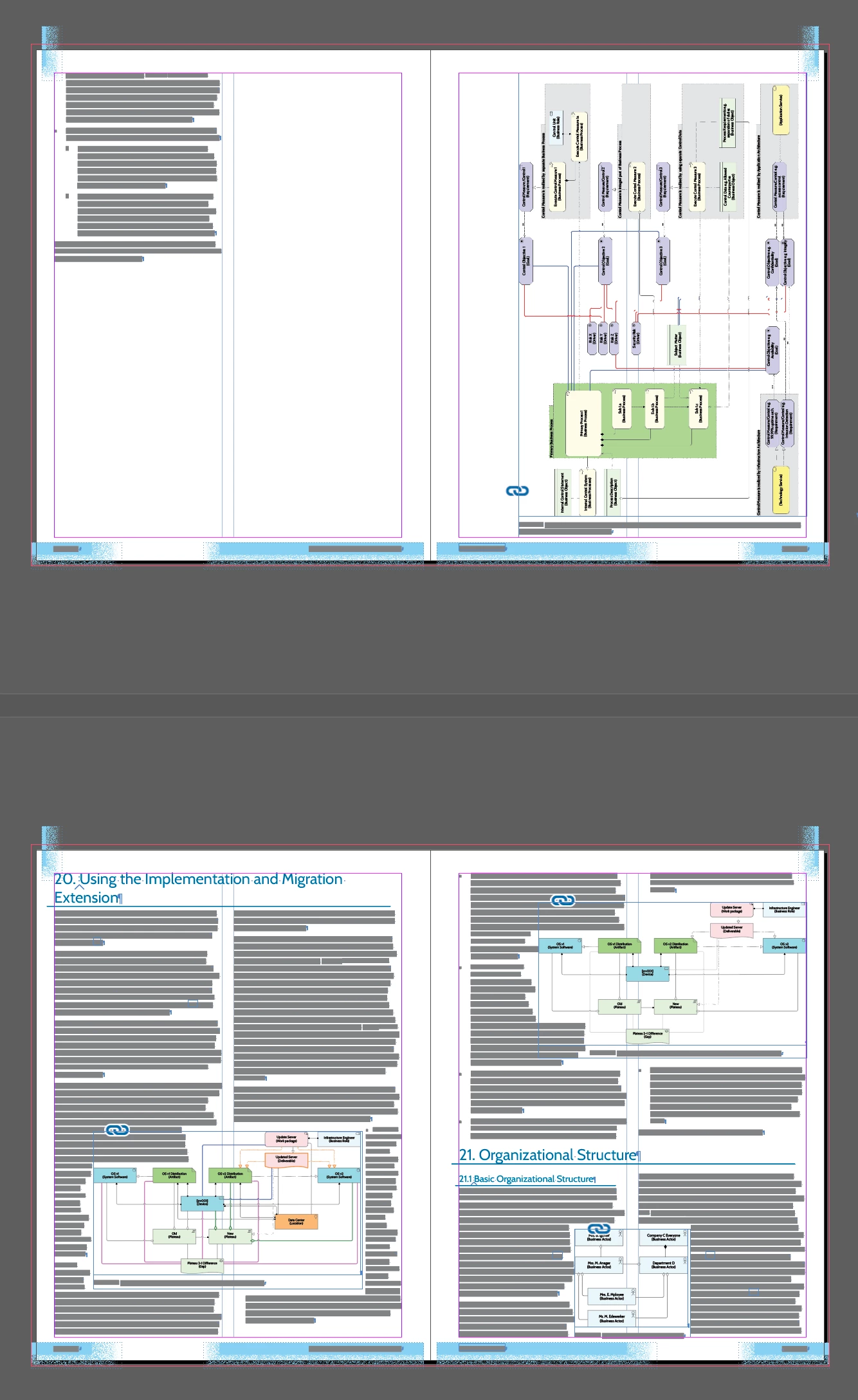
Given that a reflow triggers it now (and there was also reflow going on then) I thought: let's look into reflow a bit more. And I noticed two things in my document. In detail: I have a 240 page document with 370 diagrams. The diagrams are text frames with an inline image frame followed by a paragraph in 'caption' style which is automatically numbered. Some of these diagrams are pretty large, say they may even take up an entire page. Take the following two spreads (which are about 50 page further along than where I was triggering the hang by triggering a reflow, and which turned out to trigger the hang):


As you can see the second page has a large diagram and the third page a section heading. The section heading is unable to flow back over the page with the large diagram while there is room enough on the first page for that section heading, that is cause #1. There simply is no proper way for InDesign to typeset the heading on the second page. Basically, it seems InDesign is unable to flow the story back over more than one page. And a second cause was that the images on the third and (upper) fourth page turned out to be anchored to the text in that section. This was a leftover from an attempt by me to get proper ordering in the numbering of my diagrams (which is a mess as InDesign sort of randomly assigns these numbers per page without anchoring). That attempt to get proper diagram numbering failed long ago (too much went wrong with too many anchored objects), but these were still anchored and is (probable) cause #2. It very likely seems now that this combination makes InDesign go haywire when doing a reflow. That it looked like it was the font was accidental after all. With a different font, the text flows differently anyway, especially tens of pages further and that may remove the trigger of InDesign trying to reflow that combo.


It may be only one of the two elements of the combo is enough to trigger this separately. [Addendum. Just thinking: maybe the fact that th eheading has a paragraph style that spans multiple columns that plays a role too]

So, the font seems to have been a red herring after all. Changing font simply changed the reflow which then did or did not trigger InDesign going haywire. Which is why another reflow with another font had the same effect.


With this info it must be possible to create a smaller document that triggers the bug.

4 replies

Gerben WierdaAuthorCorrect answer
Inspiring
October 20, 2024

Well, with thanks to @Robert at ID-Tasker's help I thought I had fixed my problem. I removed the Ophian font from my document entirely (there were some leftovers we thought had triggered the bug) and the problem seemed to be gone. I started finishing my project. I say 'seemed' because it is now back, it seems. And it now seems the font may not have been the real issue after all.


Because I was using a new font, I had to redo a lot of positioning of diagrams (text frames with an image and a numbered caption as text) as well as change references (e.g. "View X" having to become "View X on page Y" because of a different flow/layout.) While I was doing that, I wanted to change the custom bounding box a on a diagram text frame (in very seldom circumstances, creating a special bounding box is the only option to get it right). When I did this I got exact the same "hanging with 100% CPU on one core" again (only a hard kill would kill InDesign).


Given that a reflow triggers it now (and there was also reflow going on then) I thought: let's look into reflow a bit more. And I noticed two things in my document. In detail: I have a 240 page document with 370 diagrams. The diagrams are text frames with an inline image frame followed by a paragraph in 'caption' style which is automatically numbered. Some of these diagrams are pretty large, say they may even take up an entire page. Take the following two spreads (which are about 50 page further along than where I was triggering the hang by triggering a reflow, and which turned out to trigger the hang):


As you can see the second page has a large diagram and the third page a section heading. The section heading is unable to flow back over the page with the large diagram while there is room enough on the first page for that section heading, that is cause #1. There simply is no proper way for InDesign to typeset the heading on the second page. Basically, it seems InDesign is unable to flow the story back over more than one page. And a second cause was that the images on the third and (upper) fourth page turned out to be anchored to the text in that section. This was a leftover from an attempt by me to get proper ordering in the numbering of my diagrams (which is a mess as InDesign sort of randomly assigns these numbers per page without anchoring). That attempt to get proper diagram numbering failed long ago (too much went wrong with too many anchored objects), but these were still anchored and is (probable) cause #2. It very likely seems now that this combination makes InDesign go haywire when doing a reflow. That it looked like it was the font was accidental after all. With a different font, the text flows differently anyway, especially tens of pages further and that may remove the trigger of InDesign trying to reflow that combo.


It may be only one of the two elements of the combo is enough to trigger this separately. [Addendum. Just thinking: maybe the fact that th eheading has a paragraph style that spans multiple columns that plays a role too]

So, the font seems to have been a red herring after all. Changing font simply changed the reflow which then did or did not trigger InDesign going haywire. Which is why another reflow with another font had the same effect.


With this info it must be possible to create a smaller document that triggers the bug.

rob day
Community Expert
Community Expert
October 20, 2024

With this info it must be possible to create a smaller document that triggers the bug.


Can you do that and share the file?

Inspiring
October 20, 2024

You want me to help Adobe out?


No.


I lost a year because of this. I was lied to by Adobe staff  – repeatedly — so I have no sympathy for Adobe (which produced an engineering piece of junk that — sadly — I depend on). I am not desiring to lose any more time over this. I only reported this here as I was lucky enough to probably find the cause. I would like to get my job done. Adobe can do their own job (which they're not really capable of, or so it seems). I finish my update (hopefully) and desire never having to use InDesign again.


As you can see (and maybe imagine) I'm quite angry about the lying and lack of honest attention while all I did was offer all the help I could give. If I spend any time on this, I might do one like this one for my followers: Can I Ever Trust Apple Again? - LinkedIn (I had two of these kind of horror experiences inside a single year).


(I did email back to the Adobe engineering contact person — who repeatedly lied to me — with a link to this thread and that is all I will do)


Maybe, maybe, maybe if Adobe (and not that same person, who is a proven liar) got in contact first with a believable apology about the repeated lying (I am really, really angry about that) and a proof that they were willing to invest serious attention. I don't expect that to happen.


Looking back, given how that person hallucinated and told me what I wanted to hear, I now am starting to suspect it was (using) Generative AI.


Sorry, you triggered an angry rant with your reasonable request.

Inspiring
October 5, 2024

So, after a year of being lied to by my Adobe contact at a hunch, I though to check the document version for which I was convinced that Ophian font was gone. Turned out, it was still there (in a table of contents that was not updated, and only a few words had this character format, very weird). So, I totally removedOphian an ID stopped completely hanging. Yay!


But th ereplacement ftonts I tried were (variable) OTF and I still had trouble. For instance, setting a variable on one font made ID for no obvious reason decide to try to set it too on a completely different font, which did not have that variable (or any variable at all). I kept struggling. I tried commercial OTf/variables, nothing worked properly.


Finally, on a hunch, I removed all OTF fonts and only used TTF, and nothing variable. Suddenly, not only do I no longer have problems and not only that, suddenly my ID is very responsive when editing.


Conclusion for me: stay away from OTF, and certainly from variable fonts. 


And don't believe a word Adobe engineering is telling you.

Peter Spier
Community Expert
Community Expert
October 5, 2024

I would bet the problem is with the variable fonts rather than .otf as a class -- we've been using .otf for years without issues.

On the other hand variable fonts are fairly new and support for them in InDesign is even newer, and anecdotaly not ready for prime time.

Inspiring
October 5, 2024

Except that Ophian isn't variable and my issues started when I had no variable font in use whatsoever. That only started when I was looking for replacements.

Peter Spier
Community Expert
Community Expert
September 8, 2024

If engineering wants/needs a small document, have you tried triggering the bug with a file made from just part of the larger file?

Inspiring
September 8, 2024

Hi Peter,

 
Thanks for the suggestion (actually you may remember that you are mentioned with thanks in the book...)
 
Engineering has everything. They have all my stuff. They can easily open the file and try to save it with lots removed. They do not need me for that.
 
And as it is now, I don't have a (currently useless) subscription anymore. So I can't anyway.
 
If they had looked into it and suggested this 9 months ago, I might have tried. 
 
Frankly, doing this with the existing document seems unnecessary. What keeps them from hooking up a debugger to see what is going wrong?  (assuming the compiler optimiser is not too blame).
 
Yours, 
 
Gerben
Robert at ID-Tasker
Legend
September 8, 2024

If you are the only one who is experiencing this bug... well, I wouldn't hold my breath... 


Can you describe in detail this bug? What are the circumstances of it happening? Maybe we can find workaround to avoid it? 


Inspiring
September 8, 2024

The bug is triggered in multiple ways. I've had it happen when I moved frames (with images and captions in them). The reliable way for me now is (was, I do not have a license anymore and I won't until this has been fixed) when I remove the 'start at next column/page' on a specific paragraph. The rearranging that happens after that seems to trigger an endless loop (1 core to 100%).


I've asked engineering that a workaround ("don't do this") is OK too. But no workaround has been forthcoming, and of course, a reliable workaround must come from knowing what the bug is or what triggers it and we do not know.


The last message (about this being the case in PDF as well) seems to suggest they know now what is going on, but I do not know if what I am being told is factual (so far it hasn't been).


My post says "you name it, I tried it" and really that is the case.

Robert at ID-Tasker
Legend
September 8, 2024

@Gerben Wierda


Any chance you can share your document - with links? 


It might have been something as simple as bad font - or corrupted image. 


Maybe, as you've suggested, they didn't really have time to properly investigate it...