

Ellen33406355efpc
Participant
November 7, 2023
Question

InDesign Update Causing Irregularities with Josefin Sans Font

  • November 7, 2023
  • 3 replies
  • 1819 views

Hi, 

After the latest update for InDesign, I have issues with JosefinSans-Variable Font displaying in  very weird way, and not at all what it should look like.  It shows up differently in PDF form as well, with irregular spacings and does not look the way it should.  


Basically it is the "regular", "medium" and "bold" fonts that are acting up. Please see screenshot attached.
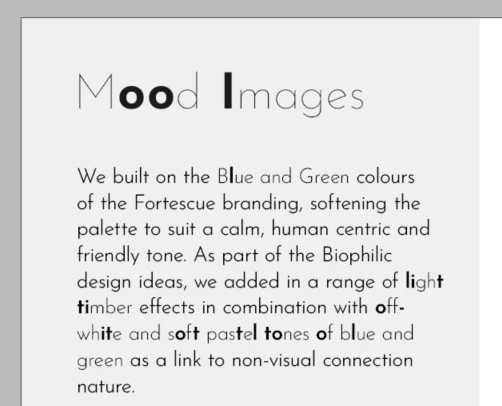
 What can I do to fix this? I am literally pulling out my hair at this stage.


Regards

Ellen


<Title renamed by MOD>

This topic has been closed for replies.

3 replies

susanr35537211
Inspiring
November 1, 2024

I am having a similar problem.  I am generally a veteran user of InDesign. This is one thing I haven't had crop up until very recently. I'm working in the latest edition version, 20.0, completely updated as of this writing. One particular font in one file will intermittently start to show a really strange phenomenon where all of the characters change to special characters for other languages. It's only this one Google Font called Josefin Sans. The other fonts in the file are fine. I'm only using the offending font because my client required me to. The suggestion given by the last poster about installing it directly from adobe fonts isn't relevant because I actually did that initially so it is already installed through Adobe. Do you think it's the font, or a setting or a glitch or ???

Joel Cherney
Community Expert
Community Expert
November 1, 2024

I don't know that we can identify the cause - it's something glitchy in Adobe Fonts auth, I think. My solution for similar issues which works for me 95% of the time is

Delete the entire family through Adobe Fonts

Shut down all of your Adobe apps and log out of Creative Cloud

Restart your computer

Upon reboot, make sure you don't have any non-Adobe-Fonts installed with identical names

Open up CC and log in

Reinstall the font


If that doesn't work, you can add a "clear font caches and reboot again" after the first reboot.


That usually fixes Adobe Fonts weirdness for me.

Ellen33406355efpc
Participant
November 10, 2023

Can anyone please help me with this? Do you have any advice? 

Hi, 

After the latest update for InDesign, I have issues with JosefinSans-Variable Font displaying in  very weird way, and not at all what it should look like.  It shows up differently in PDF form as well, with irregular spacings and does not look the way it should.  


Basically it is the "regular", "medium" and "bold" fonts that are acting up. Please see screenshot attached.


 What can I do to fix this? I am literally pulling out my hair at this stage.


Regards

Ellen


Participant
November 19, 2023

I had the same issue. I had originally downloaded and installed Josefin from Google Fonts. I completely removed the font, and then reinstalled it directly from Adobe Fonts. That fixed it for me.

kglad
Community Expert
Community Expert
November 7, 2023

in the future, to find the best place to post your message, use the list here, https://community.adobe.com/

p.s. i don't think the adobe website, and forums in particular, are easy to navigate, so don't spend a lot of time searching that forum list. do your best and we'll move the post (like this one has already been moved) if it helps you get responses.


<"moved from cc desktop bugs">
Ellen33406355efpc
Participant
November 7, 2023

Thanks.

I have never posted in any community before.

kglad
Community Expert
Community Expert
November 7, 2023

you're welcome. 


p.s.  don't reply by email or remove your signature before sending.