
Participant
October 20, 2024
Question

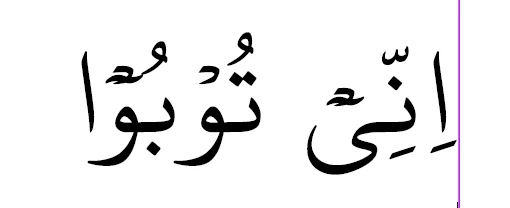
Issue with Incorrect Positioning of Arabic Diacritic in InDesign (Correct in MS Word)

  • October 20, 2024
  • 3 replies
  • 763 views

I'm encountering an issue with Arabic diacritics in Adobe InDesign. While working on Arabic text, I noticed that one of the diacritics is not positioned correctly in InDesign, though it appears perfectly in Microsoft Word. I've tried adjusting the font and settings, but the problem persists only in InDesign.

Has anyone faced a similar issue or knows how to resolve it? Any help would be greatly appreciated!


Thank you!
3 replies

Abhishek Rao
Community Manager
Community Manager
July 7, 2025

Hi @Ashhad Kaka & @al-izzah_4948,


Thank you so much for sharing the details and the font file. I tried pasting your text in both InDesign and Word, and it looked quite similar to me. To better understand and investigate the issue, could you please share a sample Word file where the diacritic positions appear correct and also show how it looks once pasted into InDesign where you see the problem?

Additionally, I recommend updating your InDesign version to the latest available, which is 20.4.1, and then testing if the issue still occurs.

If the files are confidential, you can share them with us privately via direct message using any public cloud service like Google Drive or Dropbox.


Looking forward to your update so we can help you further!

Abhishek 

sak95456465
Known Participant
July 14, 2025

Hello

You can test It yourself. type مَُت in indesign and compare it to other apps. as I said It is related to marktomark feature. I opened font in a font editor and everythings looks normal.

Thanks

Abhishek Rao
Community Manager
Community Manager
July 15, 2025

Hi @sak95456465,


Thank you so much for your patience and for sharing all the details.

I tested the issue on my end using InDesign version 20.4.1 (Middle East version). Please see the attached screenshots of my output

InDesign: 


Word: 


I was not able to reproduce the incorrect diacritic positioning issue.

If possible, could you please share a screen recording showing your complete workflow? This will help us better understand exactly how the issue occurs on your setup and investigate further.


Looking forward to your update.

Abhishek 

sak95456465
Known Participant
October 21, 2024

hello

please type original arabic text here and what is the font?

Thanks

Participant
July 7, 2025

ْ٘

ive attached the font file also, you can check

sak95456465
Known Participant
July 14, 2025

Hello سلام علیکم

It seems for this specific font indesign doesnot interpret mark to mark positioning opentype feature correctly meanwhile other apps like microsoft word or libreoffice does this correctly.

Peter Spier
Community Expert
Community Expert
October 20, 2024

OS? Version (and localization) of InDesign? Which paragraph composer are you using?

Have you tried a different font altogether to see if the problem is actually in the font itself?

Participant
October 20, 2024

Thank you for the reply!

I'm using Windows 11 and InDesign version 20.0 (Middle East version). The paragraph composer I'm using is the Adobe World-Ready Paragraph Composer.

I have tried various fonts. In some fonts, the diacritic positioning issue persists, while in others, it displays correctly. It seems the issue is font-specific but happens frequently enough to affect my workflow.

Let me know if there's anything else I should try or check!

Robert at ID-Tasker
Legend
October 20, 2024

@Ashhad Kaka


If font is the issue - you either need to find a "good" version - or use a different font?