Exit
  • Global community
    • Language:
      • Deutsch
      • English
      • Español
      • Français
      • Português
  • 日本語コミュニティ
  • 한국 커뮤니티
0

Issue with Indesign Bullets

New Here ,
Oct 09, 2022 Oct 09, 2022

Hi All


I have an issue when trying to use bullet points in my document.

When ever I apply bullets I instantly get this strange white background behind my text.


I want my text to look like this with a greeen background and white font:

Screen Shot 2022-10-10 at 5.10.06 PM.png

When I apply bullets and add my green background box below it I notice these strange white highlights behind the text.
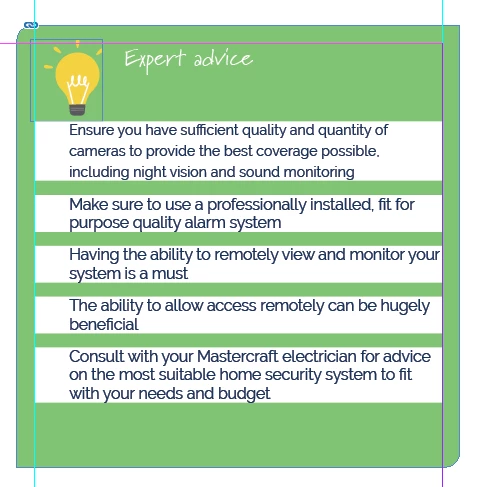
Screen Shot 2022-10-10 at 5.09.38 PM.png


Please send help

TOPICS
How to , Type
387
Translate
Report
Community guidelines
Be kind and respectful, give credit to the original source of content, and search for duplicates before posting. Learn more
community guidelines

correct answers 3 Correct answers

Community Expert , Oct 09, 2022 Oct 09, 2022

Do you have created a specific paragraph style for bullets? It should always be done. 
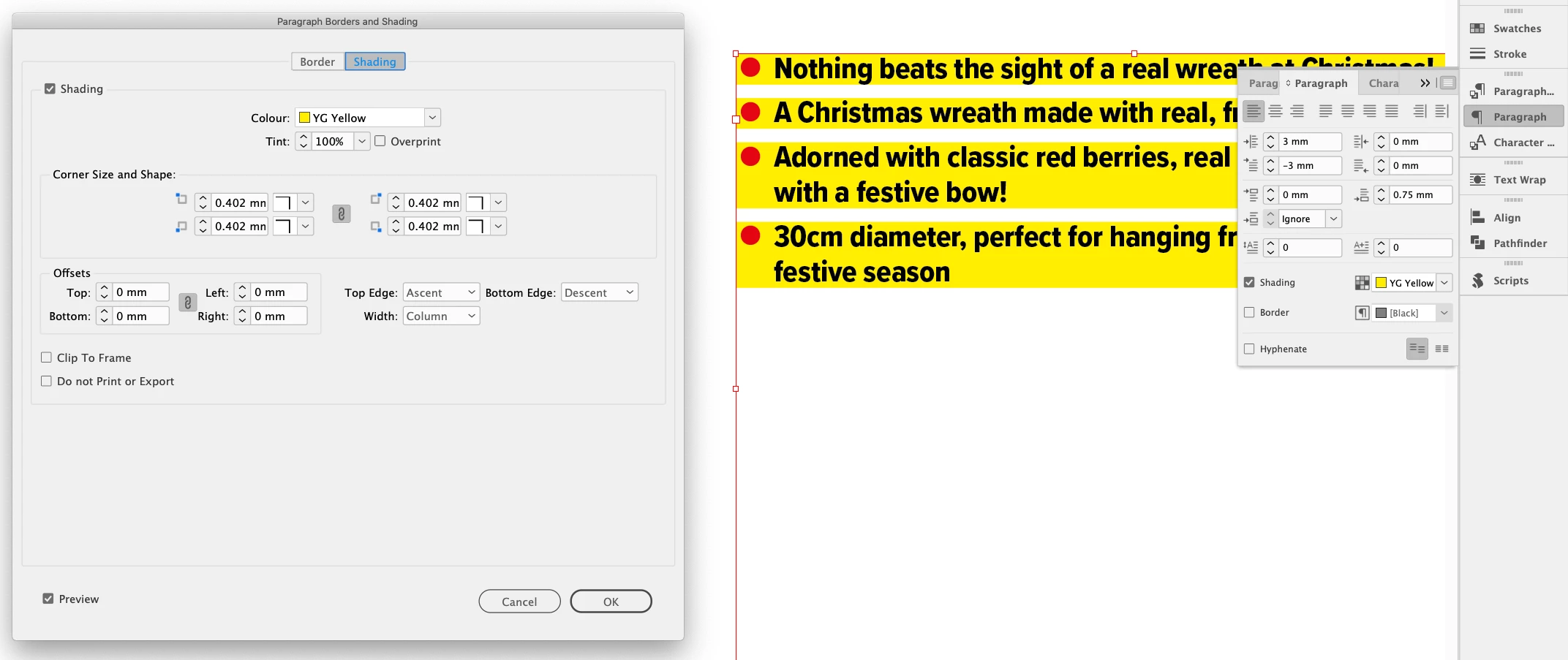
The white background is not from the bullets, it is part of the paragraph settings. Check paragraph shaddings. Check other settings like rulers. 

Translate
Contributor , Oct 10, 2022 Oct 10, 2022

Check your Paragraph Styles.

Paragraph Rules: Rule Above > uncheck, Rule Below > uncheck

Paragraph Shading > uncheck

Translate
Explorer , Oct 10, 2022 Oct 10, 2022

The text has paragraph shading applied.

Not sure if you are using styles, but as Willi suggests it's good practise and a great time-saver.


Screenshot 2022-10-10 at 11.21.24.png


Translate
Community Expert ,
Oct 09, 2022 Oct 09, 2022

Do you have created a specific paragraph style for bullets? It should always be done. 
The white background is not from the bullets, it is part of the paragraph settings. Check paragraph shaddings. Check other settings like rulers. 

Translate
Report
Community guidelines
Be kind and respectful, give credit to the original source of content, and search for duplicates before posting. Learn more
community guidelines
Contributor ,
Oct 10, 2022 Oct 10, 2022

Check your Paragraph Styles.

Paragraph Rules: Rule Above > uncheck, Rule Below > uncheck

Paragraph Shading > uncheck

Translate
Report
Community guidelines
Be kind and respectful, give credit to the original source of content, and search for duplicates before posting. Learn more
community guidelines
Explorer ,
Oct 10, 2022 Oct 10, 2022

The text has paragraph shading applied.

Not sure if you are using styles, but as Willi suggests it's good practise and a great time-saver.


Screenshot 2022-10-10 at 11.21.24.png


Translate
Report
Community guidelines
Be kind and respectful, give credit to the original source of content, and search for duplicates before posting. Learn more
community guidelines
New Here ,
Oct 10, 2022 Oct 10, 2022
LATEST

Thank you all for your quick responses. Yes it was a paragraph style shading issue. All sorted 😄 

Translate
Report
Community guidelines
Be kind and respectful, give credit to the original source of content, and search for duplicates before posting. Learn more
community guidelines