
Known Participant
March 22, 2025
Answered

Issue with Indian Languages font in InDesign 2024 and 2025

  • March 22, 2025
  • 3 replies
  • 1396 views

Hello,

we are currently facing a problem in my team when working with Indian languages using InDesign versions 19 and 20 (2024 and 2025).


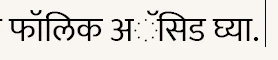
This is how it looks when we open the file in 2024 and 2025 versions
 

and this is how it looks (as it should) using 2023 verision
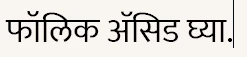
 

both files are using the exact same settings, fonts, etc, the only difference is the version of InDesign used.

I have tried to download again InDesign v18 but is not available any more in the Creative Cloud.

We work in a big team and only 2 of the older members have access to InDesign 2023 and that's a problem for us.

Are there any solutions for this? Either fix the bug or provide installation for v18

Thanks.


<Title renamed by moderator>

 

Correct answer Brad @ Roaring Mouse

Try turning on Legacy support under Preferences > Advanced Type. The new Harfbuzz text engine in CC2024 and up is probably having a problem with the font. Since it looks like Mukta is an open-source font, it may have a flaw they haven't fixed yet, epsecially if other fonts work correctly

3 replies

Brad @ Roaring Mouse
Community Expert
Brad @ Roaring MouseCommunity ExpertCorrect answer
Community Expert
March 26, 2025

Try turning on Legacy support under Preferences > Advanced Type. The new Harfbuzz text engine in CC2024 and up is probably having a problem with the font. Since it looks like Mukta is an open-source font, it may have a flaw they haven't fixed yet, epsecially if other fonts work correctly

Known Participant
March 26, 2025

Thank you @Brad @ Roaring Mouse, this actually worked in my computer! I will ask the rest of the team to check as well to make sure it works for all of us.


Brad @ Roaring Mouse
Community Expert
Community Expert
March 26, 2025

Funny enough, I decided to test a file today with the same text in your screen shot, and since it was an image, I used Google Translate to recognize the image back to English and then back to Marathi, and this is what I got!

But if I deleted the period, the dotted circle went away.  Weird.  The font Google uses here is Roboto, but apparently Google translate also uses the harfbuzz text shaper, so the plot thickens! Perhaps a bug in harfbuzz.


Community Expert
March 26, 2025

I tried some hindi text on version 20..2 on a MAC and it did work fine with Adobe Word Ready Paragraph Composer and Arial Unicode MS font. Can you check if this is a problem with a specific installation. Try it on a different computer. If possible send us a sample document that exhibits this problem.

This could also be a document specific problem so try different documents to rule out this possibility.

-Manan

-Manan
Robert at ID-Tasker
Legend
March 22, 2025

If you're big enough - you could contact Customer Support and ask them for the link. 


But are you sure you've EXACTLY the same fonts everywhere? 


Known Participant
March 22, 2025

yes, everything is identical except for the version used to open the file.

- Adobe world-ready paragraph composer is used

- metrics kerning is used

- same font (Mukta) is used. It doesn't make any difference if we use other font (we've tried Kokila, Anek Devanagari, Hind, Noto Sans Devanagari, etc)

Robert at ID-Tasker
Legend
March 22, 2025

Tagging @Abhishek Rao.