
Issues developing Adobe InDesign plugin with InDesign SDK
I've downloaded the Adobe InDesign Plug-In SDK (19.0.0.151), and can't even successfully launch a simple WriteFishPrice plugin which I'm creating following the tutorial that comes within the SDK folder (<SDK>/docs/html/id_getting_started_with_indesign_plugin_development.html)
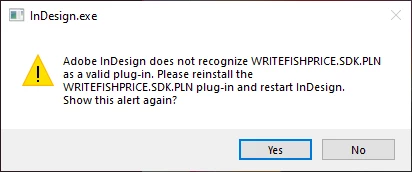
After building the plug-in with Visual Studio and copying plugin files to the InDesign's Plug-Ins directory I'm getting this error during the launch of Adobe InDesign:
Plug-Ins directory:
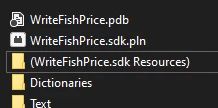
What could be the issue, since plugin is successfully being built in Visual Studio
-------------------------------
1) I'm creating a "PluginConfig.txt" file at "C:\Users\<user>\AppData\Roaming\Adobe\InDesign\Version <..>\<locale>" directory with content:
"""
"D:\Program Files\InDesign SDK\build\win\debug\sdk"

What I have is:

Or C++ plugins have been removed in later versions of Adobe InDesign? I'm testing it with 2020 version
2) Coming to the part where I create a dialog-based plug-in using dolly
Here is the win config:
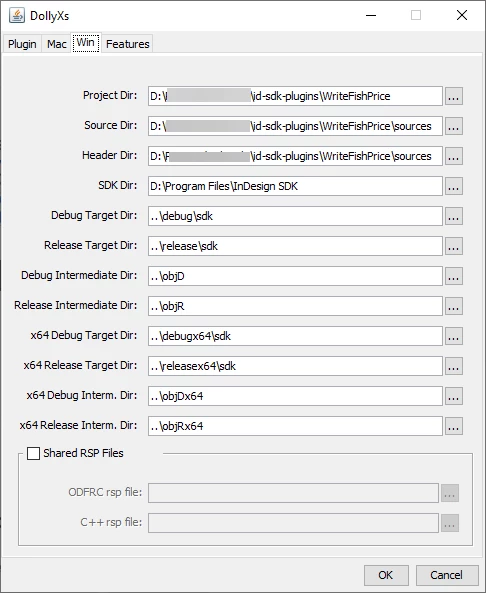
(Since Im creating plugins in custom directory, and my SDK is in other directory I'm specifying few paths as an abosulute, correct me for the best practices)
Coming to installing the right Visual Studio and necessary components, the guide says general stuff like:

It doesn't say exactly which workload and individual components are required to be installed, which is misleading
Initially I tried installing minimum amount of components with names closer to the "Visual C++", it ended up installing 3 gigs of data and still it couldn't open simple .vcxproj file solution. Then it started working, after I mass installed bunch of workloads and individual components, which ended up having 8.5GB (IDE) + 2.8GB (Shared) ≈ 11GB.
Now I know that I have installed bunch of unnecessary stuff, but I wouldn't If the guide provided me with only required Workloads and Individual Components (from Visual Studio Installer)
For example, I wouldn't have faced "xlocnum hack" error during building process If the guide specified which Windows SDK version is required
Some of the text is obsolete or unclear, for example in Step 1.7 it says:
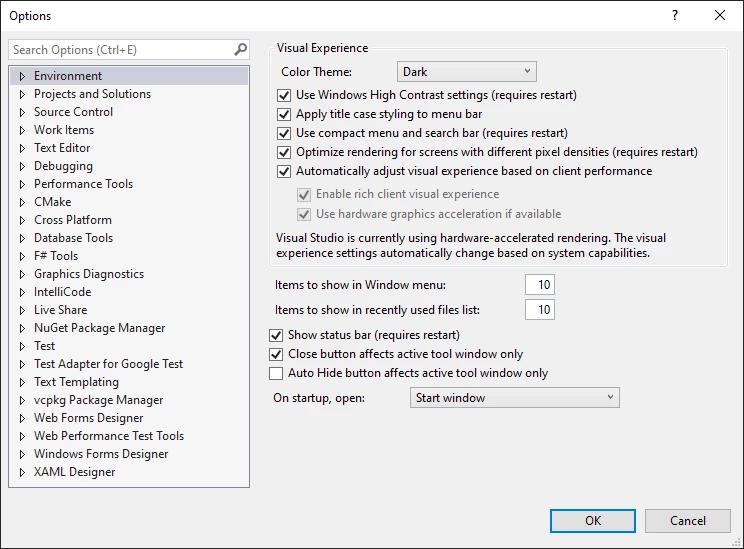
"Before building your plug-in, set up your InDesign development environment (IDE) to use the InDesign ODFRC. To do this, choose Tools > Options, and add the <SDK>\devtools\bin directory under the Executable Files directory path."
But when I open Tools > Options, there is no "Executable Files" thing:
Here is the build log:
Build started...
1>------ Build started: Project: WriteFishPrice, Configuration: Release x64 ------
1>VCPlugInHeaders.cpp
1>WFPActionComponent.cpp
1>WFPDialogController.cpp
1>WFPDialogObserver.cpp
1>PlugInStatics.cpp
1>SDKPlugInEntrypoint.cpp
1>WFPID.cpp
1>WFPNoStrip.cpp
1>TriggerResourceDeps.cpp
1>Performing Custom Build Tools
1>ODFRC deleting old resources...
1>Could Not Find D:\some_path\id-sdk-plugins\objRx64\WriteFishPrice\*.idrc
1>merge_res.cmd - calling ConcatRes
1>        1 file(s) copied.
1>ConcatRes skipped since "..\objRx64\WriteFishPrice"\WFP.fres is an empty file.
1>merge_res.cmd done.
1>Deleting old resources...
1>The system cannot find the file specified.
1>14 File(s) copied
1>   Creating library ..\..\..\build\win\objRx64\WriteFishPrice/WriteFishPrice.lib and object ..\..\..\build\win\objRx64\WriteFishPrice/WriteFishPrice.exp
1>WriteFishPrice.vcxproj -> D:\some_path\id-sdk-plugins\releasex64\sdk\WriteFishPrice.sdk.pln
1>        1 file(s) copied.
1>restore_res.cmd done.
========== Build: 1 succeeded, 0 failed, 0 up-to-date, 0 skipped ==========
========== Build started at 6:05 PM and took 07.922 seconds ==========
 AdChoices