
ashimg23377171
Inspiring
October 12, 2017
Answered

Issues with indentation in Bullets and Numbering

  • October 12, 2017
  • 5 replies
  • 26657 views

Hello

I've been facing issues with indentation of bullets. The foll is an example. The text on the second line of the bullet does not align with the first line.
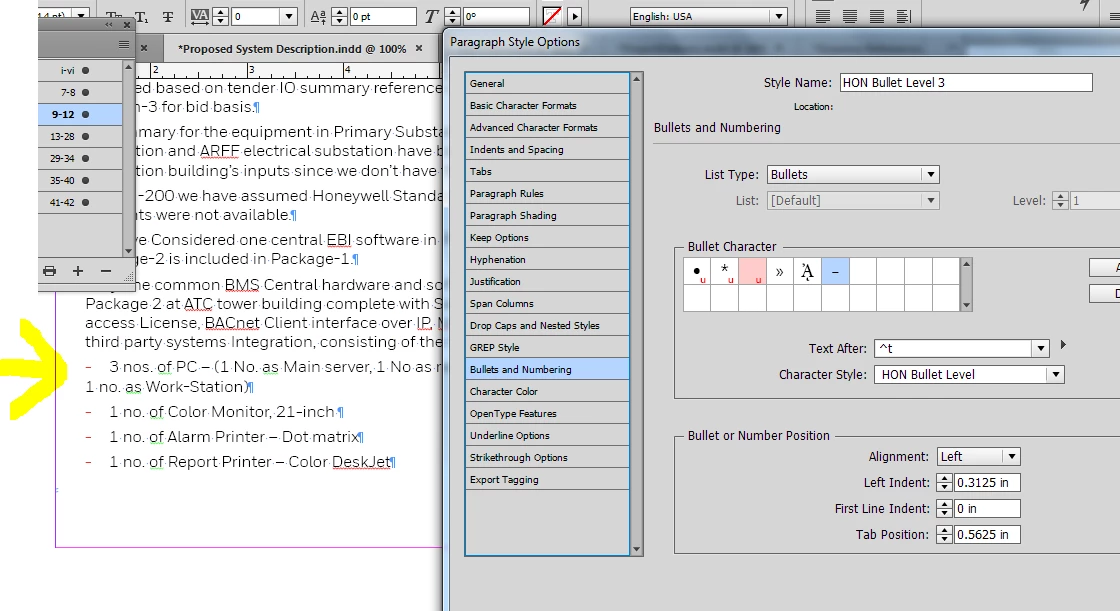
I've been able to get it to work sometimes by ensuring that the 'left indent' and 'first line indent' negate each other... but im clearly missing sthg... for that approach doesn't work always, as in this case where the second line is aligning almost with this first line... however, the bullet has been bumped to the left margin... and trying to change the 'tab position' just doesn't help.
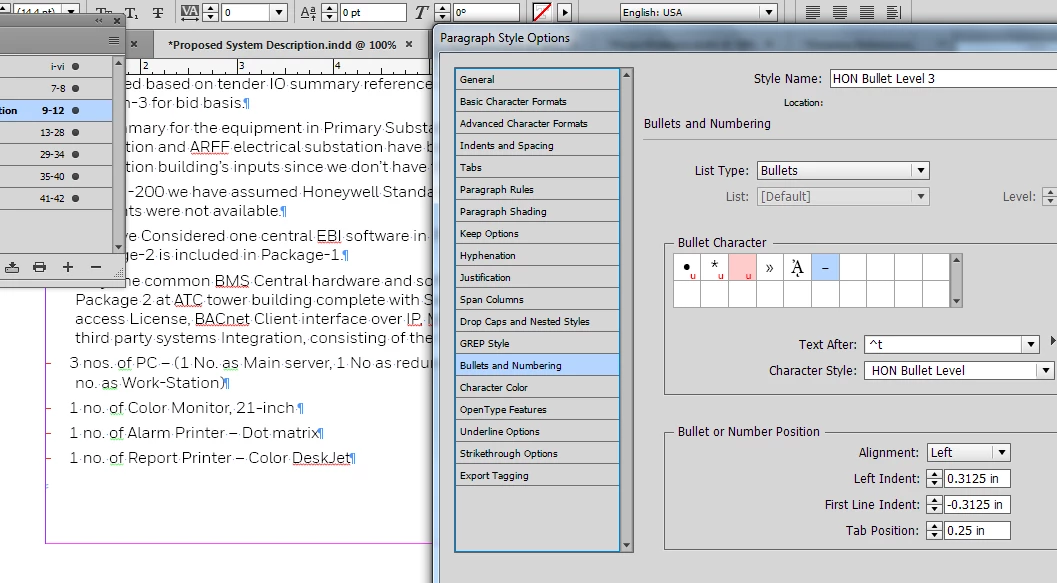
Any guidance on the right workflow for this would be appreciated.

Regards

    This topic has been closed for replies.
    Correct answer Barb Binder

    Oh hello!

    winterm is correct when he says your tab should be equal to the left indent. Here's a little more info:

    1. Use the left indent to set up the left side of the entire bullet paragraph.
    2. Use a negative right indent first line indent to pull the bullet back out towards the margin—partway or all the way
    3. Use the left indent value for your tab position (or leave it blank and it will default to the left indent value)

    So if the left indent is 18 pt, set the tab to 18 pts or leave it blank:

    (I prefer to measure in points. In your case both should be 0.3125")

    5 replies

    LyrJet
    Participant
    November 9, 2021

    I was having issues with this as well. I would get my alignment for my nested numbered list set perfectly, but then when I moved into double digit numbers, it got wonky. The solution ended up being a combination of the responses here plus selecting "Alignment: Right." Finally, I'm all set!

    Participant
    August 27, 2018

    Followed winterm​'s advice and looked for the culprit elsewhere. Turned out it was a rectangle shape with wrapping around the boundary box that I'd placed next to the text box. Once I moved it away from the text box a little bit, the alignment was fixed. Thanks! Was driving me nuts and I've got a deadline.

    Barb Binder
    Community Expert
    Barb BinderCommunity ExpertCorrect answer
    Community Expert
    October 12, 2017

    Oh hello!

    winterm is correct when he says your tab should be equal to the left indent. Here's a little more info:

    1. Use the left indent to set up the left side of the entire bullet paragraph.
    2. Use a negative right indent first line indent to pull the bullet back out towards the margin—partway or all the way
    3. Use the left indent value for your tab position (or leave it blank and it will default to the left indent value)

    So if the left indent is 18 pt, set the tab to 18 pts or leave it blank:

    (I prefer to measure in points. In your case both should be 0.3125")

    ~Barb at Rocky Mountain Training
    Inspiring
    October 19, 2023

    If you want an indented bullet list, with left justified text, that goes for 2 or more lines:

    • First, create a bullet with some text that goes 2 or 3 lines. 
    • Second, put your cursor in front of the first letter after the bullet.
    • Then, click BULLET AND NUMBER OPTIONS. 
    • Next, and this is what was throwing me off, increase the size of the LEFT INDENT. This will indent the bullet, and the text. I put mine to .5 inches.
    • Then, bring the FIRST LINE indent back .25 inches. Make it -0.25. This will set up the bullet at .25 inches from the margin, which is what I want. 
    • The TAB position should automatically go to .5 inches so your second line text, and the lines thereafter, will be .25 inches away from the bullet. In other words, the first line is indented and subsequent lines are TABBED. 


    Why doesn't InDesign do that automatically like this thing I am currently typing on does? Here is a photo of what I did:


    And here is what the text looks like in InDesign:

    Now, if your text ends up looking this this:


    You have to left justify like this:


    The earlier people responding were giving instructions for bullets that were on the margin. If you want to indent your bullets, you need to do the above. 

    Andrew MikelsonsAndy Fairchild Publishing Inc.
    Barb Binder
    Community Expert
    Community Expert
    October 19, 2023

    Hi @Andrew Mikelsons:


    ~Barb

    ~Barb at Rocky Mountain Training
    Community Expert
    October 12, 2017

    Your settings should look like this:

    Legend
    October 12, 2017

    Or you can leave the Tab Position blank. The first line indent (In InDesign) also functions as a tab stop, so it's not needed unless you want your tab to fall to the left of the indent. 

    winterm
    Legend
    October 12, 2017

    Your Tab Position should be equal to Left Indent. That's it.

    ashimg23377171
    Inspiring
    October 12, 2017

    Thank you, but im afraid that doesn't work.

    winterm
    Legend
    October 12, 2017

    That’s the way Bullets and Numbering in InDesign works. If it doesn’t for you, look for the culprit somewhere else. I’d begin with applying standard bullets to a clean unformatted text, and see how it behave. If your styles are really ok, maybe there’s a minor file corruption and it’s worth to try trashing your prefs (yes, I hate offering this ).