
Participating Frequently
April 6, 2022
Question

Issues with leading variations in justified pages

  • April 6, 2022
  • 4 replies
  • 534 views

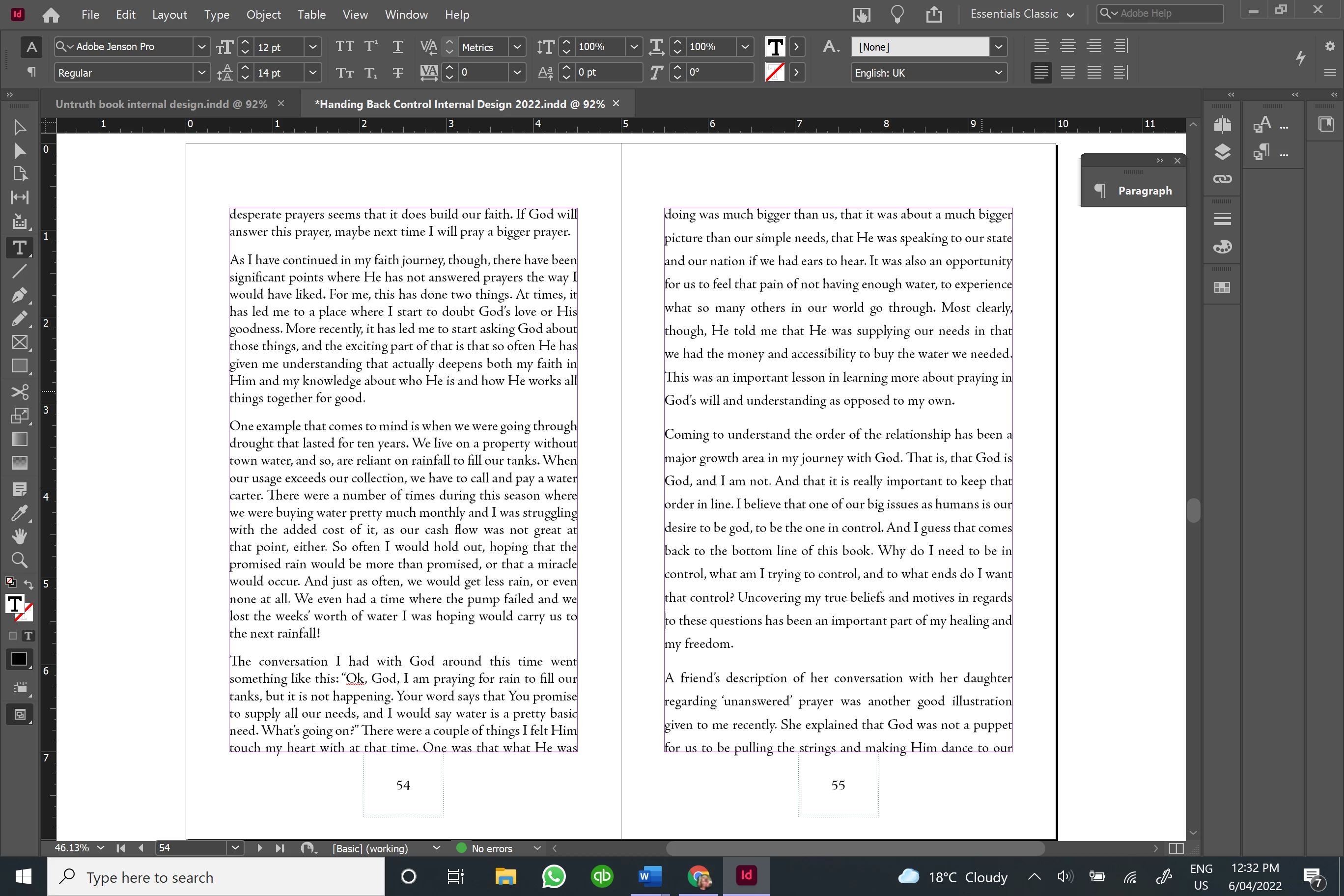
I thought I was being all clever, as I managed to get my document pages all justified with no widows or orphans using a paragraph style for my book text, until I went through and noticed that the leading was quite different in a number of places, particularly bad on some facing pages. If I try adjusting the paragraph spaces, it won't bring in text from the following page, instead ending up with massive white spaces. I've attached a photo of the worst case. Any suggestions about how to override this, or do I go back to my old way of adjusting the paragraph spacing on each page that needs it, removing the keep options? 
This topic has been closed for replies.

4 replies

Dave Creamer of IDEAS
Community Expert
Community Expert
April 7, 2022

Without seeing the file, I assume the vertical spacing on the page is from either vertical justification, baseline shift, or manual leading. I would remove that first, then deal with any gaps at the bottom of pages. 


If you don't have it applied yet, you can use a No Break character style and some GREP to prevent "line widows" (sometimes called runts). 


Then any gaps caused by the widow/orphan controls (keep line together at start/end of paragraph). These can be dealt with by applying some positive/negative tracking or by editing. 

David Creamer: Community Expert (ACI and ACE 1995-2023)
Ruth5E9EAuthor
Participating Frequently
April 7, 2022

Still seems like a lot of work...I guess the real crux of my question is: is there a way to keep the leading constant and just have the paragraph breaks adjustable?

Community Expert
April 7, 2022

If it was easy everyone would be able to do it.


You can add GREP to your styles

https://creativepro.com/de-runt-your-paragraphs-with-a-grep-style/


This one in particular won't allow a single word to split to the next line. 


Ensuring you don't have things like
this


It might be possible to script something to never allow single line to split over columns

But this would need to able to identify a single paragraph that is split over a page

adjust the tracking/kerning to pull the text back


And you'd need to run the script regularly.


It will take a lot of care and attention to get what you need.


Or take it that you won't have each page fully to the bottom.


jmlevy
Community Expert
Community Expert
April 6, 2022

You should also check the text frame settings (Ctrl B) > general


Ruth5E9EAuthor
Participating Frequently
April 6, 2022

Thanks jmlevy - had already done that 🙂 

Willi Adelberger
Community Expert
Community Expert
April 6, 2022

To adjust leading align the text to baseline grid. The top line starts from margin + H-height. To determine the height of the choosen font write a H and create outlines. In the Transform panel you can read the HIGHT and take this value, round it UP and from the border on the top is the first base line grid start.

Vertical alignment is difficult and not always possible. A little bit variance can help if in the paragraph fine justify settings you give an allwance about –4 to +4 for glyph spacing. But I would not use vertical adjustment at all, it is better to align to the grid in my oppinion. But it helps to keep an eye on the previous pages, like allow or not allow how long the last line may be. This will often change the setting on the next pages.

Ruth5E9EAuthor
Participating Frequently
April 6, 2022

Thanks - in my previous book, I simply adjusted paragraph breaks manually for the pages which had widows or orphans. It seems to be a simpler way in the long run. That way I had everything else how I wanted it as well.

Community Expert
April 6, 2022

I see what you're trying to do. But that is problematic of justified text.

Your leading needs to be a division of the page margins.

So you're better off setting your rule system to picas - so that there is no rounding.


And use Align to Baseline Grid


https://www.bookdesignmadesimple.com/book/baseline-grid/


Ruth5E9EAuthor
Participating Frequently
April 6, 2022

Thanks for your insights - have tried that now and it does seem to alleviate the problem a bit, has evened it out, although now the leading is either huge (14pt+) or if I drop it down a couple of pt (which is the only way to get it to shift at all), it is too small. I was kinda hoping there was some sort of override where you could get InDesign to only adjust the paragraph breaks and not the leading. That is what I did on my last book, but did it all manually (i.e. only do adjustments where there is a widow or orphan). With all this messing about, it still appears to be the quickest way!

Ruth5E9EAuthor
Participating Frequently
April 7, 2022

Following the guidelines on the link you shared, all the leading is lovely and even, but now I have widows and orphans everywhere, and it won't allow me to override the paragraph spacing to adjust...how do I deal with the w&o using this system?