
Known Participant
April 14, 2024
Answered

Javascript error 23 when running find/replace script

  • April 14, 2024
  • 2 replies
  • 1988 views

Hello, 


First - I am new to scripting.


I have been doing manual find/replaces on some documents I have and thought this should be a slam dunk for the find/replace script in InDesign, but I am getting an error and not sure why.


Here is the error:
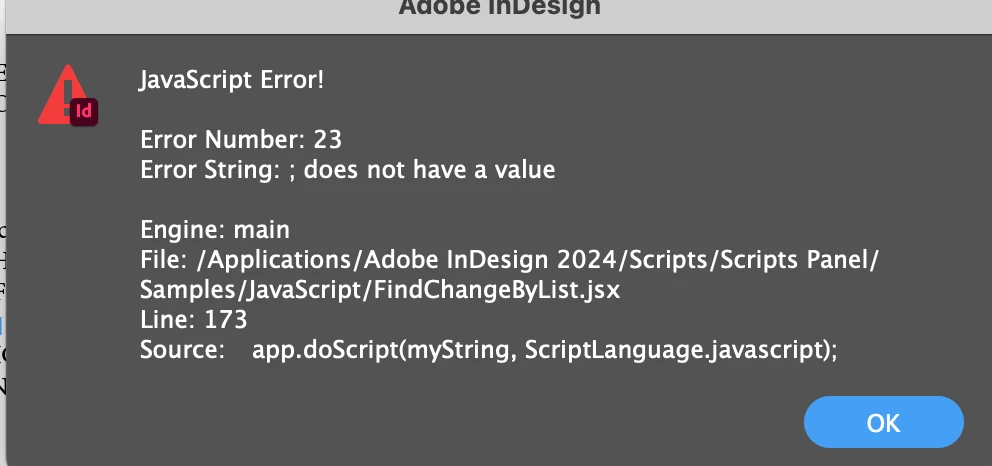


All I have done is add the first four lines to the list of find/changes in the supporting text file (file attached) and added // in front of the existing/default ones so they are ignored.


I'll admit the find/replace operations I am using are not very sophisticated,  but they achieve my exact desired ends and save me a ton of time - to be able to run them all in order at the click of a button would be even better.


Your help is appreciated.


Baxter


This topic has been closed for replies.
Correct answer Manan Joshi

Every field has to be seperated with a single tab character in two of your records the changeTo is preceded by I suppose double tabs and hence the issue. Fix it and it will work. Check the file which worked for me

https://www.dropbox.com/scl/fi/xjvf5otvz6bevgp9gxxeq/FindChangeList.txt?rlkey=1aq0xzz1bqqy13vrtlsrhx28h&dl=0

-Manan

2 replies

Manan JoshiCommunity ExpertCorrect answer
Community Expert
April 17, 2024

Every field has to be seperated with a single tab character in two of your records the changeTo is preceded by I suppose double tabs and hence the issue. Fix it and it will work. Check the file which worked for me

https://www.dropbox.com/scl/fi/xjvf5otvz6bevgp9gxxeq/FindChangeList.txt?rlkey=1aq0xzz1bqqy13vrtlsrhx28h&dl=0

-Manan

-Manan
Robert at ID-Tasker
Legend
April 17, 2024

Good catch @Manan Joshi.


leo.r
Community Expert
Community Expert
April 14, 2024
Change double return to single return
Change returns to XX 


I'm not a JS expert but should't comments like the ones above be commented? Right now they appear as part of script code.

Peter Spier
Community Expert
Community Expert
April 14, 2024

the attached file is the .txt support file, not the script itself, and that seems to be the correct formatting looking back over several versions.

What's strange is the script doesn't seem to have changed in years, and the error seems to be in the running of the script. Only thing I see different in the text file is the samples all end the comment with a period, but the new entries do not.

Peter Spier
Community Expert
Community Expert
April 15, 2024

I have just spent some time with this - stripped the txt file back to bare minimums and started building it one by one.  Oddly enough I got some lines to work by themselves, then later they would fail?  Scripting and programming is well above by head, but this seemed pretty straightforward.


As a work-around, I have just created custom find/replace actions, named them, 1, 2, 3, 4, etc and just serially click through them and Change All.  That is much quicker than I was doing, so I'll take a small win for now.


I'll have to research this scripting more later.


Many thanks for the comments.


just out of curiosity, have you tried adding a period to the end of each new line?