


.png)
Copy link to clipboard
Copied
Hi
I am wanting to make my script do 1 of 2 things depending on the result of a dialog box. I cannot seem to register the users response. Here is the code:
var myDialog = new Window('dialog', 'Confirm Changes');
myDialog.frameLocation = [600,400];
myDialog.size = [590, 250];
myImage = myDialog.add('image',[480,41,572,127],'/Macintosh HD/Applications/Adobe InDesign CS3/Scripts/Scripts Panel/Images/xxxx.png');
myPanel= myDialog.add('panel', [10,10,580,240], 'Select the action you wish to use');
//Adding Buttons
myUseExistingTextButton = myPanel.add('button', [48,190,75,25], 'Use Existing Text',{name:'select'});
myUseNewButton = myPanel.add('button', [260,190,75,25], 'Use New text as shown',{name:'select'});
myCancelButton = myPanel.add('button', [480,190,75,25], 'Cancel',{name:'select'});
myExistingTextWindow = myDialog.add('edittext',[20,40,230,200],'Existing Text');
myNewTextWindow = myDialog.add("edittext",[250,40,460,200],"New Text");
myResult = myDialog.show();
if(myResult == true)
{
if (myResult == 0)
{
alert("Old was selected");
}
if (myResult == 1)
{
alert("New was selected");
}
}
which gives the following result:
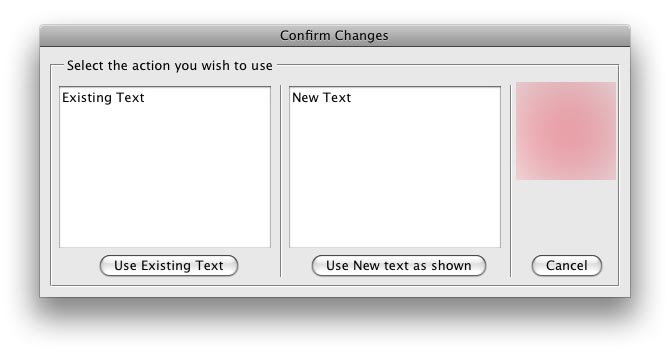
All I want to do is use the selected button do do the next part of my script depending on the text selected.
I will keep on looking, and di-secting other scripts, but any help here would be nice.
Thanks as always
Roy


 1 Correct answer

myButton.onClick = function(){
alert("You clicked the button!");
}
or
myButton.onClick = myFunction;
function myFunction () {
alert("You clicked the button!");
}
--
Thomas B. Nielsen
http://www.lund-co.dk

 8
Replies
8
8
Replies
8


Copy link to clipboard
Copied
Your code is messed up. The coordinates make no sense.
I changed it just to get some of the picture
var myDialog = new Window('dialog', 'Confirm Changes'); myDialog.frameLocation = [600,400]; myDialog.size = [590, 250]; //myImage = myDialog.add('image',[480,41,572,127],'/Macintosh HD/Applications/Adobe InDesign CS3/Scripts/Scripts Panel/Images/xxxx.png'); myPanel= myDialog.add('panel', [10,10,580,240], 'Select the action you wish to use'); //Adding Buttons var myUseExistingTextButton = myPanel.add('button', [48,190,188,220], 'Use Existing Text',{name:'select'}); var myUseNewButton = myPanel.add('button', [260,190,360,220], 'Use New text as shown',{name:'select'}); var myCancelButton = myPanel.add('button', [480,190,575,220], 'Cancel',{name:'select'}); var myExistingTextWindow = myPanel.add('edittext',[20,40,230,180],'Existing Text'); var myNewTextWindow = myPanel.add("edittext",[250,40,460,180],"New Text"); myDialog.show();
Anyways, there is no way in your code defining what happens when button is clicked. why should one button be 0 and the other 1. Where did you define that.
You need an click event for each button, which exits dialog and defines what to do for that button etc..
Copy link to clipboard
Copied
Thank you Steven for your reply.
I admit I often go around the houses, but the dialog box I was making was all good with the co-ordinates I was using.
I was stuck on the actions for the buttons as I said in my post, and that is where I was needing assistance. I will look at your code, and no doubt use it for my needs.
Thanks again for your very quick response, I am constantly amazed by this forum.
Cheers
Roy
Copy link to clipboard
Copied
Can anyone let me know how to add the 'onClick. command to carry out the selected function? I will keep looking in the meantime.
Cheers
Roy
Copy link to clipboard
Copied
myButton.onClick = function(){
alert("You clicked the button!");
}
or
myButton.onClick = myFunction;
function myFunction () {
alert("You clicked the button!");
}
--
Thomas B. Nielsen
http://www.lund-co.dk
Copy link to clipboard
Copied
Thanks for that Thomas.
Quite simple really, but unless you know it....
Anyway, I am getting a runtime error when I add the destroy() line for the dialog:
function ExistingText()
{
alert("Use Existing Text");
myDialog.destroy();
}
I have used this before but I guess not with ScriptUI. Should I use something else?
Cheers
Roy
Copy link to clipboard
Copied
I have been trying lots of options, and myDialog.close(); does it!
Cheers
Roy
Copy link to clipboard
Copied
Hi.
One more little thing, when I use this line below, the variable 'myPara2.contents' does not wrap in the box. Is there a property I need to change to allow this?
var myExistingTextWindow = myPanel.add('edittext',[20,20,230,180],myPara2.contents);
Cheers
Roy
Copy link to clipboard
Copied
Here is code created with RapidScriptUI in about 2 minutes. It includes multiline editbox, dimensions without using co-ordinates that display accurately cross platform and simple to edit code for beginners like you to learn and understand (This is a free advertisement).
var rapidDlg = new Window('dialog',"Confirm Changes",undefined);
buildWindow();
rapidDlg.show();

function buildWindow(){


// Properties for rapidDlg.Panel1
     rapidDlg.Panel1 = rapidDlg.add('panel',undefined,"Select the action you wish to choose");
     rapidDlg.Panel1.margins= [20,20,20,20];
     rapidDlg.Panel1.orientation = "row";

// Properties for rapidDlg.Panel1.Group1
     rapidDlg.Panel1.Group1 = rapidDlg.Panel1.add('group',undefined);
     rapidDlg.Panel1.Group1.orientation = "column";

// Properties for rapidDlg.Panel1.Group1.EditText1
     rapidDlg.Panel1.Group1.EditText1 = rapidDlg.Panel1.Group1.add('edittext',undefined,"Existing Text", {multiline:true});
     rapidDlg.Panel1.Group1.EditText1.preferredSize.width = 200;
     rapidDlg.Panel1.Group1.EditText1.preferredSize.height = 100;

// Properties for rapidDlg.Panel1.Group1.ExistingText
     rapidDlg.Panel1.Group1.ExistingText = rapidDlg.Panel1.Group1.add('button',undefined,"Use Existing Text");
rapidDlg.Panel1.Group1.ExistingText.onClick = ExistingText_Clicked;

// Properties for rapidDlg.Panel1.Panel2
     rapidDlg.Panel1.Panel2 = rapidDlg.Panel1.add('panel',undefined,undefined);
     rapidDlg.Panel1.Panel2.alignment = [' ','fill'];

// Properties for rapidDlg.Panel1.Group2
     rapidDlg.Panel1.Group2 = rapidDlg.Panel1.add('group',undefined);
     rapidDlg.Panel1.Group2.orientation = "column";

// Properties for rapidDlg.Panel1.Group2.EditText2
     rapidDlg.Panel1.Group2.EditText2 = rapidDlg.Panel1.Group2.add('edittext',undefined,"New Text", {multiline:true});
     rapidDlg.Panel1.Group2.EditText2.preferredSize.width = 200;
     rapidDlg.Panel1.Group2.EditText2.preferredSize.height = 100;

// Properties for rapidDlg.Panel1.Group2.NewText
     rapidDlg.Panel1.Group2.NewText = rapidDlg.Panel1.Group2.add('button',undefined,"Use New text as shown");
rapidDlg.Panel1.Group2.NewText.onClick = NewText_Clicked;

// Properties for rapidDlg.Button3
     rapidDlg.Button3 = rapidDlg.add('button',undefined,"Cancel", {name:"cancel"});
     rapidDlg.Button3.alignment = ['right',' '];

}

function ExistingText_Clicked(){
     alert(this.text +  ' was clicked!');
}
function NewText_Clicked(){
     alert(this.text +  ' was clicked!');
}
Steven
http://scriptui.com


Get ready! An upgraded Adobe Community experience is coming in January.
Learn more
 AdChoices