


Community Expert
December 19, 2011
Question

[JS] How to change the stroke order from BEST_JOINS to ROW_ON_TOP

  • December 19, 2011
  • 2 replies
  • 591 views

It should be easy to change the stroke order of a table from BEST_JOINS (default) to ROW_ON_TOP with:

myTable.strokeOrder = StrokeOrderTypes.ROW_ON_TOP;


The property changed. If I do ask with:

$.writeln(myTable.strokeOrder); //Result = 1936879476

However that is not reflected when I view the table in the UI after executing the script:
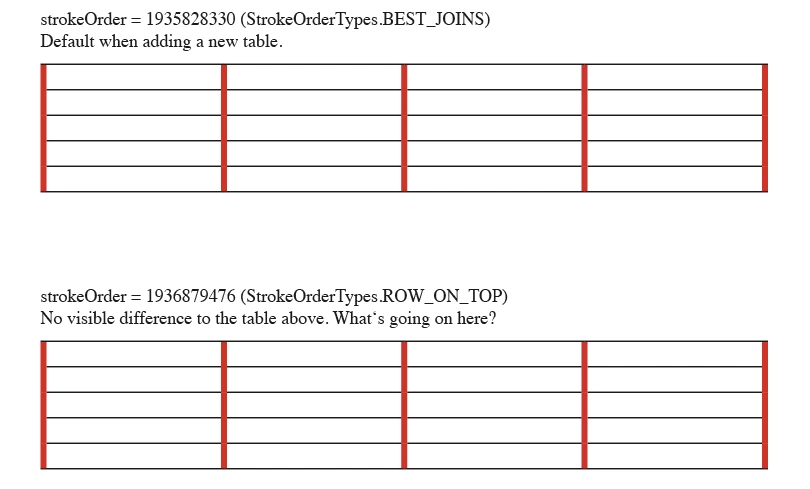
What can be done? False expectations? Is this a bug or should I set other properties of the table that the desired effect will happen?
I tried that in the UI to the same effect. The row strokes did NOT move to the top.
(InDesign CS4 (6.0.6) and InDesign CS5 (7.5.2))

With stroke order set to "InDesign 2 compatibility" (UI or script) I nearly got the wanted effect:

Ok. I found a sort of workaround: set all cell strokes to overprint:

But, hey ?!

Uwe

This topic has been closed for replies.

2 replies

LaubenderCommunity ExpertAuthor
Community Expert
October 13, 2021

Hi Rudi,

thank you for your answer. After 10 years!

I'll see into this issue and your solution the next days.


Maybe I have a different solution now, but that requires some extensive tests.


Thanks,
Uwe Laubender

( ACP )

Participating Frequently
October 13, 2021

Hi Uwe,

this is still - in 2021 - a big mess and, in my eyes, clearly an InDesign bug.

I'm struggling with setting the column strokes being on top by scripting, but no success.

Even setting all strokes to "overprint" by scripting, no success. Even recomposing afterwards.

There seems to be a real conceptual issue in InDesign, and the bad news is that this has apparently been the case for more than a decade now.

Rudi

Participating Frequently
October 13, 2021

Hi Uwe,

the only way I found was to simply redraw all strokes so that they all get the state "override":

for (var c = 0; c < theTable.cells.length; c++ ) {
	var theCell = theTable.cells[c];
	var lc = theCell.leftEdgeStrokeColor; 
	theCell.leftEdgeStrokeColor = lc;
	var rc = theCell.rightEdgeStrokeColor; 
	theCell.rightEdgeStrokeColor = rc;
	var tc = theCell.topEdgeStrokeColor;
	theCell.topEdgeStrokeColor = tc;
	var bc = theCell.bottomEdgeStrokeColor;
	theCell.bottomEdgeStrokeColor = bc;
}
theTable.strokeOrder = StrokeOrderTypes.COLUMN_ON_TOP;

Possibly the last line isn't necessary, but: you never know.

It seems to me that the combination of "stroke from cell style" and "individual stroke as an override" confuses InDesign completely.


Rudi