Hi Guys
Peter, I'm afraid I should disagree with you on a few points.
(...) In CS5.5, your script breaks on this.parent.onDraw(d). The error message is "this.parent.onDraw is not a function", which is fair enough, because onDraw is a callback. (...) |
The reason why this.parent.onDraw is not a function in Jongware's code, is just that this.parent.onDraw is undefined—as John supposed. When we call x( ) from an undefined x var, the interpreter prompts a not-a-function error.
Why is this.parent.onDraw undefined? Because there is no line in the code which sets up such member on this.parent—which by the way is a (ScriptUI) Group object, considering the context. What we call 'callback' functions are optional custom methods that are supposed to connect to events, usually, but widget prototypes do not provide any default callbacks. myWidget.onDraw, myWidget.onClick, etc., are simply undefined as long as we don't set them.
In addition, the onDraw callback, when defined, does not work the same way that other event callbacks (which are high-level fake event listeners and could generally be developed through an addEventListener() setter providing much more precision). Indeed, onDraw has no actual event counterpart (or, if any, it is not exposed to scripters as 'show', 'focus', 'blur', 'change', 'click', etc., are.) As documented, onDraw is automatically called when a widget needs to be (re)drawn, but this 'when' is highly unpredictable as it depends on the user interactions, the OS, and probably a number of low-level events.
We also know that custom layout—i.e. myContainer.layout.layout(1)—triggers such drawing stages (from containers). Also, there are crazy paths to get a non-container widget redrawn, for example:
wg.visible=false; wg.visible=true;
or sometimes:
wg.size = [wg.size[0],wg.size[1]];
The issue with manually calling a custom onDraw() method is we generally don't know when it is safe to call it and whether it may conflict with the automatic calls. I found circumstances where manual onDraw() simply fails due to a temporary invalidation of the widget.graphics property (I believe this depends on the object type). This may explain why Peter wrote:
(...) onDraw is a function but not one that you call like x.onDraw()
However, onDraw is indeed a simple (callable) function if the script did it so. What matters is that a custom onDraw() overrides and bypasses, as much as possible, the native drawing stage. So, in many cases, an empty onDraw() callback makes the widget totally undrawn (hidden) although room has been reserved to it during layout. (That's not true for composite or very interactive widgets—such as scrollbar or listbox—which still inherit from low-level painting events, at least partially.)
ANYWAY, in Jongware's script I don't see any reason to make this.onDraw() attempt to call a hypothetical parent onDraw method—which for the time being does not exist—or even to trigger the native drawing stage on the parent. Why? I guess there is a confusion between drawing and layout (?)
What is sure is that the statement this.parent.onDraw(d) fails. And, since ScriptUI is known for hushing errors up in many event handlers, you get unaccountable side effects in your EditText control.
To me, a valid approach would be to invoke the ScriptUIGraphics.drawOSControl() method when you need to produce the default widget skin before further customization.
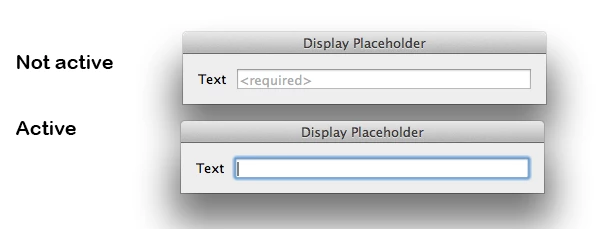
The following snippets should provide better results (unfortunately, I can't test this on all systems):
// =====================================
// EditText placeholder
// =====================================
var u,
w = new Window('dialog', "Display Placeholder"),
e1 = w.add('edittext'),
e2 = w.add('edittext'),
b = w.add('button', u, "OK"),
// ---
wgx = w.graphics,
grayPen = wgx.newPen(wgx.PenType.SOLID_COLOR,[.67,.67,.67], 1);
e1.characters = e2.characters = 32;
e1.onDraw = e2.onDraw = function(/*DrawState*/)
{
var gx = this.graphics;
gx.drawOSControl();
this.text || this.active || gx.drawString("<required>", grayPen, 0, 0);
};
w.show();
And:
// =====================================
// Underlined StaticText
// =====================================
var u,
w = new Window('dialog', "Underline Me!"),
s1 = w.add('statictext', u, "Not Underlined"),
s2 = w.add('statictext', u, "Underlined"),
b = w.add('button', u, "OK"),
// ---
wgx = w.graphics,
linePen = wgx.newPen(wgx.PenType.SOLID_COLOR,[0,0,0], 1);
s2.preferredSize[1] += 3;
s2.onDraw = function(/*DrawState*/)
{
var gx = this.graphics,
sz = this.preferredSize,
y = sz[1]-1;
gx.drawOSControl();
gx.newPath();
gx.moveTo(0, y);
gx.lineTo(sz[0],y);
gx.strokePath(linePen);
};
w.show();
Hope that helps.
@+
Marc



 AdChoices