
New Participant
April 7, 2019
Answered

Justify with last line aligned left not working

  • April 7, 2019
  • 8 replies
  • 14524 views

I'm currently formatting a book and my paragraph justification isn't working. I'll set it to justify with last line aligned left but it full justifies it.
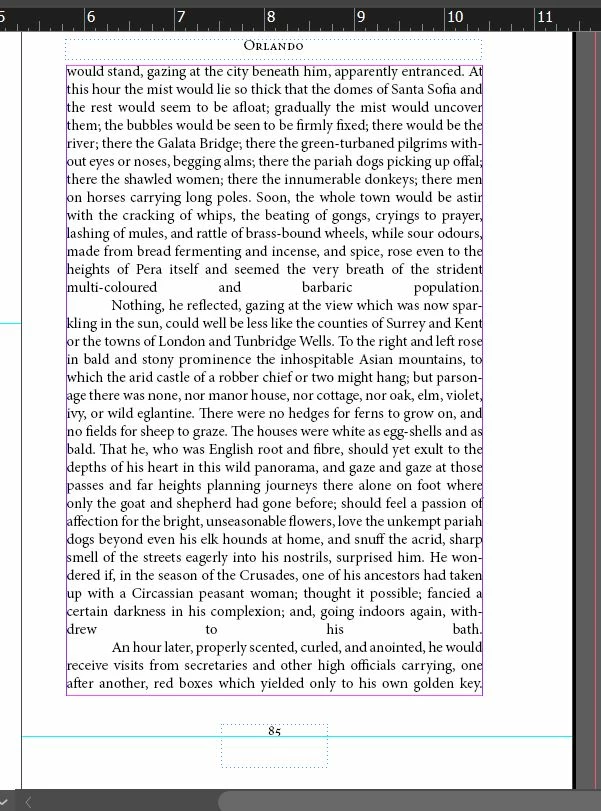
I've gone into justification settings and made sure that the single word is aligned left. I've changed documents. I've started from scratch, I've changed to document I'm placing, I've updated InDesign, I've restarted my computer. I have no idea what's wrong. How can I fix this?

This topic has been closed for replies.
Correct answer Willi Adelberger

The problem is, you have only one single (1!!!!!!!) paragraph in your document. The author wanted to write paragraph breaks (created with the return key), but used line break instead (created with schift+return keys).

You have to replace those line breaks, where the paragraph should end with a simple return.

In most cases, let's say about 99% the shift+return should never be used. There are very rare occasions where this key combination might be adequate.

Another problem I see is, that you start your “paragraphs” with a tabulator key. This should not be done either. You have to set up a paragraph style with a first line intent.

8 replies

New Participant
March 31, 2022

Hi,


Does anyone know if it's possible when I align my paragraph "Justify with last line aligned left" to not break the word at the end of the sentence?


jmlevy
Community Expert
March 31, 2022

Untick Hyphenation checkbox in the control panel, or in the paragraph panel, or better in the paragraph style options.

New Participant
March 31, 2022

Super! Thank you very much 😉

peterr19208087
New Participant
June 29, 2020

Thanks everyone but this question wasn't mine.


Kind regards

Peter

peterr19208087
New Participant
November 5, 2019

Hi, It looks like the paragraph style should be "left Justify" rather than "justify". I had the same problem but this works.

Barb Binder
Community Expert
April 7, 2019

Hi Theresa:

This is an easy fix with Find/Change. Find all line breaks followed by a Tab ^n^t, replace with a paragraph break ^p.

After Change All:

Then add the first line indent in the ¶ view of the Control panel:

~Barb

~Barb at Rocky Mountain Training
Willi Adelberger
Willi AdelbergerCorrect answer
Community Expert
April 7, 2019

The problem is, you have only one single (1!!!!!!!) paragraph in your document. The author wanted to write paragraph breaks (created with the return key), but used line break instead (created with schift+return keys).

You have to replace those line breaks, where the paragraph should end with a simple return.

In most cases, let's say about 99% the shift+return should never be used. There are very rare occasions where this key combination might be adequate.

Another problem I see is, that you start your “paragraphs” with a tabulator key. This should not be done either. You have to set up a paragraph style with a first line intent.

Scott Falkner
Community Expert
April 7, 2019

https://forums.adobe.com/people/Willi+Adelberger  wrote

The problem is, you have only one single (1!!!!!!!) paragraph in your document. The author wanted to write paragraph breaks (created with the return key), but used line break instead (created with schift+return keys).

You have to replace those line breaks, where the paragraph should end with a simple return.

In most cases, let's say about 99% the shift+return should never be used. There are very rare occasions where this key combination might be adequate.

Another problem I see is, that you start your “paragraphs” with a tabulator key. This should not be done either. You have to set up a paragraph style with a first line intent.

As I suspected.

New Participant
April 7, 2019

UPDATE: there was an issue with the docx file I imported, I had to make it from scratch and made sure to paste without formatting

New Participant
April 7, 2019

here is a screencap with more information

Scott Falkner
Community Expert
April 7, 2019

Please post again with hidden characters showing and either the Paragraph panel or the Control Panel in paragraph mode showing.