
Participating Frequently
August 9, 2022
Resuelto

Keep page orientation when exporting to PDF

  • August 9, 2022
  • 3 respuestas
  • 2606 visualizaciones

How can I create different page orientations in a single document that will keep their orientation when exported to PFD?  I have created a custom page in "edit page size", but it does nothing. I know that rotating the view in indesign is just to make it easier to look at and will not carry over when exported. 
Este tema ha sido cerrado para respuestas.
Mejor respuesta de Dave Creamer of IDEAS

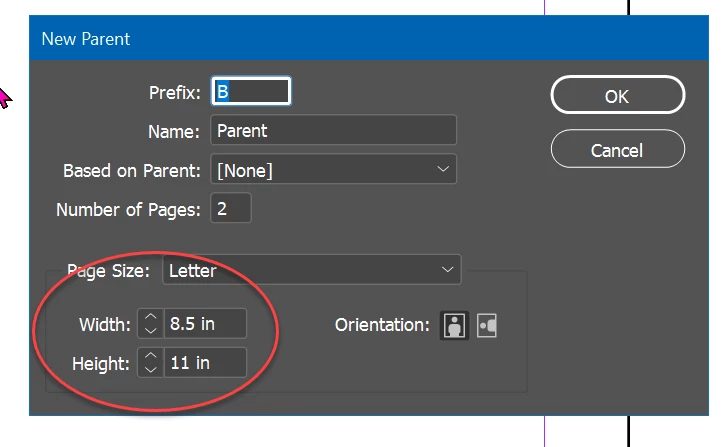
Make a new parent page--you can change the size there.


3 respuestas

rob day
Community Expert
Community Expert
August 9, 2022

Hi @Maggie142 , You can also use the Page Tool with the Transform panel to change the size and orientation of any page(s) you select in the Pages panel:


Dave Creamer of IDEAS
Community Expert
Community Expert
August 9, 2022

Create a parent/master to the new orientation. For example, if your page size is 8.5x11 inches, create a parent 11x8.5 inches. The other option is to rotate in the Pages pane in Acrobat Pro. 


David Creamer: Community Expert (ACI and ACE 1995-2023)
Participating Frequently
August 9, 2022

How do I change the page size?

Dave Creamer of IDEAS
Community Expert
Community Expert
August 9, 2022

Make a new parent page--you can change the size there.


David Creamer: Community Expert (ACI and ACE 1995-2023)
Rishabh_Tiwari
Community Manager
Community Manager
August 9, 2022

Hi @Maggie142 ,


Thanks for reaching out. I found a similar discussion which you can refer to here https://community.adobe.com/t5/indesign-discussions/my-indesign-document-has-horizontal-and-vertical-pages-in-the-layout-how-can-i-export-it-into-a-pdf/m-p/8997772#M49315


Let us know if this helps or if you need any further assistance.


Regards

Rishabh

Participating Frequently
August 9, 2022

Yes, I saw that.  Edit page size is not working for me. The screen shot in the discussion above is cut off.