

Kelli Jae Baeli
Inspiring
September 24, 2019
Question

Keeping text out of the gutter on Amazon KDPP

  • September 24, 2019
  • 2 replies
  • 2907 views

I need some clarity on print novel formatting errors from KDPP. Amazon suddenly started rejecting print manuscripts due to infringement on the gutter by text. (I've never had this issue before).  I have always set all the margins and gutter to their specification, but still, the problem persists. I tweaked it enough last time to get the project through, but i have another thirty-two novels of mine that i will be updating in ID, and need to understand why this is happening and how to avoid it. Adobe support has been no help at all on this. They either address something i did not ask, or they condescend by explaining to me what a gutter is.
Here's the screenshot from Amazon KDPP
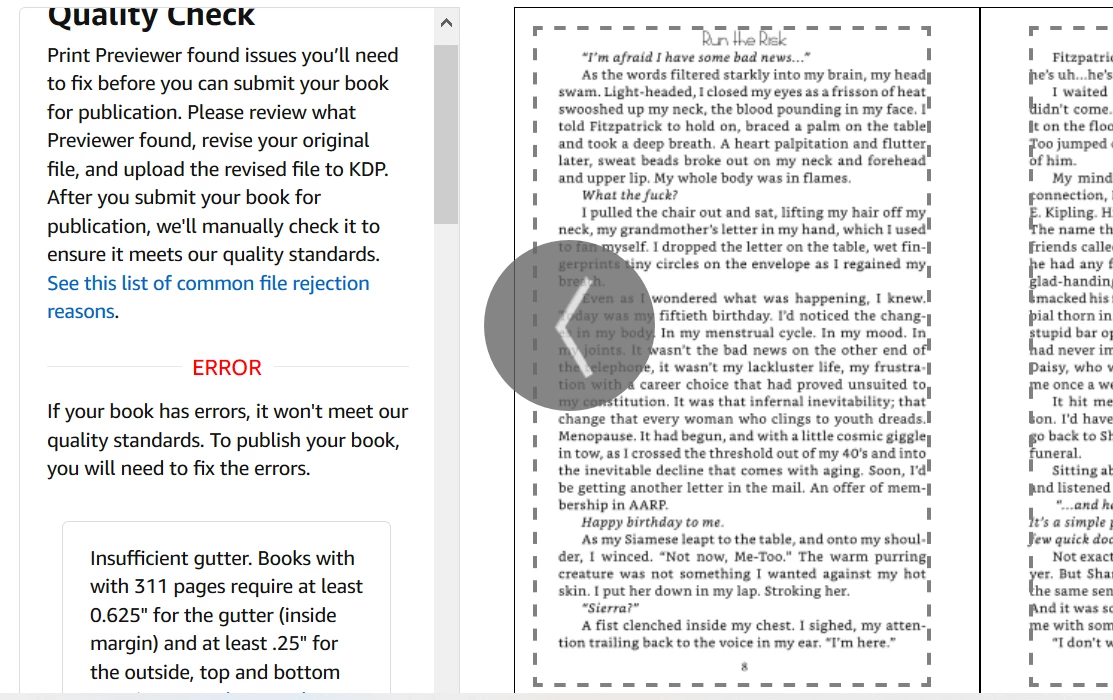
and here are my settings.
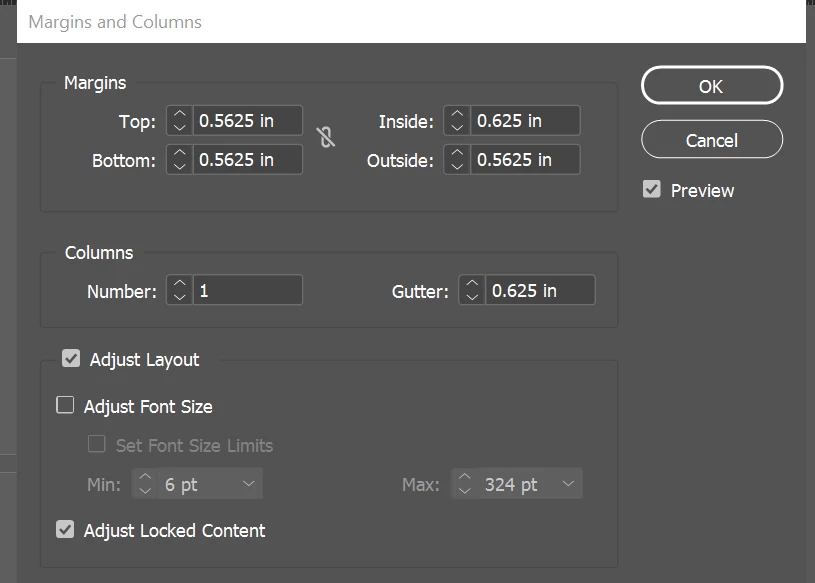

So perhaps the question is, what is the difference between margin/gutter settings AND the text frame that might be on the page? I place my text frames according to the guides created by the settings. Since most of these issues with KDPP seem to be about text infringing on the gutter, even when the page settings are correct, how do I keep this from happening? Don't the guides for the text frames match the appropriate space where text is allowed? If the proper settings won't do it, what will?


I appreciate any insight.


This topic has been closed for replies.

2 replies

James Gifford—NitroPress
Legend
August 9, 2024

Just for any future reference, this post is confusing a couple of different book layout terms. What KDP refers to as "the gutter" is what most publishers and designers would simply call "the inside margin." This misuse comes, probably, from Word, which has a completely confusing double definition of "the inside margin" and a separately settable value called "the gutter" — which is almost/kinda accurate. In absolutely strict terms, the inside margin is the space between the text and other live content and the inner edge of the sheet/page. The "gutter" is a variable amount that is lost to reader view from the bound edge to the point where text etc. can be clearly read. Designers set the inner margin; the gutter is mostly determined by the binding process. But, probably courtesty of MS-speak, KDP has blurred and confused the two so that even somewhat experienced designers have no freakin' idea what they're talking about.


And, of course, the "gutter" on the above menu refers to the space between columns and has nothing to do with margins — which again is completely correct, but somewhat antiquated usage.


Back to 2024, now.

Inspiring
August 9, 2024

Yes, the gutter thing annoys me. I actually do know what a gutter is and it has always annoyed me that Word and KDP do not distinguish between it and the inside margin. Up until now, I've always made sure both are set to their requirements, just in case, but it doesn't help in this situation. Lightning Source does know the difference, and I've done a few layouts for LS-published books and despite the fact that they're quite persnickety themselves about their requirements, as least you can get answers and fixes for them when they come up. (For example, they're very picky about Ink Coverage being under 240% (I think?) in color layouts, which they really should be.)  On the other hand, getting anything out of Amazon KDP is like pulling teeth.

—Michael
Kelli Jae Baeli
Inspiring
May 9, 2023

Wow, no responses? I'm still having this issue...can't anyone offer any sort of solution?

Inspiring
August 9, 2024

I wish you'd had some advice on this, because I'm currently having the same problem.


I have a very complex layout, and changing the margins will throw it off, create new pages and pushing my graphics out of place and will force me to have to reset the entire layout with new pages, which also means I'll have to redo my cover to accommodate the extra pages.

This is a MAJOR pain, because I had the margins set according to Amazon KDP's requirements but they still want more room.


Here's the thing though. It's apparently my font, Adobe Jenson Pro, which has serifs, and the serifs are overhanging into the gutter. I think the question should be is there anyway to tell InDesign to just not let that happen? Something similar to optical margins. Maybe something in the Paragraph Style that tells it to not let the fonts overhang no matter what.


So, that's all I've got. Maybe check to see if Optical Margins is turned on. This causes text to overhang the margins. In my case, it's turned off and I'm still having the problem, but maybe check anyway.

—Michael
Inspiring
August 9, 2024

FWIW, the original inquiry probably went unanswered for a variety of reasons (other than just being overlooked).


KDP is famously, stubbornly, irredeemably opaque and arbitrary, and seem to have gotten only more so as time goes by. Errors, warnings and admin actions are often almost indecipherable as to real causes or reasons, and there are several cases where only a collateral error is given. (One is related to your problem; KDP will repeatedly insist that more bleed margin is needed, when the problem actually traces to 'live content' intrusion on the minimum margins.)


You don't give any details of your job, but if your margins are anywhere near the KDP minimum of 3/8" all around, your only real fix is to bring them in, especially on the inside ("gutter" — a misused term throughout KDP's docs) one. My observation is that even not-quite-novices tend to make the inside margin MUCH too narrow; KDP's variation of perfect binding is very tight already, with a full 3/8-inch clamp area.. An inch is the reasonable minimum for inside margins, no matter how vast it looks on the layout.


There can be other causes of the error you see and yes, it's often due to fonts with serifs, swashes and kerning that put letter elements outside the text frame. However, KDP largely doesn't care if these elements are outside your text frame and margins; they care if they are intruding into the page minimums. The solution is to pull your margins in from those technical minimums by some good amount, 1/8 inch or more.


Speaking more editorially than technically, most newcomers or modestly experienced designers tend to make book margins too small overall. There are many reasons to use not less than an inch inside, at least a half inch outside, and the same half inch top and bottom as the very narrowest margins for any print-on-demand service, especially KDP with, as noted its very tight spine binding and somewhat loose trim accuracy.


Sorry about your complex layout and time invested in it, but I doubt there is any solution but to pull it all in with wider margins.


Yeah, the project is a 7x10 paperback with 0.5" margins everywhere except the inside which is 0.75". It has 11 documents as part of the whole book. I can kinda sorta fix things by moving the inside margin up to 0.765" on the inside which doesn't throw off most of the pages and create new pages but only ins some documents, because it does throw off other documents, shunting everything down, giving me overset errors. Also, InDesign has a major bug where when you use Adjust Layout, sometimes it doesn't move the actual text boxes, and other times it does. It also shunt graphics over to the opposite page on the page spreads, and then you have to individually click on each one and just nudge it once, and it magically pops back into place, as if it just needed a reminder of where it was supposed to be.


So, this is all just maddening in an already very tedious layout that took me over a week to complete. Frankly, I'm just too exhausted by it to look at it anymore.


I'm also perplexed by the fact that almost all of my books have used this font on KDP without issue, including the prior edition of this very same book, but suddenly it's now an issue. I don't know if KDP had suddenly become more sensitive lately or not, but there absolutely should be an option within InDesign to prevent serifs from dangling beyond the margins. Maybe some people will want that some of the time, but given that KDP is big now and most writers/publishers are publishing there, there needs to be a fix.


Also, optical margins did not work. I was able to get all the serifs within the margins, but then all the quotes were dangling, and there was no way to fix that.

—Michael