
fredl11600511
Inspiring
November 23, 2018
Answered

Keyboard shortcut for full justify in InDesign

  • November 23, 2018
  • 2 replies
  • 3819 views

InDesign used to have a keyboard shortcut for full justify (which used to be force justify) and if you look at the keyboard shortcut listing for Windows it is ctrl-shift-F. That shortcut does nothing, and there is no listing of "full justify" or "justify all" in the keyboard shortcuts menu available to users--there is only "Justification" listed in the panel shortcuts for paragraphs.

The built-in shortcuts for left-, right-, and center-justify all work, so what happened to force/full justify? Was it simply removed? How bad is that?

[Here is the list of all Adobe forums... https://forums.adobe.com/welcome]

[Comments is to ask about the operation of the Forum, not a specific program]

[Moved from the Comments forum to the specific Program forum... Mod]
    This topic has been closed for replies.
    Correct answer Barb Binder

    Hi Fred:

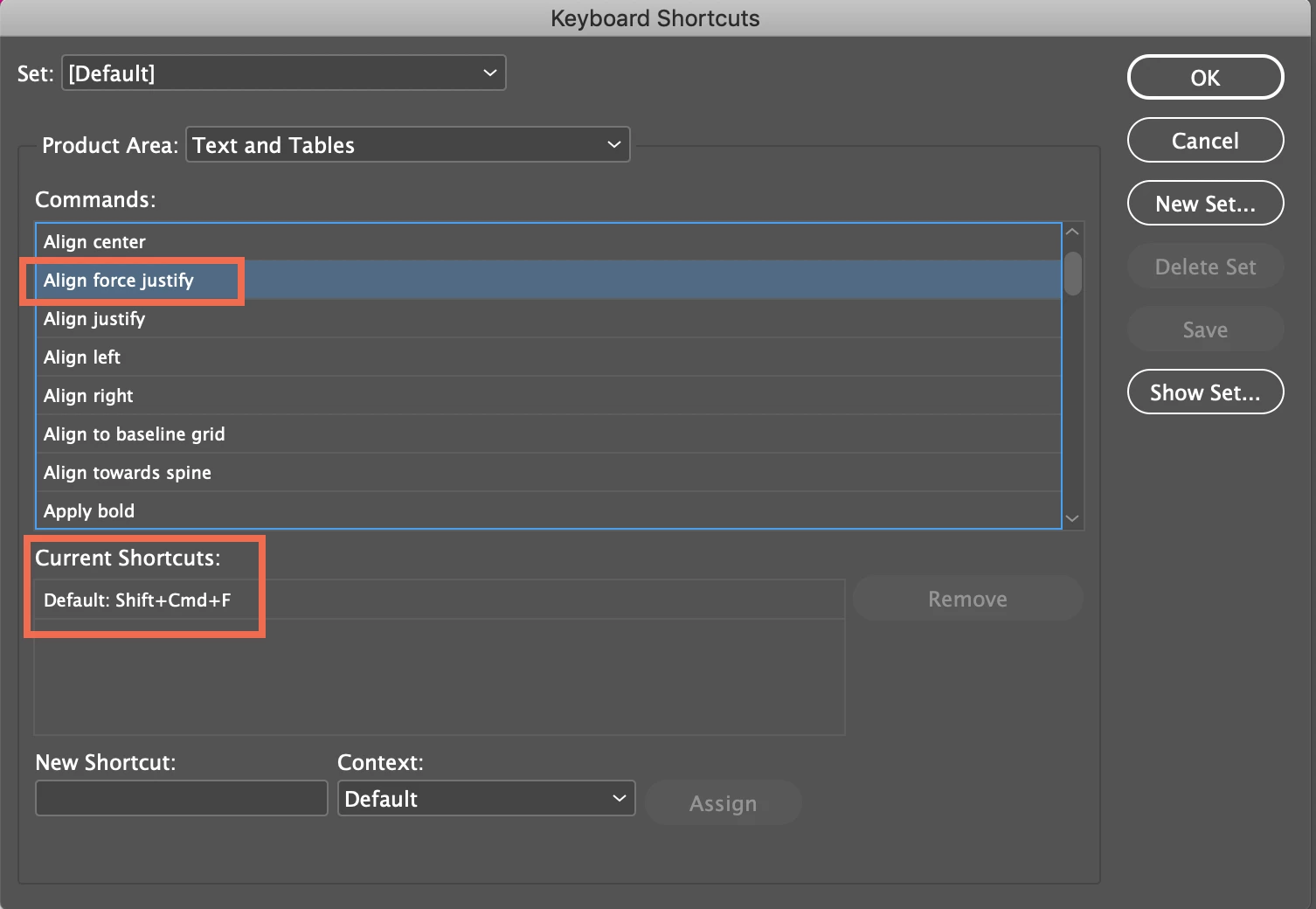
    If you have customized your shortcuts, you may have reassigned that particular shortcut to something that doesn't work with an active insertion point. Sh Ctrl F (Sh Cmd F on a Mac) is still the default for Force Justify in 2019.

    You can return to the default set, or redefine that specific shortcut in your custom set using the New Shortcut text box at the bottom of Edit > Keyboard Shortcuts:

    ~Barb

    2 replies

    Barb Binder
    Community Expert
    Barb BinderCommunity ExpertCorrect answer
    Community Expert
    November 24, 2018

    Hi Fred:

    If you have customized your shortcuts, you may have reassigned that particular shortcut to something that doesn't work with an active insertion point. Sh Ctrl F (Sh Cmd F on a Mac) is still the default for Force Justify in 2019.

    You can return to the default set, or redefine that specific shortcut in your custom set using the New Shortcut text box at the bottom of Edit > Keyboard Shortcuts:

    ~Barb

    ~Barb at Rocky Mountain Training
    fredl11600511
    Inspiring
    November 28, 2018

    Thanks, Barb. I think a big part of my problem was that I couldn't find the command--I was looking under "justify" (as in the dropdown label for the icon, "justify all lines") and, under the Panels menu, Paragraph.

    But your comment solved the issue. Thanks.

    There are so many commands and ways to identify them Adobe would do well to offer an alpha listing somewhere in the Shortcuts menu so you don't have to guess where the command will appear, and they should standardize what they call each command and icon, so that the icon name is the same as the command name.

    Community Expert
    November 28, 2018

    Hi,

    you can save an overview of a set of keyboard shortcuts to a text file.

    See Generate a list of shortcuts for printing in:

    Customize menus and keyboard shortcuts in InDesign

    Regards,
    Uwe

    winterm
    Legend
    November 23, 2018

    Aren't you using custom Keyboard Shortcuts set? Check Edit > Keyboard Shortcuts, Product Area: Text and Tables > Align force justify.

    Shortcut Shift+Ctrl+F should be set as default here.