


- Startseite
- InDesign
- Diskussionen
- I found the function key on MAC AIR -!!! I have ne...
- I found the function key on MAC AIR -!!! I have ne...

Link in Zwischenablage kopieren
Kopiert
To Peter Spier and Jongware, thank you very much for your help on that stubborn text frame. I never did figure out exactly what I was doing wrong, so I ended up deleting and re-creating them, and had better luck doing that.
Anyway, my next newbie question is: What is the keyboard shortcut for page break? I see on the drop down menu that is is Command- something (I'm on a Mac), but I don't recognize the icon in the menu for the second key. What the heck is that?
Some websites said it was Command-Enter, but that didn't work.
Thanks!


 1 richtige Antwort


I'm guessing you're on a Mac laptop where there is no dedicated Enter key.
In that case, it's Command + Fn + Return.
Fn + Return gives you the Enter key (shown above the Return key on the keyboard).

 11
Antworten
11
11
Antworten
11

Link in Zwischenablage kopieren
Kopiert
I'm guessing you're on a Mac laptop where there is no dedicated Enter key.
In that case, it's Command + Fn + Return.
Fn + Return gives you the Enter key (shown above the Return key on the keyboard).

Link in Zwischenablage kopieren
Kopiert
I bought my Mac and asked specifically for the extended keyboard. More keys = more fun!
In case this Fn stuff is no Fn for you: you can always assign just about any key combo to just about any function
Link in Zwischenablage kopieren
Kopiert
Now I understand!
All these years I thought enter and return were two names for the same thing.
Thanks, Steve!
But how is someone supposed to know what those keyboard icons mean? My Command key is the only one that has the icon on it, that four leaf clover thing.
Thanks again, this is a great support community!
Link in Zwischenablage kopieren
Kopiert
Heh heh -- I have the bigger keyboard and so there is enough room on the keys for all of these little icons! (They are nothing special either. All Mac software refer to them in the same way.)
These symbols come courtesy of the font "Apple Symbol":
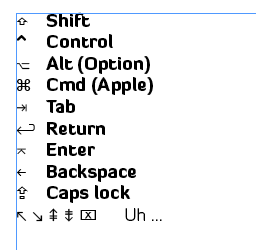
(This font sports some pretty weird characters! Anyone ever needed a glyph for the Aegean number one thousand?)

Link in Zwischenablage kopieren
Kopiert
[Jongware] wrote:
Heh heh -- I have the bigger keyboard and so there is enough room on the keys for all of these little icons! (They are nothing special either. All Mac software refer to them in the same way.)
These symbols come courtesy of the font "Apple Symbol":
(This font sports some pretty weird characters! Anyone ever needed a glyph for the Aegean number one thousand?)

My guess for the last line (in Windows equivalence) would be Home, End, Page Up, Page Down and I have no idea what...
Link in Zwischenablage kopieren
Kopiert
Peter, for some reason the Mac doesn't sport the same set of movement keys as Windows keyboards do. The little six-pack above the arrows is
[fn] [uh -- home?] [page up -- fairly sure]
[delete] [end?] [page down, surely?]
Home and End don't quite work the same I'm used to 
As for the crossed-out rectangle, it's in the position every other keyboard in the world has a Num Lock indication, but this one seems to be doing nuffin'.
Link in Zwischenablage kopieren
Kopiert
Well, it HAS been a while since I sat in front of a Mac keyboard. 
Link in Zwischenablage kopieren
Kopiert
Here's a link to a Mac keyboard symbols legend:
http://www.danrodney.com/mac/
Link in Zwischenablage kopieren
Kopiert
Wow, great info, thanks, Steve!
I wish that came in the box w every mac.

Link in Zwischenablage kopieren
Kopiert
Thank you, Steve! That "enter" symbol was driving me crazy. I could not find anything that showed what it meant. It wouldn't kill Adobe to include some sort of legend with the software.

Link in Zwischenablage kopieren
Kopiert
I found the function key on MAC AIR -!!! I have never needed it before ( only 7 years)


Weitere Inspirationen, Events und Ressourcen finden Sie in der neuen Adobe Community
Jetzt ansehen
 AdChoices