
Known Participant
November 23, 2022
Question

Last page of booklet prints too dark

  • November 23, 2022
  • 3 replies
  • 1431 views

I am having an issue with an image on the last page of a booklet that is printing too dark. When I move the image to a previous page, it's fine but on the last page it becomes too dark. 
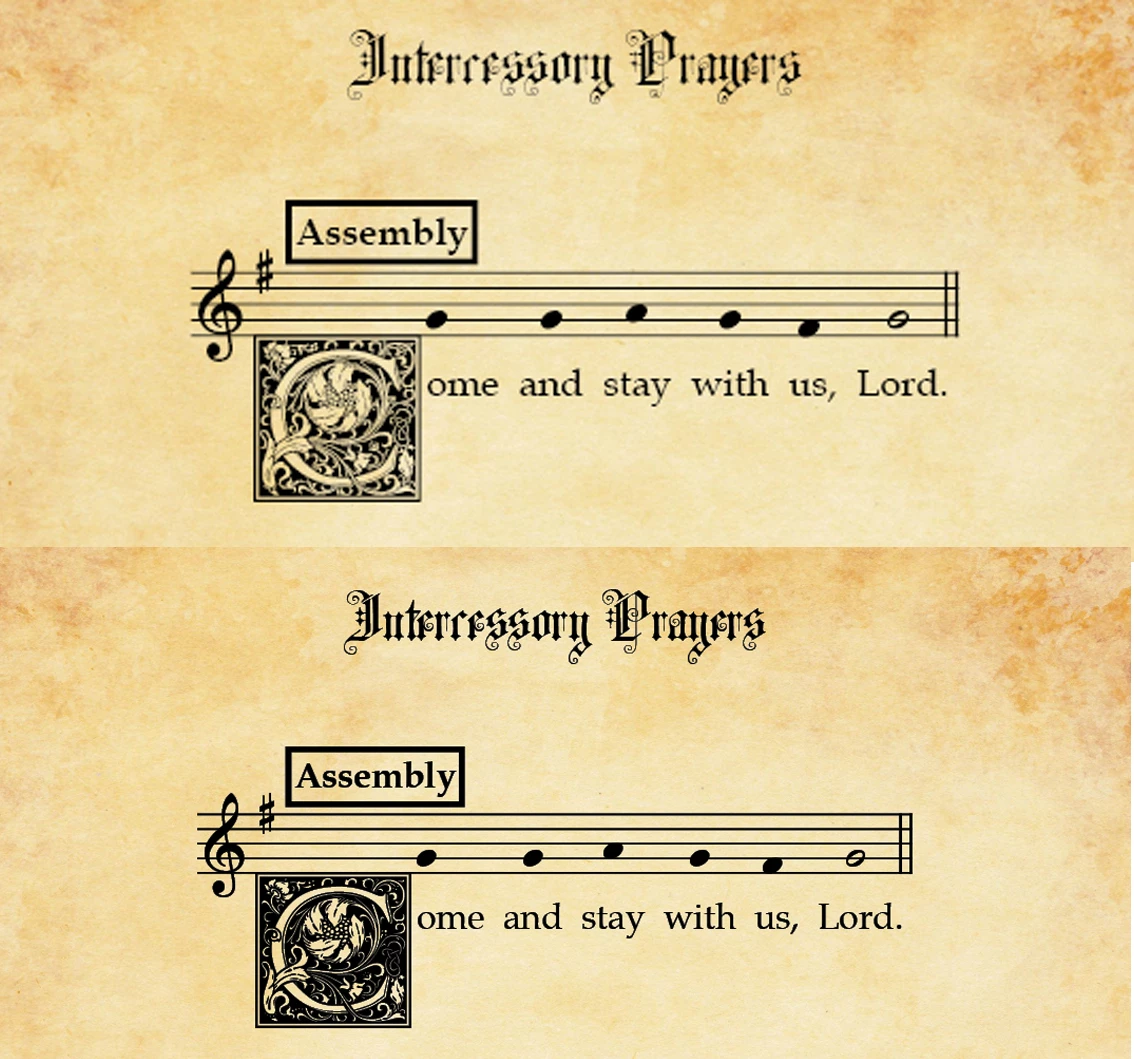
The image on top is what it looks like on previous pages but when it gets put on the last page it suddently becomes very dark. Never had this happen before so not sure what to do. Any suggestions would be greatly appreciated.

This topic has been closed for replies.

3 replies

Luke Jennings3
Community Expert
Community Expert
November 23, 2022

Are you viewing your pdf in Acrobat or Reader? It looks ok here on a Mac.

I opened page 10 in Illustrator and was able to copy the vector art from Illustrator and paste it into InDesign without any issues, when I tried this with page 12, the vector art was a font (missing in Illustrator). Perhaps you converted the other art to outlines (page 10) but accidently neglected to convert the art on page 12, or the type is grouped with the vector art? it's hard to say. If you are pasting the art into InDesign, set your clipboard preference to "Prefer pdf when pasting".

Edit, you might see improvement executing to PDF/X-4, but all the letter art should be consistent vector art.

James Gifford—NitroPress
Legend
November 23, 2022

If possible, put 1 or 2 blank pages at the end of the booklet and reprint, so that this page is (effectively) the last page but physically moved forward a bit. This could be an anomaly of how the printer is handling the pages, rather than an ID/document issue.


You might also export the booklet to PDF and see if the page image shows the same darkening, which would indicate it's both a document issue and something oddball about that page.


Brad @ Roaring Mouse
Community Expert
Community Expert
November 23, 2022

"This could be an anomaly of how the printer is handling the pages"

I thought that too, as some printers can have separate settings for cover pages, but the OP mentioned it showed on the screen as well. Hmmm.

Known Participant
November 23, 2022

It is showing on the screen and when I inserted 2 pages so it was no long the last page, still had the same issue. I'm stumped.

Brad @ Roaring Mouse
Community Expert
Community Expert
November 23, 2022

Hard to say without seeing the file. Does the image include the background or are you layering the black onto a separate background?

Is there a blend mode or transparency assgned to the image on one page and not the other? (like Multiply)

Also: the top image looks lower resolution than the bottom one.

Known Participant
November 23, 2022

It is layered onto a background image. It's the exact same image in both cases. The blend mode is normal in both. I did a print screen and may have left the top image at 72 dpi by accident but it is the exact same image. The "parchment" background is on the Master page. It appears that anything I put on the last page of the booklet gets much darker/bolder in look but when it is on the previous pages, the images look "normal".

Brad @ Roaring Mouse
Community Expert
Community Expert
November 23, 2022

Very odd. Can you upload a sample? (don't need the whole book)