

Mahesh_JW
Inspiring
March 9, 2017
Question

launch InDesign CC2015 using VBscript

  • March 9, 2017
  • 3 replies
  • 4133 views

Hi All,

We using this vb code to launch InDesign CC2015 in widows7.

Set myInDesign = CreateObject("InDesign.Application.CC2015")

Msgbox("This message from Vbscript")

myJavaScript = "D:\Program Files (x86)\Adobe\Adobe InDesign CC 2015\Scripts\Scripts Panel\Test.jsx"

Msgbox("This message from Vbscript-Script")

myInDesign.DoScript myJavaScript, 1246973031

But we are getting the below error message while run the Vbscript.
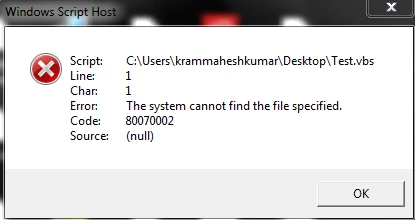
Help me to suggest better way..

Thanks in Advance,

Mahesh

This topic has been closed for replies.

3 replies

Trevor:
Legend
March 17, 2017

Did you not get this working?

Kasyan Servetsky
Legend
March 12, 2017

Here's a more elegant solution: both scripts should be located in the same folder -- JS and VBS. The latter uses the ActiveScript property to figure out the path to the folder with the scripts.

Set myInDesign = CreateObject("InDesign.Application.CC.2017")

Set myFSO = CreateObject("Scripting.FileSystemObject")

myActiveScript = myInDesign.ActiveScript

Set myFile = myFSO.GetFile(myActiveScript)

myJavaScriptFileName = "Test.jsxbin"

myJavaScriptFilePath = myFile.ParentFolder.Path & "\" & myJavaScriptFileName

myInDesign.DoScript myJavaScriptFilePath , idScriptLanguage.idJavascript

Trevor:
Legend
March 12, 2017

Looks like there's something wrong with the path Mahesh is using.

Try

pathToMyFile = "C:\Path\to\the\file" ' change to the correct path

Msgbox("VB says - File exists: " & CreateObject("Scripting.FileSystemObject").FileExists(pathToMyFile))

CreateObject("InDesign.Application.CC.2015").DoScript "alert(""Hi From InDesign"")", 1246973031

If the path is false then you know your problems nothing to do with ID

If you get "Hi From InDesign" then you know you are communicating good with ID

If the problems with the path then try with a more simple path like "C:\myJavaScript.jsx" and see if that works.

HTH

Trevor

Loic.Aigon
Legend
March 9, 2017

I can't say that's the issue but backslashes can be escaping characters so once interpreted it can be read as

"D:*rogram Files (x86)*dobeAdobe InDesign CC 2015*cripts*cripts PanelTest.jsx"

* means any interpretation of escape the following character.

Use this instead:

D:\\Program Files (x86)\\Adobe\\Adobe InDesign CC 2015\\Scripts\\Scripts Panel\\Test.jsx"

In clear english, escape the escaping character…

Loic

Trevor:
Legend
March 9, 2017

Hi Loic,

The escaping here is not the issue, (The codes in VB and not js) \ doesn't need escaping in the visual basic family.

In fact escaping it would cause problems.

Regarding the Op's problem see

Re: InDesign CS6 scripts don't work on CC anymore

and

Re: Create Indesign.Application CC

HTH

Trevor

Qwertyfly___
Legend
March 9, 2017

this is not VB.

Your code is VB, it creates a String of the file name.

then using DoScript.javascript you are passing the string to the Javascript engine.

Escape them as stated by Loic.Aigon

"D:\\Program Files (x86)\\Adobe\\Adobe InDesign CC 2015\\Scripts\\Scripts Panel\\Test.jsx"

or revers them

"D:/Program Files (x86)/Adobe/Adobe InDesign CC 2015/Scripts/Scripts Panel/Test.jsx"

both will work.