
Participant
September 22, 2017
Answered

Layer Tab Group Scrolling Issue

  • September 22, 2017
  • 1 reply
  • 720 views

Hi,

Does anybody know how to fix the scrolling in the Layers menu. I have several layers which I can see and highlight in my workspace, however when scrolling down through these I cant seem to get all the way to the bottom of the Layers Tab Group? The text at the bottom of the window appears to be hovering over the layer names at the bottom and not in its own area?
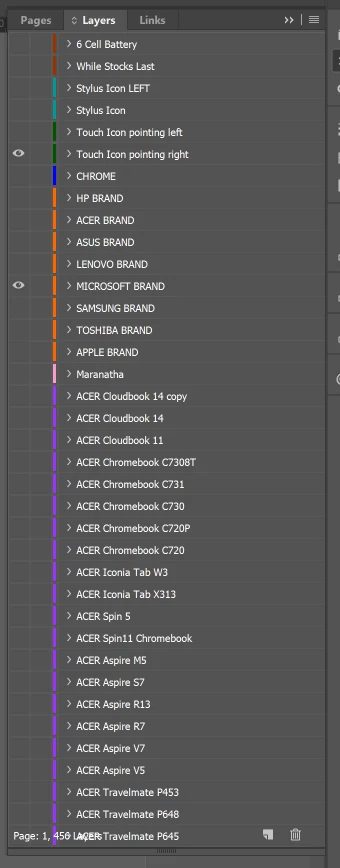
The scroll bar is also missing?

When this file is opened by other users there is no issue, this is the case for all ID files.

Any ideas?

    This topic has been closed for replies.
    Correct answer amaarora

    Hi,

    This issue occurs rarely with InDesign CC 2017.1 (mostly and not with prior versions).

    Please try the below workaround:

    1. Save the file and any other unsaved ID documents

    2. Clean/replace your InDesign cache and preferences.Troubleshooting 101: Replace, or "trash" your InDesign preferences

    3.  Restart InDesign

    -Aman

    1 reply

    amaarora
    amaaroraCorrect answer
    Inspiring
    September 22, 2017

    Hi,

    This issue occurs rarely with InDesign CC 2017.1 (mostly and not with prior versions).

    Please try the below workaround:

    1. Save the file and any other unsaved ID documents

    2. Clean/replace your InDesign cache and preferences.Troubleshooting 101: Replace, or "trash" your InDesign preferences

    3.  Restart InDesign

    -Aman