
Known Participant
April 11, 2018
Question

Layers are lost when saving as PDF

  • April 11, 2018
  • 3 replies
  • 13878 views

When saving a single page document from InDesign as a PDF all layer information is lost.
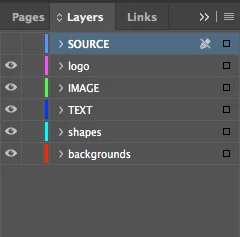
All the layers exist but are jumbled up in one layer and unnamed in a clip group. Why is this?
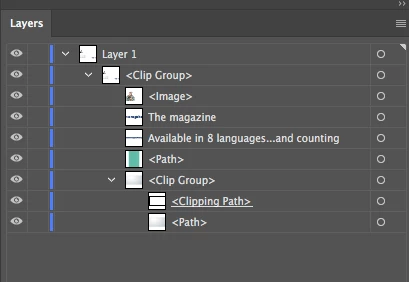
I then have to rebuild thus:
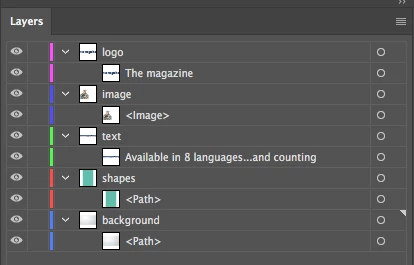
I then have to rebuild the layer sequence order in Illustrator for subsequent delivery to AfterEffects and Premiere. It is important to do this as the latest updates of Premiere Pro, After Effects and Media Encoder don't support PNG files

    This topic has been closed for replies.

    3 replies

    Community Expert
    April 11, 2018

    https://forums.adobe.com/people/sequence+W4  wrote

    When saving a single page document from InDesign as a PDF all layer information is lost.

    Hi,

    as Bob already mentioned:

    The layer information can only make it to the PDF if you allow it during PDF Export. There is a checkbox for it.

    You wrote:

    The problem is InDesign does not save these Layers correctly in the Adobe protocol.

    What do you mean by "Adobe protocol"? What by "correctly"?

    If you export PDF from InDesign you can allow "layers" in the PDF. Just open the PDF with Acrobat Pro DC and check the Layers View there. It seems that you open the PDF with Adobe Illustrator. That will transform any PDF content to Illustrator objects. If "layers" do not transfer as "layers" how you need them from an Illustrator perspective then I suggest you'd do a feature request with the Illustrator team.

    Regards,
    Uwe

    Known Participant
    April 11, 2018

    I used PDF (interactive) export as that has an option for Layers

    The acrobat 8/9 doesn't seem to have a Layers option:

    When you open this PDF in Illustrator you get 1 unnamed Layer with all the items in a Clip Group. All the items in the group are correct in terms of order, mode, font etc.

    thanks - Pete

    Known Participant
    April 12, 2018

    As an InDesign, Illustrator, and Premiere Pro certified instructor (and designer), I can say that InDesign is not a common program for creating graphics for video. Your designers need to get out of their comfort zone and use Illustrator or Photoshop.

    Moreover, Illustrator is not that different from InDesign in basic usage, so it should not be hard for them to switch. For video-type graphics, Illustrator is a much better choice since it has many more design options.

    As was mentioned, when you export a layered PDF from InDesign, the layers are only for Acrobat (or placing the PDF back in ID). PDF layers are not the same as ID, AI, or PS layers. PDF layers are lost when opening the PDF up in AI.

    Multiple pages in a PDF is not the same as having layers. Two different issues.


    Hi IDEAS-TRAINING,

    I strongly disagree. In the workplace where assets are required for print, web and video, InDesign is the best layout software.  It is particularly so because of the way Items in the linked in the different packages. I have teams from all over who work in Illustrator and photoshop but deliver to our video company as InDesign files.

    I now understand that the Layer information is sadly discarded. I am surprised that it is not possible to keep this metadata.

    regards . - Pete

    BobLevine
    Community Expert
    Community Expert
    April 11, 2018

    BTW, from InDesign you must select the layers option in the export dialog.

    BobLevine
    Community Expert
    Community Expert
    April 11, 2018

    What does this have to do with InDesign? That doesn't appear to be an InDesign layer panel. Looks like Illustrator.

    Known Participant
    April 11, 2018

    Hi Bob,

    That is an strange response!

    Many designers use InDesign to create assets for video and animation. The designers collate items in layers to organise their pages. The problem is InDesign does not save these Layers correctly in the Adobe protocol. This causes extra work reconstructing the layers in other Adobe software.

    As less assets are made in Illustrator and more and more in InDesign for multiple purposes this has become a real issue.

    BobLevine
    Community Expert
    Community Expert
    April 11, 2018

    Are you looking at an email response or the web? I hit send accidentally and then edited the response.

    Go back to the web and read it.