Known Participant
March 4, 2021
Question

Leader dots in ToC not working

  • March 4, 2021
  • 4 replies
  • 6764 views

I am a fairly advanced ID user, but maybe I've worked at this so long that I can't see the forest for the trees!


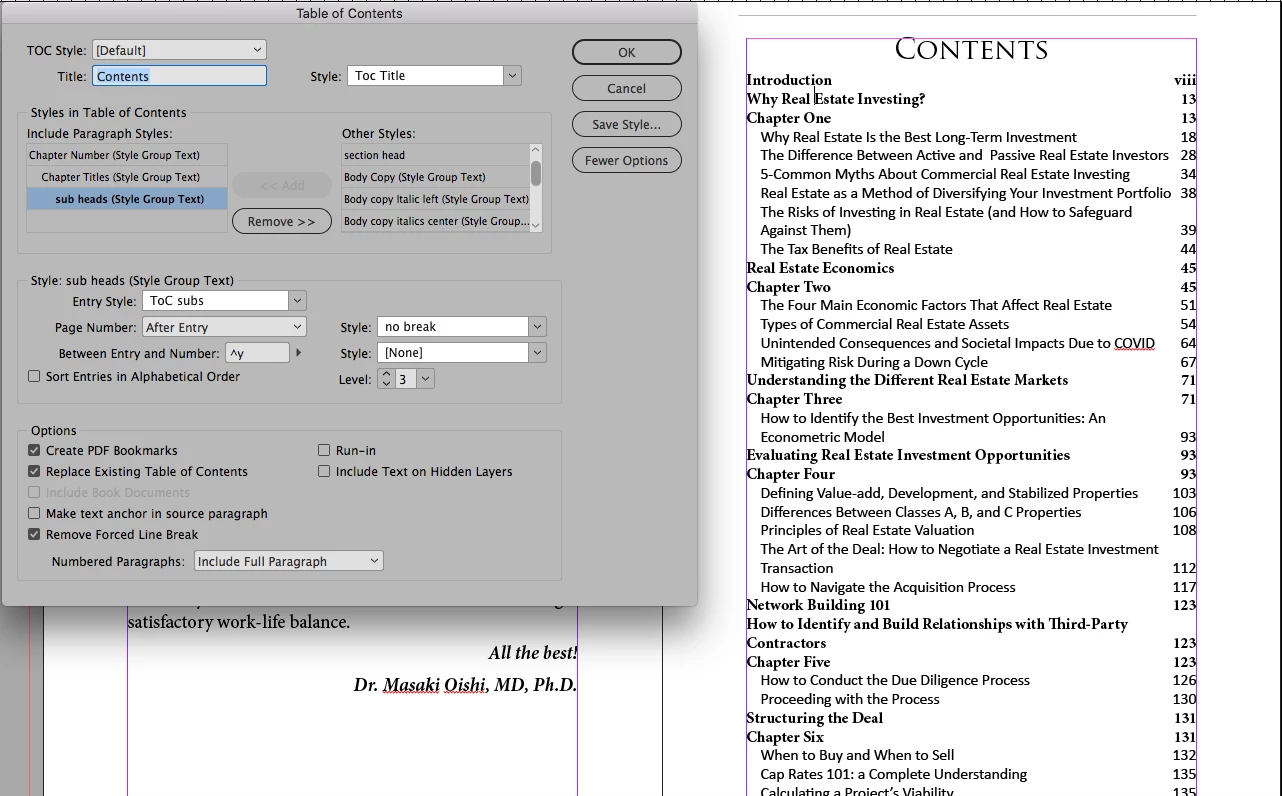
I cannot get the leader dots to show up on the chapter number - titles, the leader dots are larger with tracking and 75% black. I don't want them on the subs, there's no room.


ID crashed on me several times on this file so I thought it might be corrupt, saved as an idml -- no luck.


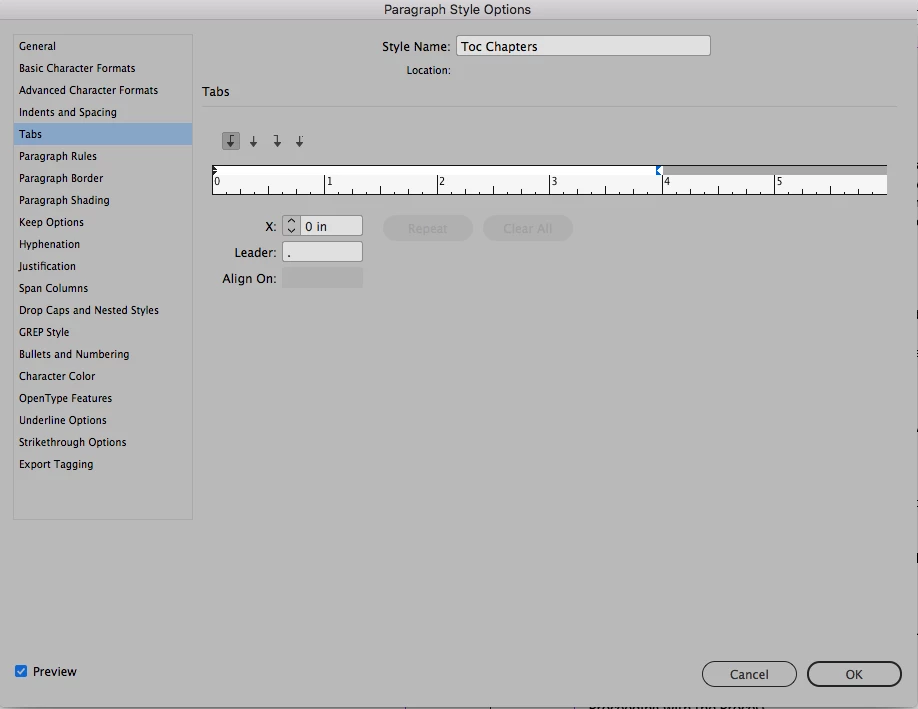
Screen shot settings attached @Barb Binder  @nigelfrench, you two have saved me many times!
 

4 replies

Barb Binder
Community Expert
Community Expert
March 4, 2021

Hi Marcy:


When I tried to open the file again I got a message that the file is damaged. 

Days of work down the drain?

Step 1: Save as .idml

Step 2: Work through this list: https://helpx.adobe.com/indesign/kb/troubleshoot-file-issues.html

Step 3: Send the file to idfile@adobe.comadobe.com

Step 4: Try https://markzware.com/products/file-recovery-service/


~Barb 


~Barb at Rocky Mountain Training
Known Participant
March 5, 2021

I finally just wallked away from the computer and did something else. Maybe it needed a break from me, everything was working this morning.


Are deleting prefs still a thing? I thought with 2020 version it wasn't needed.


Thanks everyone!

Dave Creamer of IDEAS
Community Expert
Community Expert
March 5, 2021

Sometimes software gets stressed out and needs some time off too. 😁


(Unfortunately, deleting prefs is still a first-step trouble-shooting technique.)

 
David Creamer: Community Expert (ACI and ACE 1995-2023)
Barb Binder
Community Expert
Community Expert
March 4, 2021

Good catch, Frans.


I don't use right indent tabs (^y) in a TOC—I just use a regular right tab (^t)—so was giving that advice, earlier.


When I use a right indent tab, I seem to still need to set a right-align tab with a leader, but InDesign doesn't seem to care where I put it. Maybe one of you who regularly use right-indent tabs can shed some light on that for me?


In any case, you don't need both.


~Barb

~Barb at Rocky Mountain Training
Known Participant
March 4, 2021

When I tried to open the file again I got a message that the file is damaged. 

Days of work down the drain? 

Dave Creamer of IDEAS
Community Expert
Community Expert
March 4, 2021

Never mind--I realized what you were doing for your styles. 

Your settings worked for me, although I normally use a tab [^t] and a right-align tab settings.


Are you sure you don't have a tab off screen to the far-right of your margin?

>>Right indent tabs use the tab leader of the first tab stop past the right margin, or, if there isn't one, the last tab stop before the right margin


David Creamer: Community Expert (ACI and ACE 1995-2023)
Known Participant
March 4, 2021

with the way the chapter starts are stylized I had to do two styles. I'm getting closer, but I don't know why my tab character style isn't present. I've d

Frans v.d. Geest
Community Expert
Community Expert
March 4, 2021

Be aware that in your first screenshot you have both and a right align tab and a normal tab (^y^t), your second screenshot shows only the right align tab (^y).

Barb Binder
Community Expert
Community Expert
March 4, 2021

Hi @Marcy McGuire:


In the first image, you have the right indent triangle selected and not a tab.


  1. Click the right align tab icon in the Tab Well (arrow #3).
  2. Click to add the tab above the ruler at around 3.75".
  3. Add the leader dot to the selected tab.
  4. Carefully drag the tab arrow over the right indent triangle (or just type in 4 for the x value.) Try not to slide the mouse up or down.


~Barb 

~Barb at Rocky Mountain Training