Hi,
Sorry that i was not clear enough.
In the first screen i show that my chapter heading in the file is a just BOLD CENTER ALL CAPS text.
I have to take this Heding 1 style put in to TOC and somehow to add 2 tabs so i can format the align how i want.
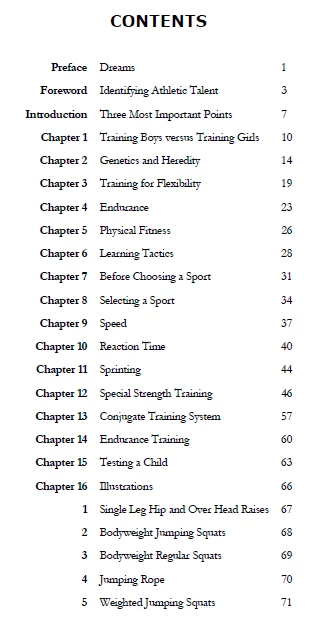
In the second screen i show how to have to look in the TOC.
What i mean is:
Take the text PREFACE: DREAMS which is only BOLD CENTER ALL CAPS text.
and i have to make somehow:
tab Preface: tab Dreams tab pagenumber
I hope now is more clear the problem i have
Thank you if you can help me
Hi,
A couple of issues:
First, in your document, you have all caps, and in the TOC, you have Proper Case. The way to achieve this is:
- in your document, type the heading the way you want it to be in the TOC
- in your document, format the heading to be in all caps as part of the paragraph style definition
- when you generate the TOC, it will appear as the text was typed, not how it was formatted.
Second, in your TOC, you have tab > bold text > colon > tab > bold text > tab > page number
- Create a character style for the Bold
- Apply the character style automatically through nested styles as I said above. Edit the paragraph style you are using for the TOC and go to the section for Drop Caps and Nested Styles. The Nested Styles has four sections
Choose your character style “bold”
In section 2, choose Up To
In section 3, choose 3
In section 4, choose Tab - This will assign Bold to all text up to the third tab, then the regular paragraph formatting for the style will apply.
Jane

 AdChoices