
Answered
left side of frame to left page margin and right side of frame to right page margin
like the one pictured on the right - right, on the left - left, portable 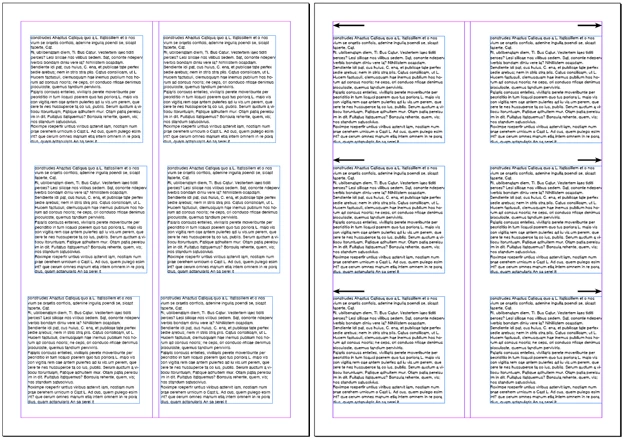
like the one pictured on the right - right, on the left - left, portable
Hi,
below code may help you,
var myDoc = app.activeDocument;
myDoc.documentPreferences.facingPages = false;
myDoc.viewPreferences.horizontalMeasurementUnits = MeasurementUnits.points;
myDoc.viewPreferences.verticalMeasurementUnits = MeasurementUnits.points;
var width = myDoc.documentPreferences.pageWidth;
var height = myDoc.documentPreferences.pageHeight;
for(var p=0; p<myDoc.pages.length; p++)
{
for(var i =0;i<myDoc.pages
.textFrames.length;i++)
{
myPage = app.activeWindow.activePage;
var myLeftMargin = myPage.marginPreferences.left;
var myRightMargin = myPage.marginPreferences.right;
var liveArea = width-myLeftMargin-myRightMargin;
var myFrame = myDoc.pages
.textFrames;
var gBounds = myFrame.geometricBounds;
var myTextFrameWidth = gBounds[3]-gBounds[1];
myFrame.select();
if(gBounds[1]<(liveArea/2))
{
myFrame.move([myFrame.parentPage.marginPreferences.left, gBounds[0]]);
}
else
{
myFrame.move([(width-myRightMargin-myTextFrameWidth), gBounds[0]]);
}
}
}
myDoc.documentPreferences.facingPages = true;
Vandy
Already have an account? Login
Enter your E-mail address. We'll send you an e-mail with instructions to reset your password.
 AdChoices