Participant
October 11, 2017
Answered

Letter spacing on right-justified Hebrew paragraph

  • October 11, 2017
  • 1 reply
  • 757 views

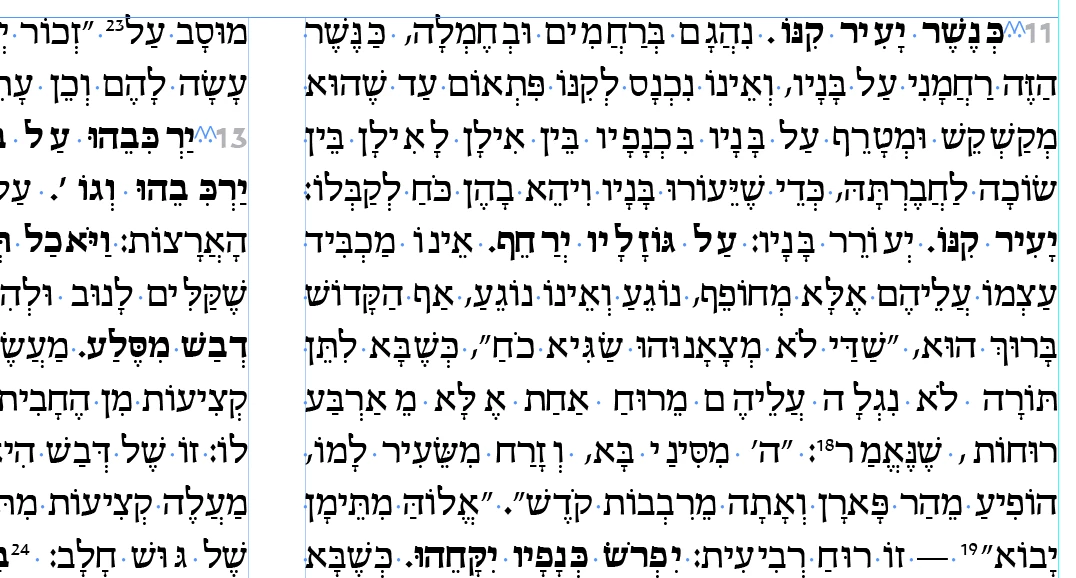
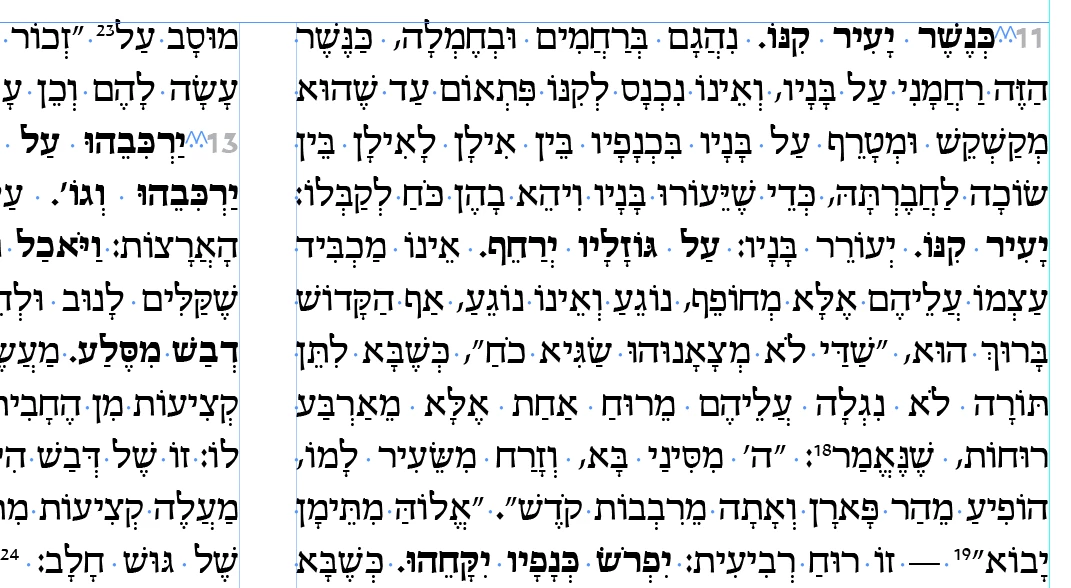
I'm aligning Hebrew text justified with the last line right-aligned. It is messing up the spacing (kerning/tracking) between the letters. Every time I make any change to the paragraph (doesn't matter what), it fixes the spacing automatically (i've attached good and bad versions for comparison). But then when I save the file, close and open, the problem is back. Worse yet, exporting to PDF always exports with the issues. I've made many files like this and I've never had this issue…

Please help.

    This topic has been closed for replies.
    Correct answer TᴀW

    The Adobe World-Ready paragraph composer is pretty buggy. But obviously in your case you can't help but use it.

    The funny spacing usually happens because there are some weird characters somewhere on the page (even in a footnote). For instance, a discretionary line break can do it. Or maybe those 2 funny spaces you've got after the numbers at the beginning of paragraphs. What are they? Just to check, try removing those two weird spaces and replacing with a single normal space. Do the spacing issues then disappear?

    You should file a bug report. The more they hear about it, the more they might be compelled to fix it.

    Ariel

    1 reply

    Srishti Bali
    Community Manager
    Community Manager
    October 12, 2017

    Hi Zalman Friedman,

    This seems to be issue with the particular file, would you mind sharing your file?

    Also, share a video with the work flow you are following?

    Regards

    Srishti

    Participant
    October 15, 2017

    Hi Srishti,

    Thank you for your response. I don't think I'm allowed to share the file publicly, as the content is not mine, but I don't know much about this… I am in touch with Adobe support for this though. Hopefully it will get resolved that way.

    Thanks!

    Z

    TᴀW
    TᴀWCorrect answer
    Legend
    October 15, 2017

    The Adobe World-Ready paragraph composer is pretty buggy. But obviously in your case you can't help but use it.

    The funny spacing usually happens because there are some weird characters somewhere on the page (even in a footnote). For instance, a discretionary line break can do it. Or maybe those 2 funny spaces you've got after the numbers at the beginning of paragraphs. What are they? Just to check, try removing those two weird spaces and replacing with a single normal space. Do the spacing issues then disappear?

    You should file a bug report. The more they hear about it, the more they might be compelled to fix it.

    Ariel