

Exit
  • Global community
    • Language:
      • Deutsch
      • English
      • Español
      • Français
      • Português
  • 日本語コミュニティ
  • 한국 커뮤니티
0

Linking text boxes

Contributor ,
Aug 08, 2022 Aug 08, 2022

Hi all, 

I am experiencing some behaviour I don't understand.  I am trying to remove pages 4-5 in the attached first screen shot. To do that I understand I must unlink them.
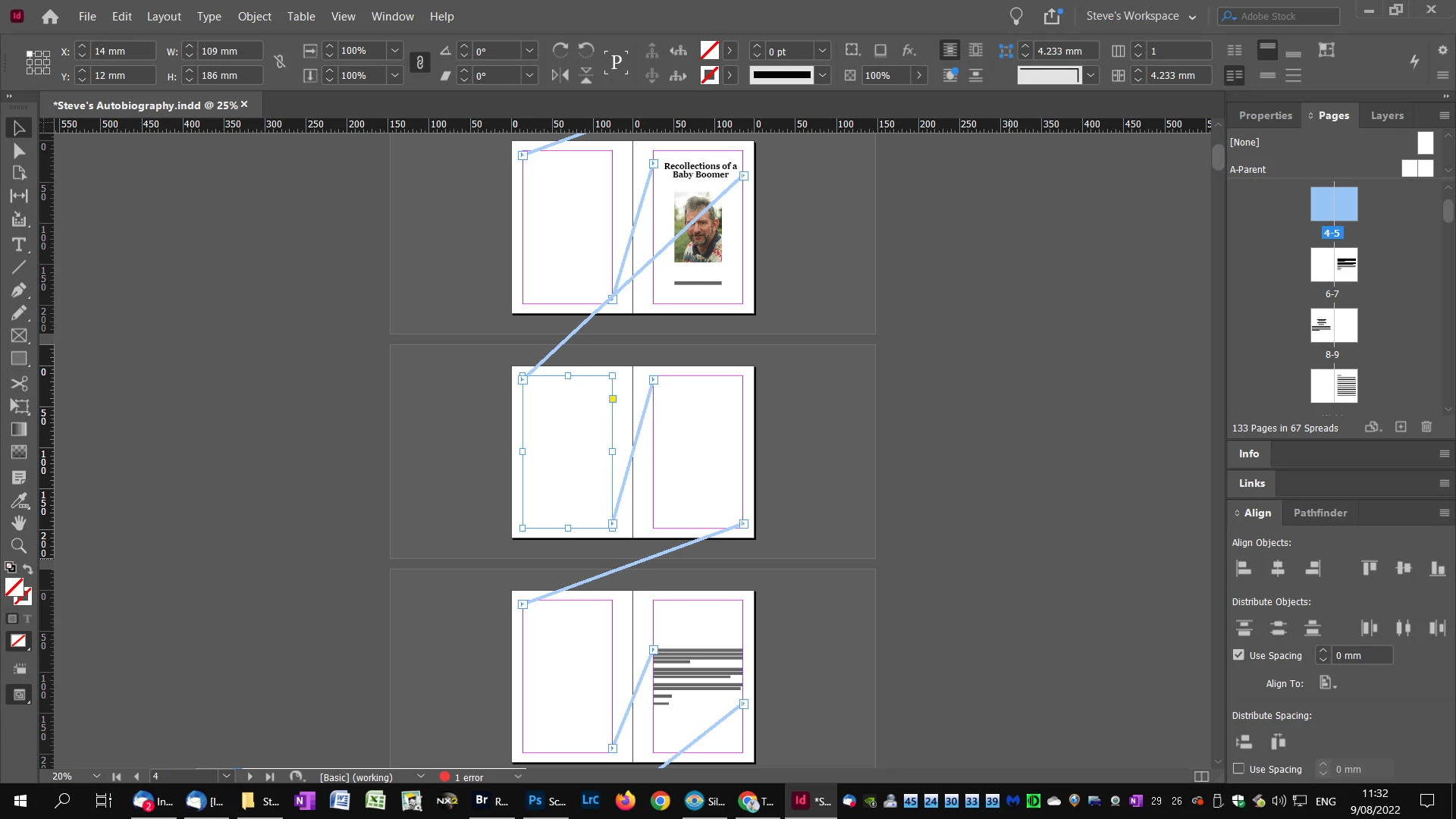
 

Screen dump #3 InDesign.jpg


However, when I unlink, all text disappears as per the next screen shot. 
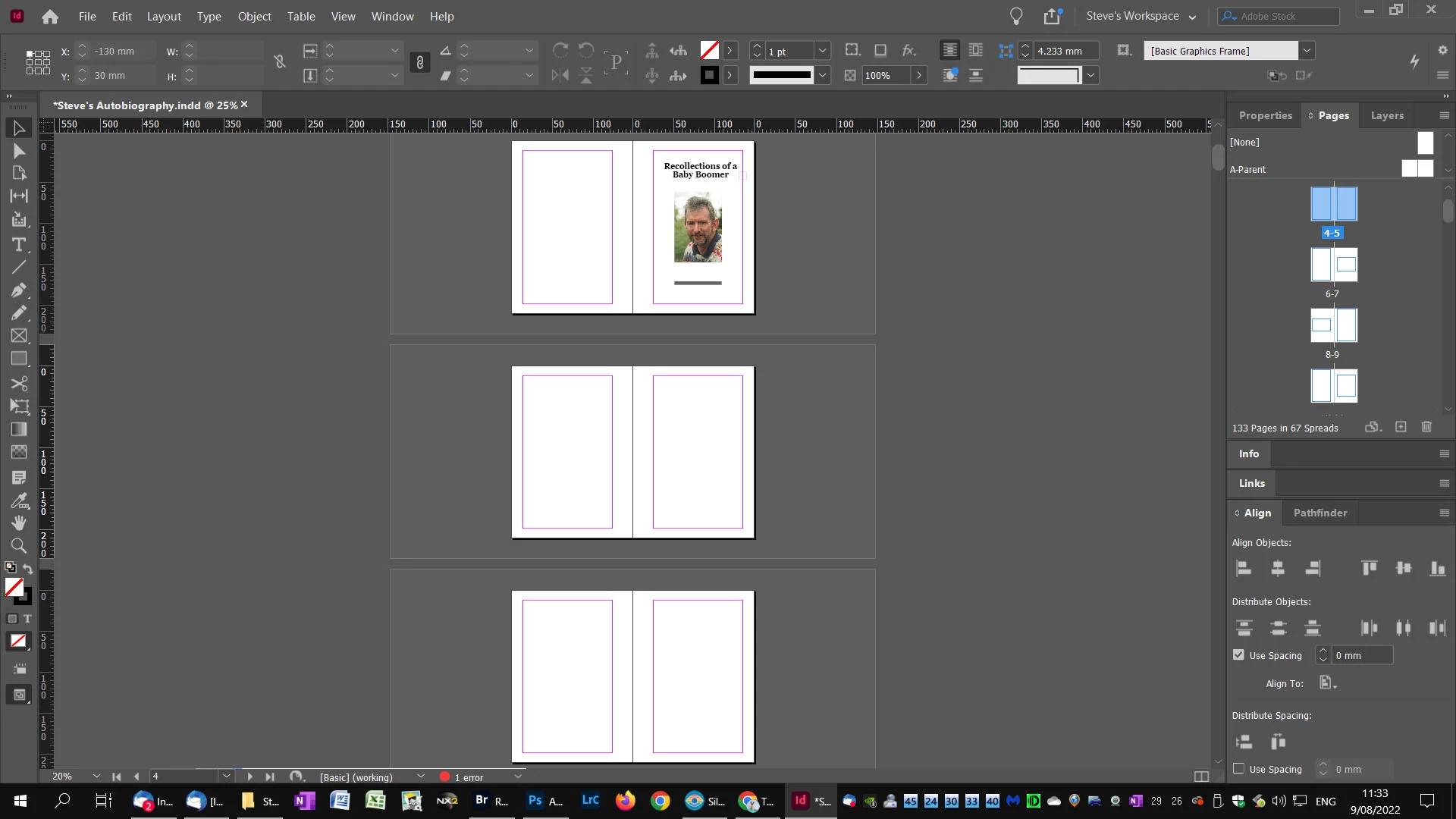
Screen dump #4 InDesign.jpg

What am I doing wrong?

Regards,

Steve (InDesign V17.3)


TOPICS
How to
940
Translate
Report
Community guidelines
Be kind and respectful, give credit to the original source of content, and search for duplicates before posting. Learn more
community guidelines

correct answers 1 Correct answer

Community Expert , Aug 09, 2022 Aug 09, 2022

@OzPhotoMan said: "To do that I understand I must unlink them."


Hi Steve,

don't think so. Both frames on both pages 4-5 seem to be empty.

Usually you want to select all the text in both threaded text frames and delete it, only then you'd remove the pages.

No need to unlink them.


What do I not get is why the text on page 7 does not flow on page 6, 5 or on page 4.


Regards,
Uwe Laubender
( Adobe Community Professional )

Translate
Contributor ,
Aug 08, 2022 Aug 08, 2022

P.S.

Before I delete, the pages panel shows 133 pages in 67 spreads. After I delete it shows 131 pages in 61 spreads, but pages 4-5 are still blank. The text box on page 7 then moves to the top of the page 7 where before it was centred. The pages then move to the incorrect side. I am totally lost although I am an intelligent person!

Translate
Report
Community guidelines
Be kind and respectful, give credit to the original source of content, and search for duplicates before posting. Learn more
community guidelines
Community Expert ,
Aug 08, 2022 Aug 08, 2022

@Scott Falkner is correct of course.

What I do here is

Delete the text frame from the pages you want, which will leave blank pages.

The text will still show further down the pages - as all the text frames are connected. 

Manually delete the content on the continued pages that you no longer need.

Then delete the blank pages.


Hopefully, either Scott or my workflow will demonstrate how it works, and you can then proceed with a method that you find best for yourself.

Translate
Report
Community guidelines
Be kind and respectful, give credit to the original source of content, and search for duplicates before posting. Learn more
community guidelines
Contributor ,
Aug 08, 2022 Aug 08, 2022

I did try that, but it dod not work. I had read you needed to remove the text box links before deletion, but doing that resulted in loss of text. Finally, I read you had to use a script to remove the link. What I had to do eventually was break the links between pages. Took me a lot of digging to find the solution. One script removed all links, but there is a script that only removes the link on a per page basis, the BreakFrame script. that worked and I am now back on track.

Surely there must be a simpler way to implement this. I am becoming more disillusioned with InDesign the more i learn it. But then, it took me a few years to become proficient in Photoshop.


Regards,


Steve

Translate
Report
Community guidelines
Be kind and respectful, give credit to the original source of content, and search for duplicates before posting. Learn more
community guidelines
Community Expert ,
Aug 08, 2022 Aug 08, 2022

No you don't have to do any of that. 

Just delete the text frames altogether and leave blank pages.


You seem to be a bit confused on the relationships of the elements. No worries, I was too! I had the exact same confusion as you 20 years ago.


The text frames are linked. They flow from page to page. 

If you delete a page, the content remains within the text frames, in essence they reflow to the pages, as the other pages are gone.


When working with flowing text, you need to understand that remove the text is the first step. 


If you do this - then the pages further on will be blank. As the text was flowing.

So you delete the pages later on in the document to counter this.


The way I suggest is removing/deleting the Text Frame altogether from the pages you want to remove.

This leaves the page blank.

But you do have to go to the following pages where the text reflowed to manually remove the content from the pages. 

Translate
Report
Community guidelines
Be kind and respectful, give credit to the original source of content, and search for duplicates before posting. Learn more
community guidelines
Community Expert ,
Aug 08, 2022 Aug 08, 2022

When you unlinked the text frames the text became overset since it has no place to go. You didn’t need to do that, you can just delete the pages. But since hte text frames are linked you will also need to delete whatever text is on those pages, even if it’s just frame breaks. First delete the text so the text that is on pages 6–7 now appears on pages 4–5. Then you can delete teh pages. You might not need to, since now the text is where you want it.

Translate
Report
Community guidelines
Be kind and respectful, give credit to the original source of content, and search for duplicates before posting. Learn more
community guidelines
Community Expert ,
Aug 09, 2022 Aug 09, 2022

@OzPhotoMan said: "To do that I understand I must unlink them."


Hi Steve,

don't think so. Both frames on both pages 4-5 seem to be empty.

Usually you want to select all the text in both threaded text frames and delete it, only then you'd remove the pages.

No need to unlink them.


What do I not get is why the text on page 7 does not flow on page 6, 5 or on page 4.


Regards,
Uwe Laubender
( Adobe Community Professional )

Translate
Report
Community guidelines
Be kind and respectful, give credit to the original source of content, and search for duplicates before posting. Learn more
community guidelines
Community Expert ,
Aug 09, 2022 Aug 09, 2022
LATEST

>>>Both frames on both pages 4-5 seem to be empty.

In the first screen capture, the frames can't be completely empty--I would think they must have a column or page break in them. 


David Creamer: Community Expert (ACI and ACE 1995-2023)
Translate
Report
Community guidelines
Be kind and respectful, give credit to the original source of content, and search for duplicates before posting. Learn more
community guidelines