
Participant
October 20, 2022
Answered

linking Variable text (or Live Captions) that are far from images

  • October 20, 2022
  • 2 replies
  • 366 views

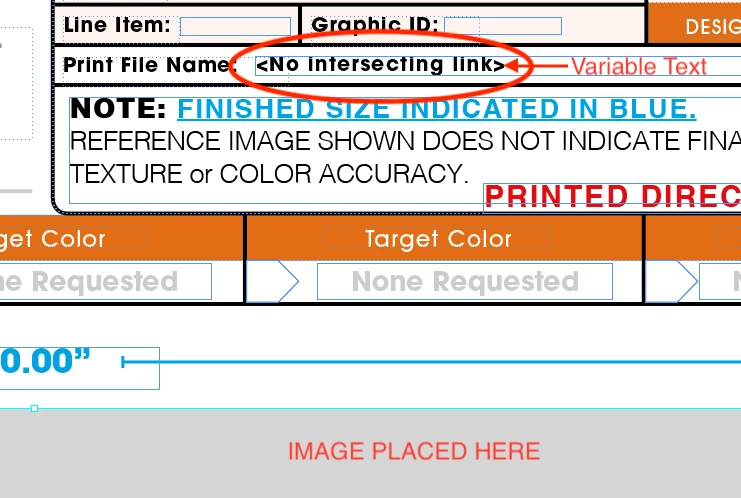
Hi, One of the things I do as a designer is set up graphic proofs for a client so they can approve the graphics before going into production. I'd like to set up my templates to autopopulate some things (like image file name). However, the place I have put the file name is too far from the image. Is there a way to link the variable text to an image without grouping the two objects? I've found myself forgetting to group info and when I do, its harder to manipulate the image frame. 
 

This topic has been closed for replies.
Correct answer Barb Binder

Hi @Shayna5F8B:


Live captions have to touch the image—that's non-negotiable. There's no logical workaround like adding a cross-reference or even place and link. If you can't redesign the page to work within this limitation, the only thing I can come up with is to add the caption text on its own layer, stretch the text frame down to touch the graphics frame, add the live captions and then lock the layer so that it's not in the way when you're working in the text frames in between. You could even change that layer color to white so that you don't have to see it. 


~Barb

2 replies

Barb Binder
Community Expert
Barb BinderCommunity ExpertCorrect answer
Community Expert
October 20, 2022

Hi @Shayna5F8B:


Live captions have to touch the image—that's non-negotiable. There's no logical workaround like adding a cross-reference or even place and link. If you can't redesign the page to work within this limitation, the only thing I can come up with is to add the caption text on its own layer, stretch the text frame down to touch the graphics frame, add the live captions and then lock the layer so that it's not in the way when you're working in the text frames in between. You could even change that layer color to white so that you don't have to see it. 


~Barb

~Barb at Rocky Mountain Training
Participant
October 21, 2022

Brilliant! I tried making the text wrap touch, but didn't think about the bounding box for the text. Thanks!

chrisg11235813
Participating Frequently
October 20, 2022

When you Place the image choose the option "Create Static Captions" from the Place dialog.

After you place the image, the file name comes up as a placeable item -- click the text frame you want to place the Caption in.


For Caption options:

Choose Object > Captions > Caption Settings.