
Participant
April 7, 2017
Answered

Macbook pro freezes while running any Adobe application

  • April 7, 2017
  • 6 replies
  • 10312 views

Hi,

I've been facing this issue since last week—earlier the freeze was occurring randomly while working with CC apps therefore, I uninstalled everything and reinstalled.

Now, I've been working on InDesign only since yesterday and have noticed that the system freezes completely whenever I choose to close / quit the application. Sometimes the random freeze also occurs while the application is running.

Force restart is required every time. Looking for some help with the issue.
This topic has been closed for replies.
Correct answer amaarora

Hi,

Can you check and see if you also have an Intel GPU?

And what version of MAC OS do you have? is it 10.12.4?

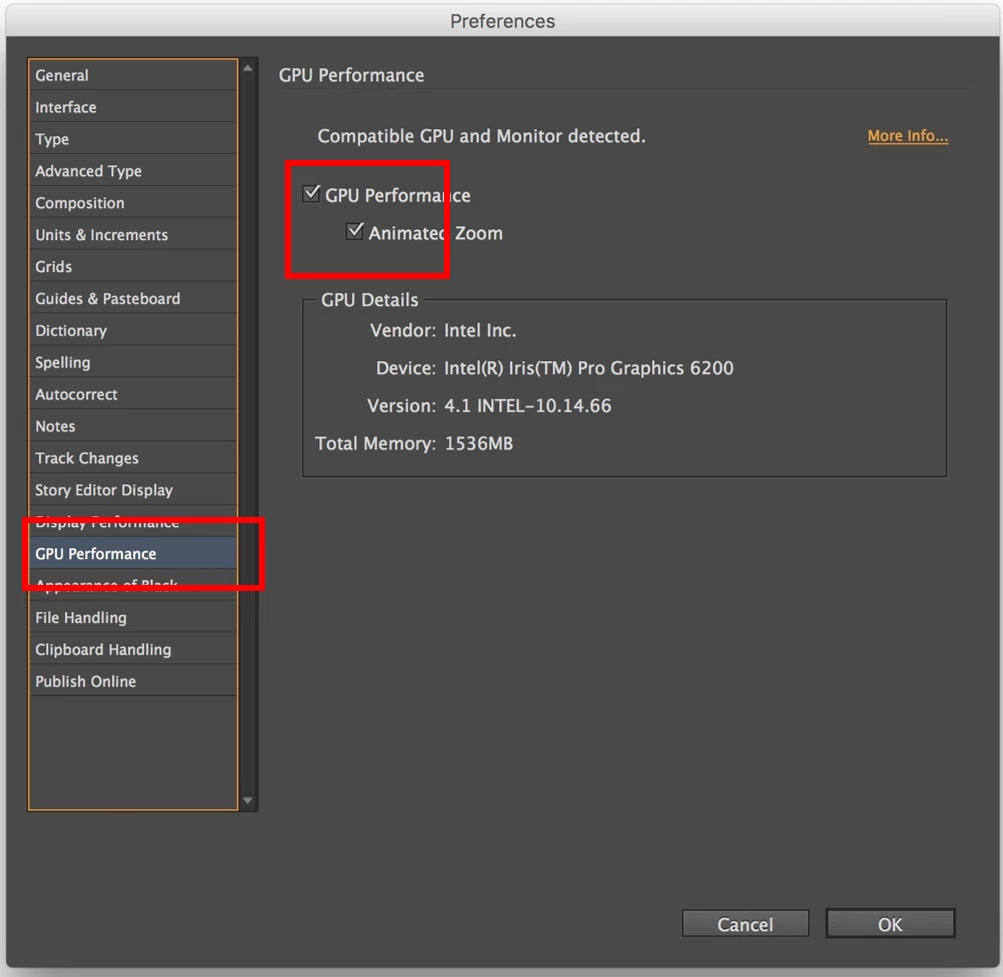
Try working with InDesign after disabling the GPU performance from preferences.(Turn off the below highlighted option)

Do let us know if it solves your problem. Also please mention for which all CC apps did you face the problem

-Aman

6 replies

Participant
April 27, 2017

Hi everyone,

I also experience the issue on my setup as well.

Had repeatently complete system freezes, as well as strange glitches.

Machine: MacBook Pro (Retina, 13-inch, Early 2015)

OS: macOS Sierra 10.12.4 (16E195)

Application: Adobe InDesign, Most current version as of Monday, April, 24th

Turning off GPU Performance solved the issue for me as well.

Kind regards,

Peter

Participant
April 22, 2017

Hey,

I have the same problem since this week after I updated Adobe Photoshop, Illustrator and InDesign. My Macbook Pro is exactly the same...

Will there be a solution for this?

Karolina

jazzmillerdavis
Participant
April 10, 2017

Hi, I'm also having this issue, Sierra 10.12.4 on MacBook Pro 13" Early 2015. System completely freezes, occasionally with strange graphical glitches like this immediately before the freeze:

I will try disabling GPU Performance, but that shouldn't be necessary, hopefully Adobe gets around to fixing this so we can use GPU acceleration.

egasattwika
Participant
April 8, 2017

Hi, i facing same problem but with illustrator & photoshop running, completely freeze, can't do nothing except force restart

i'm on macOS Sierra 10.12.4 too

amaarora
Inspiring
April 8, 2017

Hi,

Did you try turning off GPU as shown above by me, and then working?

Do post your results.

-Aman

egasattwika
Participant
April 8, 2017

Amaarora,

Thanks for your response,

Now i dont have any adobe app, i just uninstalled it a couple minute ago, I will try turning off GPU tomorrow, as soon after i reinstall all the adobe app from the creative cloud app.

I will be post the result ASAP

Thank You

amaarora
amaaroraCorrect answer
Inspiring
April 7, 2017

Hi,

Can you check and see if you also have an Intel GPU?

And what version of MAC OS do you have? is it 10.12.4?

Try working with InDesign after disabling the GPU performance from preferences.(Turn off the below highlighted option)

Do let us know if it solves your problem. Also please mention for which all CC apps did you face the problem

-Aman

aarishabhAuthor
Participant
April 7, 2017

Hi,


Thanks for the quick reply.
Yes, it has Intel Iris Graphics 6100 and currently running on macOS Sierra 10.12.4!


I've now disabled the GPU from preferences as shown by you and will update you by tomorrow if the issue occurs again.

Please note: I've been facing system freeze while working with Illustrator, InDesign and Muse as I've been using these most of the time since last week.

amaarora
Inspiring
April 7, 2017

Thanks for the information.

Am glad it solved your problem.

-Aman

Kanikas
Legend
April 7, 2017

Moving to InDesign