
Known Participant
May 6, 2025
Beantwortet

Margins perfect bound book

  • May 6, 2025
  • 2 Antworten
  • 559 Ansichten

Hi I got my first book printed perfect bound and realise now as a newbie that I need to have a wider inside margin to make it easier for people to read. It was ok and readable but could be better.


In the original, I used the same margin size of 0.3937 for top, bottom, inside & outside margins.


The screenshot below shows how I have reset it: inside margin 1 inch, outside: 0.375 in. Top & bottom remain 0.3937 in.


Does it look about right or any tips? The document page size is A4 (8.2677 in x 11.6929 in).


Also, is there a way to automate moving the content to fit within the new margins (text and photos)? I expect not but thought I'd ask. 
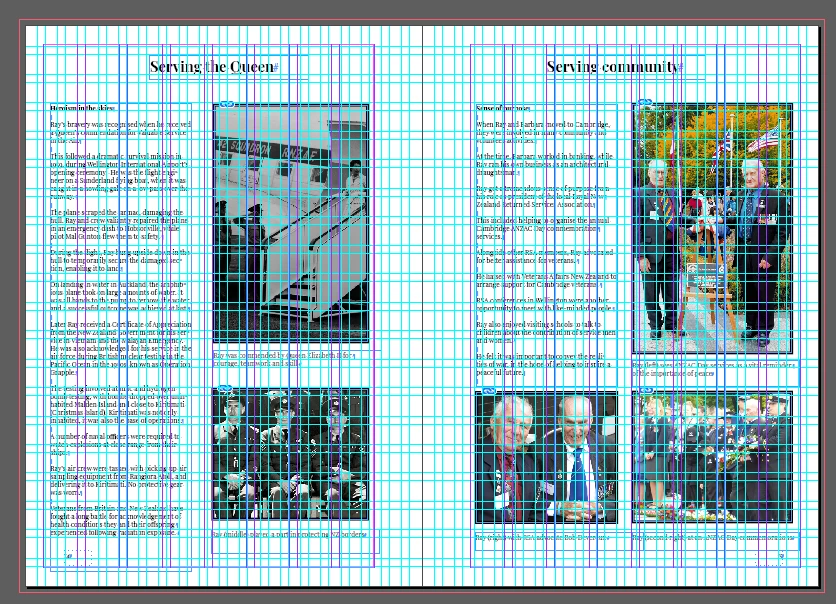


Also, the bottom line of the dotted page number box is now sitting exactly on the bottom margin. Will that cause any problems or will it print ok? 



Beste Antwort von Willi Adelberger

You should align all content frames to the page margin, this would allow to fit to any changes you do in the document. You need to activate adjust layout.

You crated way to many text frames. One single text frame for the content is better as the layout adjustment would work much better. Work with multible columns in the text frame, but not on the page as you do now. Work with span colums for the headline, and create the columns in the text frame.

Align the page number frame to the margin of the page. Make the distance with the mean of the text frame offset. This will move the page number if you change margins.

Work with Object styles for everything. 


2 Antworten

Willi Adelberger
Community Expert
Community Expert
May 6, 2025

You should align all content frames to the page margin, this would allow to fit to any changes you do in the document. You need to activate adjust layout.

You crated way to many text frames. One single text frame for the content is better as the layout adjustment would work much better. Work with multible columns in the text frame, but not on the page as you do now. Work with span colums for the headline, and create the columns in the text frame.

Align the page number frame to the margin of the page. Make the distance with the mean of the text frame offset. This will move the page number if you change margins.

Work with Object styles for everything. 


Known Participant
May 6, 2025

That's brilliant advice! Thank you

Brad @ Roaring Mouse
Community Expert
Community Expert
May 6, 2025

Works for me.

You can probably reduce it to .75" if you need more room for copy, but 1" is good. ..  the more the better on perfect bound.

My perosnal rule of thumb is to use twice the outer margins for a nice balanced look.