Participating Frequently
February 18, 2023
Answered

Markdown with SVG images to InDesign?

  • February 18, 2023
  • 3 replies
  • 2896 views

This is kicking my butt. I am comfortable with coding, scripting, xml, html, ..., ..., ..., but I cannot get this figured out. I was hoping there would be some kind of way to


  1. create styles in InDesign
  2. export those styles in some editable format (css, html, xml, icml, etc.)
  3. have a look at the formats so I could write a converter without learning some 400-page specification
  4. convert my markdown to some editable format (css, html, cml, icml, etc.)
  5. apply the styles from the InDesign export to my converted markdown.
  6. import the result into InDesign


Oddly, InDesign seems to import several such formats, and export several such formats, but as far as I can tell, there is ZERO overlap. XML looks like it would be two-way, but every xml export I try just generates an empty xml file.


I'm happy to do this *any* way. Scripting, writing a simple converter, clicking menu items, whatever. In fact, I'm happy to pay someone else to do it for me. But I want to get something working well enough that I know I'm on the right track with my input.


My latest attempt has been

  1. convert md to docx with pandoc
  2. place into InDesign


This doesn't work, I'm losing images. Example images and documents for all steps at this GitHub link. Appreciate any help.
ShayHill/markdown-to-indesign: This is the process I'm using to convert markdown files to InDesign. IT DOES NOT WORK. (github.com)

This topic has been closed for replies.
Correct answer Eugene Tyson

Have you looked at exporting to IDML - as IDML is basically xml


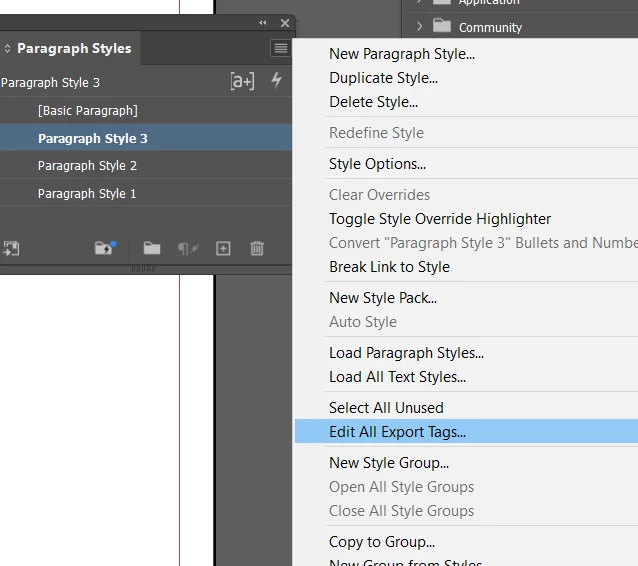
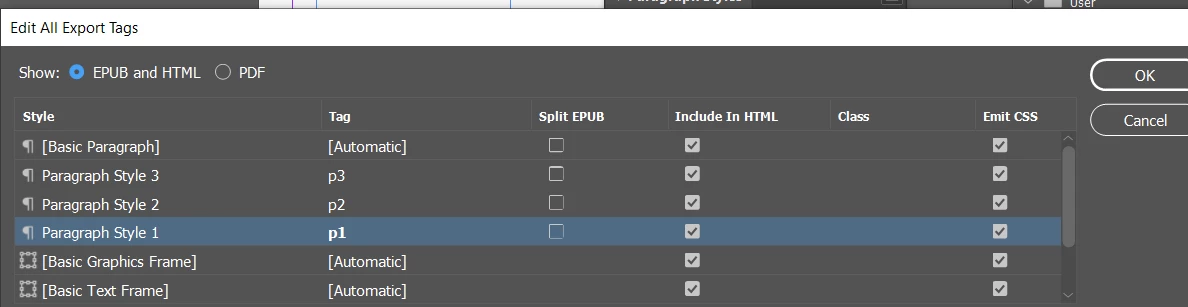
So in paragraph styles fly out (and most of the styles menus there is an option for Edit Export Tags)


You can pick predefined styles - or put in your own


Export to IDML

Change the extension to .zip

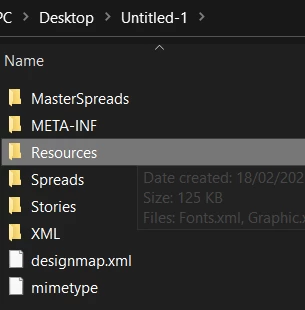
unzip the folder


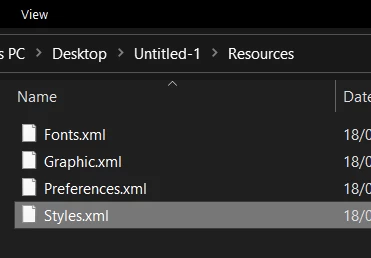
In the resources folder is a styles.xml


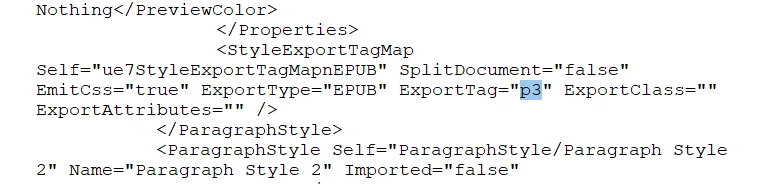
And you'll see the p3 tag has been applied


Is this along the lines of what you're after?


3 replies

Joel Cherney
Community Expert
Community Expert
February 19, 2023

Is there some reason why you're converting Markdown to docx? I mean, maybe I'm missing something, but you could go straight from Markdown to icml, and place the icml directly into InDesign. 


If your svg is dropping when you convert with pandoc, isn't that maybe a question for the pandoc maintainer(s)? I mean, I don't know if you can slip an svg into icml, but you certainly should probably be able to get an svg into a docx, and you're reporting that this doesn't work. 


XML looks like it would be two-way, but every xml export I try just generates an empty xml file.


Can you either describe your workflow here, or post a sample document? Because an empty XML file is not the expected export. I don't want to PEBCAK you, but you know, maybe the empty XML export is down to you not using InDesign's wonky XML tools correctly? 

Participating Frequently
February 19, 2023

PEBCAK is the reason behind every one of these "whys". I'm sure of it. That's why I'm asking for help instead of filing a bug report. I spent several hours trying different workflows. With each path, I ran into something I didn't know how to work through.


  • md > docx > ID : This looked to be the standard approach from what I'd seen online. Images made it into docx, so I assumed Pandoc was working correctly. I've since discovered I can take some intermediate steps after the docx is created and get my images in.
  • md > icml > ID : This was my most successful attempt, but I got bad layout problems with some of my images, which turned out to be another deep rabbit hole.
  • ID > xml : I was missing the tags. I spent some time searching the Net for guidance there, but didn't get very far.
  • md > idml seems to be working fine. I think that will be the most straightforward way for me to get things into a presentable state withtout making a second job out of this whole thing.

Thank you for the feedback.

Eugene TysonCommunity ExpertCorrect answer
Community Expert
February 18, 2023

Have you looked at exporting to IDML - as IDML is basically xml


So in paragraph styles fly out (and most of the styles menus there is an option for Edit Export Tags)


You can pick predefined styles - or put in your own


Export to IDML

Change the extension to .zip

unzip the folder


In the resources folder is a styles.xml


And you'll see the p3 tag has been applied


Is this along the lines of what you're after?


Participating Frequently
February 18, 2023

That's exactly it! Thank you. I have already written a somewhat popular parsing library for docx files, which are very close to this structure. My workflow in docx is to

  • create style placeholders (e.g., $HEADING$ in Word)
  • extract surrounding xml elements and replace text
  • insert these back into the xml file
  • zip everything back up

This is how I make my invoices. Looks like I will be able to put this together with just a bit of tweaking. Thank you!

James Gifford—NitroPress
Legend
February 18, 2023

From long familarity with InDesign, HTML/CSS, some XML and — regrettably — Markdown, I would say there's no way to get from Markdown to InDesign without a wholly custom code conversion project.


The only thing close to MD or HTML that InDesign imports is XML; I can't see any route here except a conversion from MD to XML This could be done in a number of ways including repetitous search-and-replace or GREP to convert one code structure at a time, along with some more sophisticated scripting in a macro-enabled text editor.


Maybe others here with deeper conversion and file structure experience have a better solution, but I think you are outlining one of the most nearly impossible conversions in the whole doc spectrum — simply because Markdown is a deliberately simplified tinker-toy approach to document structure, not really conforming to any standard but its own and forcing all but the most unimaginative, vanilla users to use what CSS elements will work, or elaborate, oddball combinations of its features.


I'm close to saying "forget it — rebuild the documents in InDesign from what text export and scrapes you can extract, and forget about any sort of conversion that preserves formatting, structrure, image placement, etc." Close but maybe not adamant.


(I use Doc360 for a client and have worked with other MD tools and environments, and think of it as something only a developer team could love, more "coding documents" than any kind of actual document tool. But it sounds like you've made the mistake of writing something very large and complex in it, and now need to get that project into a real doc platform. I hope someone here has better ideas than I do... 😛 )


Participating Frequently
February 18, 2023

Ha! That was discouraging, but it was a fun read. Thank you for the feedback.

James Gifford—NitroPress
Legend
February 18, 2023

Yeah, sorry, I've come to really hate Markdown. I'm tasked with maintaining and expanding a large online library for outside users, and I am often reminded of kindergarten, when you had to do everything on that weird lined paper, with a giant pencil and two odd colors of crayon.


(I've also spent too many decades battling the idea of documentation from the Dev viewpoint, when what's needed is docs from the end user viewpoint. MD is very much another swing at the "engineering-sourced/self documenting" chimera.)