Known Participant
July 16, 2024
Question

Marks positiong goes wrong in InDesign 18.5.3 on Windows 11

  • July 16, 2024
  • 2 replies
  • 731 views

Hello,

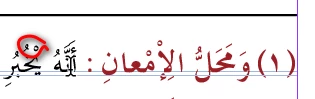
The Marks over the ligatures glyphs' goes in wrong places when I insert a footnote.

As you can see, the superscript (Alef) must be over the (lam), also the (damma) must be over the (tah), in both places.

I get to manage that in the paste by wrong ways, but this is not the correct way.

Any help?

This topic has been closed for replies.

2 replies

Anshul_Saini
Community Manager
Community Manager
July 22, 2024

Hi @G.Fares,


I understand how frustrating it can be when the marks over the ligature glyphs aren’t positioned correctly, especially with the added complexity of footnotes. It sounds like you’re dealing with a challenging issue in InDesign.


Here are a few suggestions that might help resolve the problem:

  • First, ensure that the font you're using supports proper diacritic positioning with ligatures. Font limitations can sometimes cause these kinds of issues.

  • Update to the latest version of InDesign 19.5 and see if that helps.
  • Try enabling Optical Margin Alignment in the Paragraph panel. It might help with the alignment issues, although it may not always fix diacritic positioning.

  • For specific instances where the positioning is off, you can manually adjust the diacritics:

    • Select the affected text.
    • Open the Character panel (Window > Type & Tables > Character).
    • Adjust the Baseline Shift for the diacritics to align them properly.
  • Sometimes, the footnote style settings can affect text formatting. Check if adjusting the footnote style or creating a custom style for footnotes helps with the alignment issue.

  • If the issue seems specific to a particular font, try testing with another font to rule out the possibility that it is with the font itself.


I hope these suggestions help. If the problem persists or if you need further assistance, feel free to reach out again with more details or screenshots. I’m here to help!


Best regards,
Anshul Saini

G.FaresAuthor
Known Participant
August 8, 2024

Hi Saini,

The font work's well on Word, Publisher and Scribus, also on other platform, but not on InDesign as I mentioned before.

All the suggestions didn't resolve the problem.

I think it is a bug, or something else.

Thanks anyway, trying to help me.

Abhishek Rao
Community Manager
Community Manager
August 8, 2024

Hello @G.Fares


Thank you for all the information and patience. Could you update the InDesign application to 19.5 and then test if the issue persists? 


If yes, please share a screen recording of the workflow you follow till the issue.


Thank you, 

Abhishek Rao

leo.r
Community Expert
Community Expert
July 16, 2024

Your versions of InDesign and the operating system?

G.FaresAuthor
Known Participant
July 17, 2024

InDesign 18.5.3 64, Windows 11 64,

Dell Precision 5820, Intel(R) Xeon(R) W-2245 CPU @ 3.90GHz 3.91 GHz, 64G ram.

All InDesign version have this issue, accept CS2, as I could remember.