
Inspiring
July 26, 2019
Question

MathType Equation - Get mathml equations from MathType EPS

  • July 26, 2019
  • 2 replies
  • 3650 views

Hi,

     I want to get the MathML equation from eps image.  When reading image file, getting text like as below screenshot.
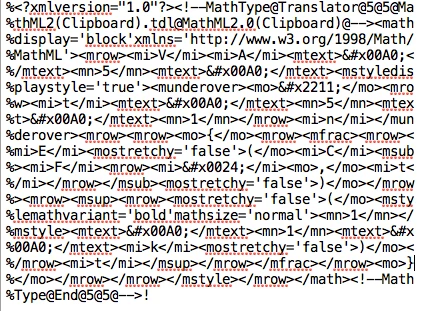
    

     But the image has used fonts style like bold, bold-italic etc. when reading this MathML text from image that styles are missing.

     How can i retaining that styles with MathML?

This topic has been closed for replies.

2 replies

MrMathType — Retired
Participating Frequently
February 18, 2021

I realize this question is a year and a half old, so either you haven't gotten an answer yet, you've gotten an answer elsewhere, or you've just moved on. Whatever the case, I'm answering it in case someone else finds this question on a search.


As you said, you can find the MathML inside an EPS created with MathType. (Actually you didn't mention MathType, but there it is in the first row of your MathML, saying it came from MathType.)


There are 3 things you can do:


  • You can take the MathML from the EPS:


%<?xmlversion="1.0"?><!--MathType@Translator@5@5@Ma
%thML2(Clipboard).tdl@MathML2.0(Clipboard)@--><math
%display='block'xmlns='http://www.w3.org/1998/Math/
%MathML'><mrow><mi>V</mi><mi>A</mi><mtext>&#x00A0;<
%/mtext><mn>5</mn><mtext>&#x00A0;</mtext><munderove
%r><mstylemathsize='140%'displaystyle='true'><mo>&#
%x2211;</mo></mstyle><mrow><mi>t</mi><mtext>&#x00A0
%;</mtext><mn>5</mn><mtext>&#x00A0;</mtext><mn>1</m
%n></mrow><mi>n</mi></munderover><mfencedclose="}"o
%pen="{"><mrow><mfrac><mrow><mi>E</mi><mostretchy='
%false'>(</mo><mi>C</mi><msub><mi>F</mi><mrow><mi>&
%#x0024;</mi><mo>,</mo><mi>t</mi></mrow></msub><mos
%tretchy='false'>)</mo></mrow><mrow><msup><mrow><mo
%stretchy='false'>(</mo><mstylemathvariant='bold'ma
%thsize='normal'><mn>1</mn></mstyle><mtext>&#x00A0;
%</mtext><mn>1</mn><mtext>&#x00A0;</mtext><mi>k</mi
%><mostretchy='false'>)</mo></mrow><mi>t</mi></msup
%></mrow></mfrac></mrow></mfenced></mrow></math><!-
%-MathType@End@5@5@-->!​


But once you get it, what do you do with it? You can't just copy it and paste it into MathType, because it doesn't look like MathML to MathType. Even if you find & replace to remove all the comment characters (%) and copy everything between <math> and </math> and paste that into MathType, it still won't work. So basically this chunk of commented EPS that looks like MathML isn't very useful to you.


  • There is also "MTEF" (i.e., MathType Equation Format) code inside the EPS. It looks like this:


%MathType!MTEF!1!1!+-
%feaahqart1ev3aaatCvAUfeBSjuyZL2yd9gzLbvyNv2Caerbqf
%gBHrxAU9gimLMBVrxEWvgarmWu51MyVXgaruavP1wzZbItLDhi
%s9wBH5garqqtubsr4rNCHbGeaGqiFu0Je9sqqrpepC0xbbL8F4
%rqqrFfpeea0xe9Lq-Jc9vqaqpepm0xbba9pwe9Q8fs0-yqaqpe
%pae9pg0FirpepeKkFr0xfr-xfr-xb9adbaqaaeGaciGaaiaabe
%qaaiqadaabaaGcbaaeaaaaaaaaa8qacaWGwbGaamyqaiaabcka
%caaI1aGaaeiOamaawahabeWcpaqaa8qacaWG0bGaaeiOaiaaiw
%dacaqGGcGaaGymaaWdaeaapeGaamOBaaqdpaqaa8qacqGHris5
%aaGcdaGadaWdaeaapeWaaSaaa8aabaWdbiaadweacaGGOaGaam
%4qaiaadAeapaWaaSbaaSqaa8qacaGGKaGaaiilaiaadshaa8aa
%beaak8qacaGGPaaapaqaa8qacaGGOaGaaCymaiaabckacaaIXa
%GaaeiOaiaadUgacaGGPaWdamaaCaaaleqabaWdbiaadshaaaaa
%aaGccaGL7bGaayzFaaaaaa!55FD!​


You can copy all of that and paste it into MathType and you'll have your equation. It works, but why not just do the easiest thing? That's next...

  • Since the EPS was created with MathType, you can open it with MathType. So just open it:

So there it is. In a comment you said your goal "is to get the MathML equation from EPS image which i have posted". So there's the equation. You want the MathML with styling, so go to MathType's Preferences menu, then Cut and Copy Preferences. Set thusly:

Now copy the equation and you have the MathML with styling:


<math display='block' xmlns='http://www.w3.org/1998/Math/MathML'><mrow><mi>V</mi><mi>A</mi><mtext>&#x00A0;</mtext><mn>5</mn><mtext>&#x00A0;</mtext><munderover><mstyle mathsize='140%' displaystyle='true'><mo>&#x2211;</mo></mstyle><mrow><mi>t</mi><mtext>&#x00A0;</mtext><mn>5</mn><mtext>&#x00A0;</mtext><mn>1</mn></mrow><mi>n</mi></munderover><mfenced close="}" open="{"><mrow><mfrac><mrow><mi>E</mi><mo stretchy='false'>(</mo><mi>C</mi><msub><mi>F</mi><mrow><mi>&#x0024;</mi><mo>,</mo><mi>t</mi></mrow></msub><mo stretchy='false'>)</mo></mrow><mrow><msup><mrow><mo stretchy='false'>(</mo><mstyle mathvariant='bold' mathsize='normal'><mn>1</mn></mstyle><mtext>&#x00A0;</mtext><mn>1</mn><mtext>&#x00A0;</mtext><mi>k</mi><mo stretchy='false'>)</mo></mrow><mi>t</mi></msup></mrow></mfrac></mrow></mfenced></mrow></math>


Peter Kahrel
Community Expert
Community Expert
July 26, 2019

Typefaces and styles aren't part of MathML. You might be able to match the Postscript part of the EPS to the MathML, but that's a Herculian task. And why bother: MathTools does a great job converting MathType EPSs to its own MatrhZone format, which is pure InDesign text, formatted and formattable.

P.

Sudha_KAuthor
Inspiring
July 26, 2019

Hi,

     Thank you for your reply.

     How can i convert eps to mathml in indesign? can you please explain.

Peter Kahrel
Community Expert
Community Expert
July 26, 2019

If you want the bare MathML from the EPS, then just copy it out of the EPS file. If you want it formatted as an equation then you need the MathTools plug-ins (see https://movemen.com/​) some other MathML-to-InDesign converter, but I have experience only with the MathTools plug-ins.