
Inspiring
November 10, 2022
Question

Memory problem with InDesign 2023 Quicklook feature

  • November 10, 2022
  • 2 replies
  • 3817 views

I'm using MacOS Ventura and I keep my work computer turned on 24/7 so I can connect to it from home. 

I found a memory leak in the new InDesign Quicklook feature.


I was experiencing sluggishness like when memory runs out but couldn't see that I was doing something I haven't done before. There's 24 GB RAM in my Mac and it seldom runs out.


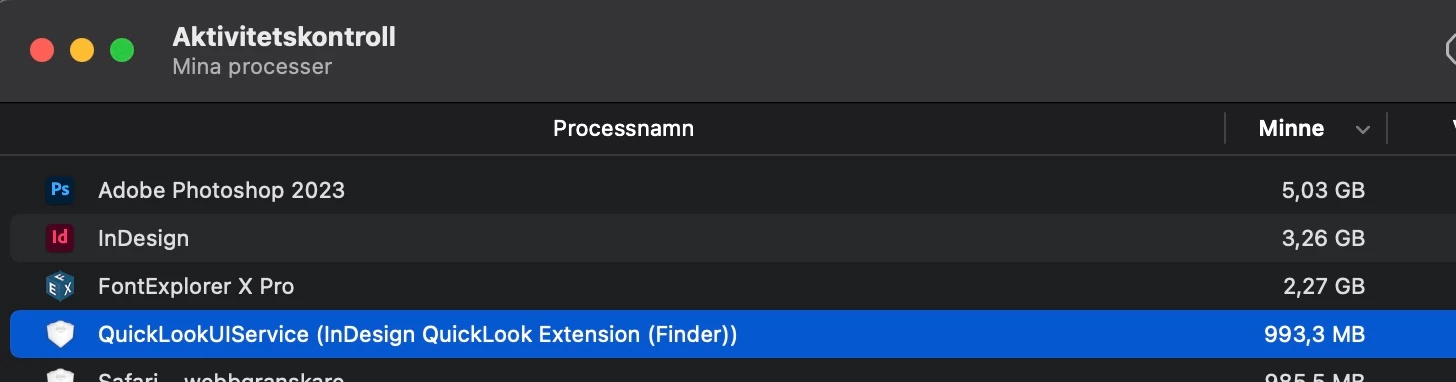
I had a look at the Activity Monitor and saw the InDesign Quicklook plugin using almost 7 GB RAM!

I force quit it and it restarts at about 250 MB RAM. Now it's 3-4 days later and it's up to 1 GB RAM. Looks like it's slowly eating up memory and since I dont turn off my Mac it builds up.


Posting this as a heads up to others. Don't know how to send in a bug report to Adobe but maybe someone here knows about that?

 

Back at 1 GB RAM after a few days
This topic has been closed for replies.

2 replies

Participant
September 10, 2024

I have been having this problem on a new Macbook Pro Nov 2023. It is primarily with the InDesign PDFs when previewed with the QuickLookUIService - I tried the solution to turn of this extension and it seems to have helped aleviate some of the problem. Still some PDFs associated to the InDesign file are using increased RAM as monitored in the Activity Monitor. For now it appears to be this connection between Indd and QuickLook spotlight. After several unexpected crashes with the App Memory (which never happened before on my older 2016 Macbook) I think this may be one solution. They should really forewarn about this. It is unexpected for a new laptop thats supposed to be more powerful. Any other solutions would be greatly appreciated.

Participant
September 10, 2024

... Side note. I just discovered that OUTLOOK also has severe issues in the 'Preview' of files in the app. Anyone know how to fix that? Good grief!! It crashed without even a second to force quit. 

Steve Werner
Community Expert
Community Expert
November 10, 2022

Having been a longtime InDesign user I had never heard of an InDesign Quicklook feature.


A search suggests it's a Markzware extension:


https://markzware.com/id-util/get-quicklook-finder-previews-adobe-indesign-files-id-util-macos/


Is that what you have installed? If so, you should contact Markzware.

AtappAuthor
Inspiring
November 18, 2022

Sorry, I assumed everyone had read the release notes for inDesign 2023.

So it's built in now.

https://helpx.adobe.com/indesign/using/whats-new/2023.html#doc-preview

Participant
May 10, 2024
quote

We have severe problems showing the "opened as write protected" issue. During my research, I found...

There is a file called "IDQuickLookPreview.appex" which we quickly renamed to "IDQuickLookPreview-BAK.appex" so InDesign doesn’t find it anymore...
We hope to reduce the error mentioned above and the overall system utilization. If it comes out to be the reason for any unconvenience, we will have to make this change to all our clients, of course. And after every software update of InDesign again.


By @defaultzyey9fhgioqc


Can you please elaborate...


So did disabling the plug-in solve the "opened as write protected" issue, and is the plug-in the reason for any other unspecified inconvenience?


Hi everybody, after testing for couple of days without the quicklook feature, it appears not to be the origin of our write protections errors. But we found out how to disable the plugin the official way. In the System Preferences, go to Security & Privacy. In the section Others choose Extensions and there either Added Extensions or Overview. There you can disable the InDesign Quicklook plugin.

I want to add, that we didn’t turn off the feature on every Mac in the network, only on the affected systems. Our  gigabit network consists of a variety of Macs with Sonoma, Kerio firewall and a Synology NAS. It feels like the problems occured with the switch from AFP to SMB and upgrade to InDesign 18 and Sonoma.