
Inspiring
November 10, 2022
Question

Memory problem with InDesign 2023 Quicklook feature

  • November 10, 2022
  • 2 replies
  • 3824 views

I'm using MacOS Ventura and I keep my work computer turned on 24/7 so I can connect to it from home. 

I found a memory leak in the new InDesign Quicklook feature.


I was experiencing sluggishness like when memory runs out but couldn't see that I was doing something I haven't done before. There's 24 GB RAM in my Mac and it seldom runs out.


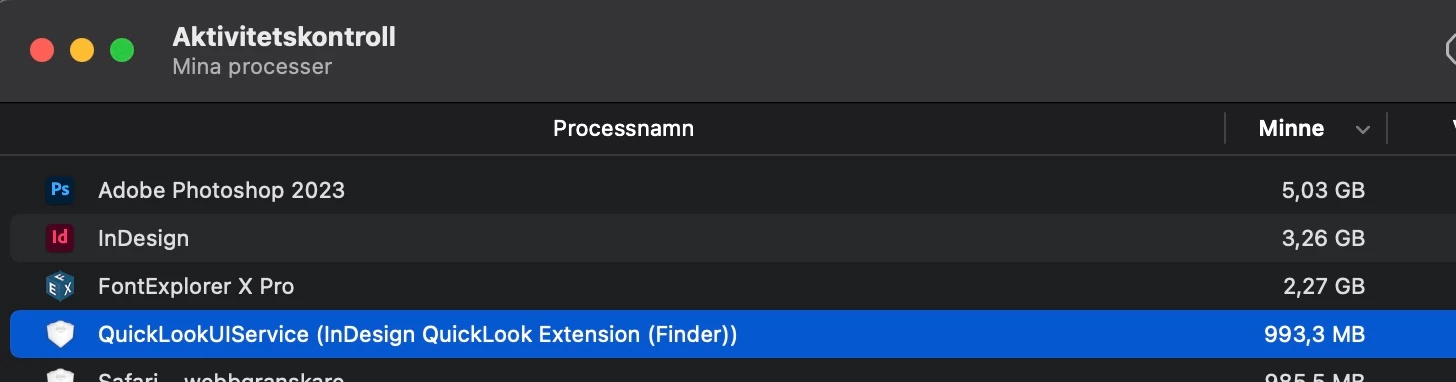
I had a look at the Activity Monitor and saw the InDesign Quicklook plugin using almost 7 GB RAM!

I force quit it and it restarts at about 250 MB RAM. Now it's 3-4 days later and it's up to 1 GB RAM. Looks like it's slowly eating up memory and since I dont turn off my Mac it builds up.


Posting this as a heads up to others. Don't know how to send in a bug report to Adobe but maybe someone here knows about that?

 

Back at 1 GB RAM after a few days
This topic has been closed for replies.

2 replies

Participant
September 10, 2024

I have been having this problem on a new Macbook Pro Nov 2023. It is primarily with the InDesign PDFs when previewed with the QuickLookUIService - I tried the solution to turn of this extension and it seems to have helped aleviate some of the problem. Still some PDFs associated to the InDesign file are using increased RAM as monitored in the Activity Monitor. For now it appears to be this connection between Indd and QuickLook spotlight. After several unexpected crashes with the App Memory (which never happened before on my older 2016 Macbook) I think this may be one solution. They should really forewarn about this. It is unexpected for a new laptop thats supposed to be more powerful. Any other solutions would be greatly appreciated.

leo.r
Community Expert
Community Expert
September 12, 2024
quote

I have been having this problem on a new Macbook Pro Nov 2023. It is primarily with the InDesign PDFs when previewed with the QuickLookUIService - I tried the solution to turn of this extension and it seems to have helped aleviate some of the problem.  For now it appears to be this connection between Indd and QuickLook spotlight. After several unexpected crashes with the App Memory (which never happened before on my older 2016 Macbook) I think this may be one solution.


By @Ryan5CDC


First, do I understand correctly that you have issues when prevewing PDF files? PDF preview is provided by the same engine, regardless of the app that produced the PDF file (InDesign or otherwise).


Still some PDFs associated to the InDesign file are using increased RAM as monitored in the Activity Monitor.


Can you please elaborate on this... What kind of increased RAM use do you experience? Can you post some screenshots from Activity Monitor that illustrate the problem?


After several unexpected crashes with the App Memory (which never happened before on my older 2016 Macbook)


Could you please clarify this, too... What exactly are the crashes with "App Memory"? What app did crash, or was it a system crash that required to restart the Mac? How do you know these crashes were memory-related?


Also, how much RAM does your machine have? Also just in case: is your Sonoma updated to the latest version?

leo.r
Community Expert
Community Expert
September 14, 2024

The initial post at the top of this chat is the basic scenario. Which is why I related to this post almost to a T. 


Everything is to the most Up-To-Date as it gets at this point. 


18GB RAM on this MBP. It was primarily PDFs associated with Indd. I tried to monitor other PDFs in the Activity Monitor and those seemed fine. I cant explain it either. Sometimes it happens sometimmes not so specifically.


Here is a quick try. mere seconds with previewing this PDF and I stopped it before it would tell me App Memory exceeded. 

It very well could be an Apple issue - hence the QuickLookUIService. As mentioned it also happens when previewing directly from Outlook on a mac. 


quote

18GB RAM on this MBP. It was primarily PDFs associated with Indd. I tried to monitor other PDFs in the Activity Monitor and those seemed fine. I cant explain it either. Sometimes it happens sometimmes not so specifically.


By @Ryan5CDC


Yes, it sounds unusual. ~14 GB used by QuickLook UIService (Finder) is bizarre. 


I still don't think this is related to the fact that these PDFs were created in InDesign. It's possible that PDFs created from InDesign are particularly heavy - while others are not.


I wonder if you can upload a couple of sample PDF files : one created from InDesign, and another from a different program.


I any case, 14 GB used by QuickLook is still excessive (unless you preview some image-rich monster PDFs with tens of thousands of pages?)


Here is a quick try. mere seconds with previewing this PDF and I stopped it before it would tell me App Memory exceeded.


You still need to show us a screenshot of this "App Memory exceeded" message. I personally have never seen such a message. It's important to know what it says exactly.


Also, is it possible that 16 GB is not sufficient for the amount and type of tasks you perform on your machine? Is your Memory Pressure in green in Activity Monitor?


As an additional troubleshooting step, try to create a clean new user account in System Settings > Users & Groups and work from there. Will it make a difference?

Steve Werner
Community Expert
Community Expert
November 10, 2022

Having been a longtime InDesign user I had never heard of an InDesign Quicklook feature.


A search suggests it's a Markzware extension:


https://markzware.com/id-util/get-quicklook-finder-previews-adobe-indesign-files-id-util-macos/


Is that what you have installed? If so, you should contact Markzware.

AtappAuthor
Inspiring
November 18, 2022

Sorry, I assumed everyone had read the release notes for inDesign 2023.

So it's built in now.

https://helpx.adobe.com/indesign/using/whats-new/2023.html#doc-preview

Steve Werner
Community Expert
Community Expert
November 18, 2022

Adobe doesn't call it QuickLook. In their documentation, it's just the ability to preview documents. The name confused me. I don't spend much time using features about my Mac's memory and have never experiended memory problems.